Announcements
Autodesk has retired Inventor Fusion. We recommend our customers to visit the Fusion 360 community for related inquiries.

Copying/arraying items

Copying/arraying items

JWPepper
Contributor Contributor
1,078 Views
2 Replies
Message 1 of 3

Copying/arraying items

JWPepper
Contributor
Contributor

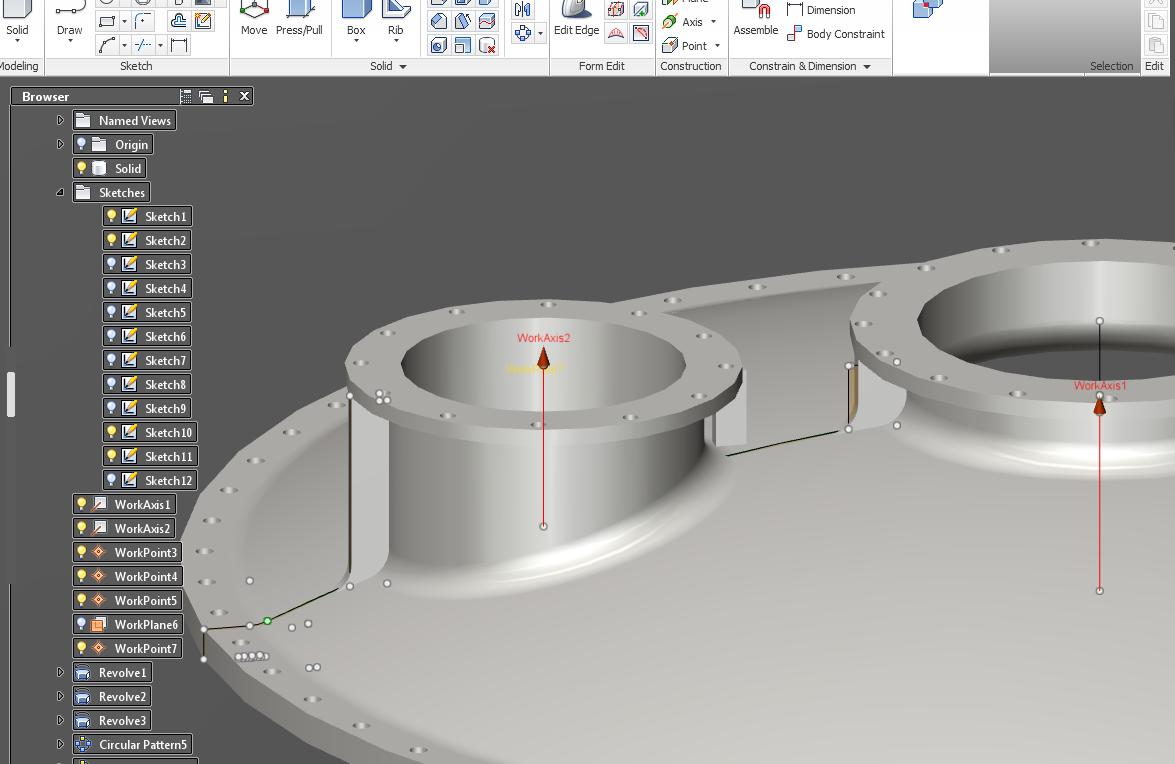
If anyone can assist in telling me the correct procedure in copying/arraying the nozzle stiffners (90 deg's) on the attached screen shot I would be most grateful - I can only create new sketches at the correct plane/position and re-sketch the geometry each time (labourious) there most be a way to copy rotate solids? the other method I tried was creating a rough outline for the stiff then press pull to correct thickness & use assemble to position flush........but nothing I do will making the floating plate shown on the screen shot move using assemble

Reply
Reply
0 Likes
Accepted solutions (1)
1,079 Views
2 Replies
Replies (2)
Message 2 of 3

schneik-adsk
Community Manager
Community Manager
Accepted solution

Try selecting the 5 faces of the rib/stiffener and using radial array?


Or,


delete the current rib and recreate it as a separate body. Then array the body and then boolean it into the main form.


Kevin Schneider
Reply
Reply
0 Likes
Message 3 of 3

JWPepper
Contributor
Contributor

Thanks, the first method I cannot select all the faces - namely the ones merged into the body only the outer faces

second works, I created new solid and in Boolean made new component which I never saw before.


Cheers


Reply
Reply
0 Likes