


- Mark as New
- Bookmark
- Subscribe
- Mute
- Subscribe to RSS Feed
- Permalink
- Report
The remote solve capabilities of Autodesk Simulation CFD allow users to perform the calculation of their analysis on a different computer than their own. With this remote solve option the available computation power can be optimally used.
If there are two computers (interface computer > analysis computer) involved the following requirements are necessary:
- Both computers have to be in the same network (WAN or LAN)
- Both computers need the installation of the same version of Autodesk Simulation CFD
- The interface computer needs to be configured:
Inside the installation folder at the interface computer (i. e. C:\Program Files\Autodesk\Simulation CFD 2012\...) there is file called server.cfg. Open this file with Notepad and simply enter the name (or IP address) of the analysis computer.
After restarting the software at the interface computer the user is able to chose the desired analysis computer:
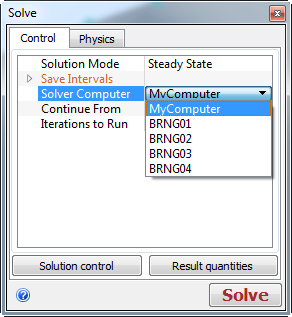
Additional computers can be added in new lines inside the server.cfg-file. Also the number of CPU cores to be used for the calculation can be specified (default value is the maximum available number of cores, smaller than or equal to 2^N: so 2, 4, 8, 16...). e. g. to use only 4 cores the line should look like:
*4cores analysis-pc-name MPI4
*8cores analysis-pc-name MPI8

Marco Müller
Product Support Specialist
Digital Simulation
Autodesk, Inc.
Solved! Go to Solution.



