Can't see ceiling patterns

Can't see ceiling patterns

Anonymous
Not applicable
48,987 Views
21 Replies
Message 1 of 22

Can't see ceiling patterns

Anonymous
Not applicable

My problem is I have a view in which the ceiling patterns will not show up.


I have a reflected ceiling plan in which I can select ceilings by clicking their borders, so for all intents and purposes I have my view settings correct (I think).  The view discipline is Mechanical.  The ceiling type is a 2x4 acoustic tile (the pattern shows up in a separate lighting plan).  I've tried making a view template from said lighting plan and applying it to the mechanical plan, but to no avail.


What am I missing here?  Using Revit MEP 2012, btw.


Thanks in advance.

Accepted solutions (1)
48,988 Views
21 Replies
Replies (21)
Message 2 of 22

asommer
Collaborator
Collaborator
Accepted solution

Look in the View Properties... Underlay Orientation should be Reflected Ceiling Plan.

Message 3 of 22

Anonymous
Not applicable

Thanks for that!  Exactly what I needed 🙂

0 Likes
Message 4 of 22

Anonymous
Not applicable

I'm have a simliar problem. I believe I've followed the correct steps but no dice. I'm trying to get the ceiling plan to show up on my mechanical Floor Plans. The ceiling plan is from a linked architectural file. On the RCP, the ceiling shows up as expected. When I set the Underlay to the associated level, and the Underlay Orientation to RCP, I still do not see the ceiling pattern. I've checked the view ranges. Ceilings are turned on in VG. I'm baffled and frustrated. Any clues would be great!


View Range

Top: Associated level 12' 6"

Cut plane: Associated level 4' 0" (need to see walls, windows, doors)

Bottom: Associated level 0' 0"

View Depth: Associated level 0' 0"

Message 5 of 22

abulla
Collaborator
Collaborator

Getting the ceiling grid to show up on a floor plan has always been an issue. Try either using a reflected ceiling plan, or using a separate ceiling plan with only ceilings visible and overlaying that onto your floor plan on the sheet.

Message 6 of 22

Anonymous
Not applicable

Thanks for your reply. I tried creating another RCP only showing the ceiling, which worked as expected, and then underlaying this onto the plan but still no success. Argh Revit!!

Message 7 of 22

Anonymous
Not applicable

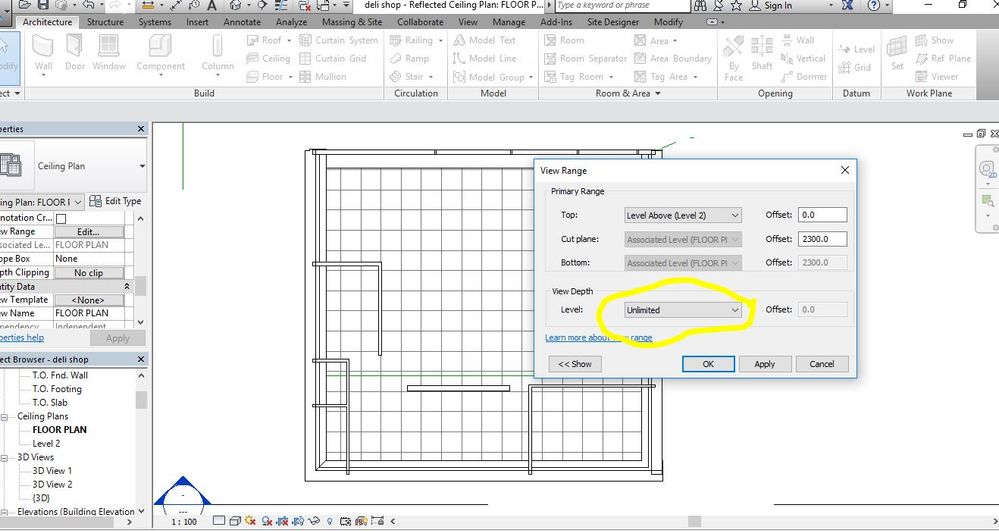
Under view range set the view depth to unlimited. 

cieling view.JPG

Message 8 of 22

Anonymous
Not applicable

I am having a similar problem. I have checked everything that is suggested in this post and everything I can think of. Why are the lights visible and not the grid that they are in?

Message 9 of 22

ToanDN
Consultant
Consultant
Ceilings category is off?
Ceiling surface pattern is off?
Message 10 of 22

Anonymous
Not applicable

Ceilings are on from Arch. Revit link. Where would I find the Ceiling surface pattern?

0 Likes
Message 11 of 22

Anonymous
Not applicable

Is this what you were referring to? (Ceiling surface pattern)

Message 12 of 22

ToanDN
Consultant
Consultant

VG > Ceilings.  Make sure the Ceilings box is ticked, and the Surface pattern box is NOT overridden.


0 Likes
Message 13 of 22

ToanDN
Consultant
Consultant

Click on the plus sign below the link to see the link instance, and if it has the same settings as you show for the link master.

Message 14 of 22

Anonymous
Not applicable

 I think that it is.

0 Likes
Message 15 of 22

megan
Explorer
Explorer

Underlay Orientation = Look up

0 Likes
Message 16 of 22

Anonymous
Not applicable

I did in Underlay following setting

Range: Base level None

Range Top level Unbounded 

Underlay Orientation Look up


Did not work!


Message 17 of 22

Anonymous
Not applicable

I had tried but!

Still without view the ceiling


0 Likes
Message 18 of 22

n_w
Observer
Observer

I have same problem, the ceiling layout is not showing up from interior design linked revit file.


The work around for me is to export to ceiling plan to dwg file and link it as that.


0 Likes
Message 19 of 22

adveencha
Participant
Participant

Solved:

The above solutions didn't work for me. After a bit of frustration I realized that my ceilings were painted with a material that has no hatch.

Message 20 of 22

divyankdiwakar70
Community Visitor
Community Visitor

Guys, goto View/visibility graphics/ceiling/pattern ->crosshatch & color  -> black/ APPLY/ OK .