Community
- Forums Home
- >
- Community Archive - Read Only
- >
- Inventor Publisher Community
- >
- Inventor Publisher Forum
- >
- Help me on Dimensioning
Inventor Publisher
Welcome to Autodesk’s Inventor Publisher Forums. Share your knowledge, ask questions, and explore popular Inventor Publisher topics.
Turn on suggestions
Auto-suggest helps you quickly narrow down your search results by suggesting possible matches as you type.
 This page has been translated for your convenience with an automatic translation service. This is not an official translation and may contain errors and inaccurate translations. Autodesk does not warrant, either expressly or implied, the accuracy, reliability or completeness of the information translated by the machine translation service and will not be liable for damages or losses caused by the trust placed in the translation service.
Translate
This page has been translated for your convenience with an automatic translation service. This is not an official translation and may contain errors and inaccurate translations. Autodesk does not warrant, either expressly or implied, the accuracy, reliability or completeness of the information translated by the machine translation service and will not be liable for damages or losses caused by the trust placed in the translation service.
Translate
Reply
Topic Options
- Subscribe to RSS Feed
- Mark Topic as New
- Mark Topic as Read
- Float this Topic for Current User
- Bookmark
- Subscribe
- Printer Friendly Page
4 REPLIES 4
Message 2 of 5


11-22-2012
08:31 PM
- Mark as New
- Bookmark
- Subscribe
- Mute
- Subscribe to RSS Feed
- Permalink
- Report
11-22-2012
08:31 PM
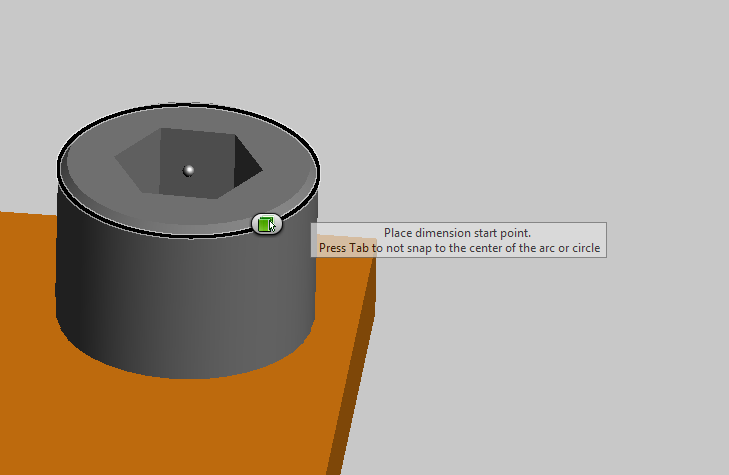
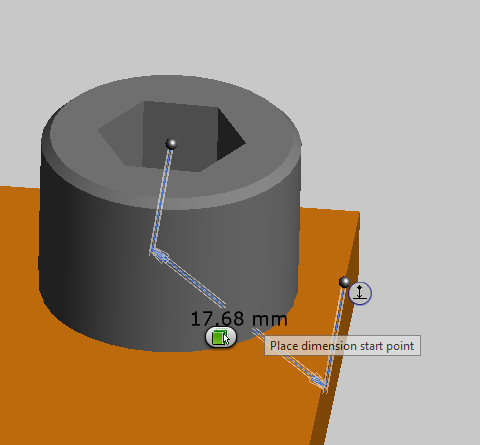
Please see my attached image.
When select the center of the arc or circle, please press TAB button on Keyboard. Publisher is a 3D software, and it support 3D dimension, it dimension the point to Point distance, if you want to Point to Line distance, please place the dimension and click the little button near the dimension, it will change to align.
Hope this helps. In image 2, the dimension is 17.68, this dimension is point to point. in image 3, the dimension is 17.52, it is point to line.

Peggy Wang
Sr. Software QA Engineer
Publisher Quality Assurance Team
Autodesk, Inc.
Message 3 of 5
11-22-2012
08:32 PM
- Mark as New
- Bookmark
- Subscribe
- Mute
- Subscribe to RSS Feed
- Permalink
- Report
11-22-2012
08:32 PM
If it is not easy to select some lines, please rotate it to another view, Publisher will always dimension the 3D distance
Peggy Wang
Sr. Software QA Engineer
Publisher Quality Assurance Team
Autodesk, Inc.
Message 4 of 5

Anonymous
in reply to:
Anonymous
11-22-2012
10:22 PM
- Mark as New
- Bookmark
- Subscribe
- Mute
- Subscribe to RSS Feed
- Permalink
- Report
11-22-2012
10:22 PM
Hi,
Thanks for your reply. But I want to dimension it for the shortest distance which is from the centre perpendicular to the face. Basically, like you do in Inventor with Ruler.
Message 5 of 5
11-22-2012
11:41 PM
- Mark as New
- Bookmark
- Subscribe
- Mute
- Subscribe to RSS Feed
- Permalink
- Report
11-22-2012
11:41 PM
Yep, I totally understand your feelings. And i have worked in Inventor drawing team for years, it is very convenient to create different dimesion and align to Horizontal or vertical or leaned. But Invetor dimension is 2D dimension, once the Base view is created, we can't remotate the model.
In Publisher, that is the 3D dimension, we always reotate the model after creating the annotation. We need some workaround to create the annotation, for example, rotate to some special view to select the points and lines. And i also agree with you, Publisher 3D annotaion need some improvement, Thank you for your post here.
Peggy Wang
Sr. Software QA Engineer
Publisher Quality Assurance Team
Autodesk, Inc.
Reply
Topic Options
- Subscribe to RSS Feed
- Mark Topic as New
- Mark Topic as Read
- Float this Topic for Current User
- Bookmark
- Subscribe
- Printer Friendly Page