*Warning* Multiply owned object, handle "206CF"

*Warning* Multiply owned object, handle "206CF"

Anonymous
Not applicable
43,016 Views
35 Replies
Message 1 of 36

*Warning* Multiply owned object, handle "206CF"

Anonymous
Not applicable

I am getting this warning as I try to save my drawing.  Not sure what it means.


My drawing file crashed (FATAL ERROR) before I was able to complete the save.  I did a MAPCLEAN followed by AUDIT, but still get the error message when trying to save.


I am using C3D 2011 with Windows 7.


Any ideas would be greatly appreciated.

0 Likes
Accepted solutions (1)
43,017 Views
35 Replies
Replies (35)
Message 21 of 36

Jeff_M
Consultant
Consultant
Ah, that edit wasn't there when I replied 🙂
BTW, I have SP2 installed here.
You can see what the object is using (entget (handent "A4A7")), if the object exists (this didn't in your drawing for me) you will get a long list of DXF code pairs. The pair which begins with 0 is the object type.
Note that, in my experience, this warning typically stems from styles and layers, not really actual drawing objects.
Jeff_M, also a frequent Swamper
EESignature
0 Likes
Message 22 of 36

emersoncadista79
Observer
Observer

tanks, very well

0 Likes
Message 23 of 36

JustOpie
Advocate
Advocate

If the entget that Jeff_M mentions doesn't provide a list of DXF data, you may need to convert the ENAME to a VLA-OBJECT.  You can do that using this code:


(vlax-dump-object (vlax-ename->vla-object (handent "206CF")))


You will want to replace the "206CF" string with the correct handle mentioned in the warning.

0 Likes
Message 24 of 36

vtkong.com
Explorer
Explorer

Chào bạn, bạn có thể sử dụng lệnh "x" và thực hiện lại thao tác của mình nhé.

Trân trọng!

0 Likes
Message 25 of 36

Anonymous
Not applicable

Thanks this worked, although like most of the endless bugs in C3D, I've no clue what it was, why it did it, etc. but thanks!

Message 26 of 36

Neilw_05
Mentor
Mentor

This has been my go-to thread for dealing with this problem. I have been encountering it frequently in a couple of my projects. While I can get by with deleting the bad objects once at a time, i would make life a lot easier if we had a tool that would read a list of entities from a text file and delete them automatically.


I don't do coding. Would this be something I could figure out without a lot of trial and error? If so where would I start?

Neil Wilson (a.k.a. neilw)
AEC Collection/C3D 2024, LDT 2004, Power Civil v8i SS1
WIN 10 64 PRO

http://www.sec-landmgt.com
Message 27 of 36

Anonymous
Not applicable

1. Use "WBLOCK" command, seclect "W", save to another file .DWG

2. Open that .DWG file, use "PURGE" and "DWG-PURGE" command

3. Saveas to . DWF file

4. Open . DWF file, use "PURGE" and "DWG-PURGE" command

5. Saveas to .DWG file

If still problem, do again from step 1. My problem solved after 2 time.

0 Likes
Message 28 of 36

Neilw_05
Mentor
Mentor

I appreciate your suggestion. However a WBLOCK approach does not preserve layouts and it its prone to errors and data loss by the user and the software. I'd prefer just manually deleting the bad objects vs. using WBLOCK.

Neil Wilson (a.k.a. neilw)
AEC Collection/C3D 2024, LDT 2004, Power Civil v8i SS1
WIN 10 64 PRO

http://www.sec-landmgt.com
0 Likes
Message 29 of 36

jfarwick_PE
Explorer
Explorer

I've ran across this problem so many times that I created a Excel Macro-Enabled Workbook to remove multiple object handles at a time rather than going through the arduous process of removing them one at a time. I attached the .xlsx version of the workbook (.xlsm upload is not allowed) for anyone to use and created a video of the process. I'm new to creating content, and the only way I know how to share the video with captions is by uploading it from Camtasia to YouTube. Hopefully this will help someone out down the road. 


https://youtu.be/EAV54B2baXU


Message 30 of 36

jphilleyKV6QQ
Contributor
Contributor

I am having this issue in one of my drawings and when I try the entdel string civil 3d gives me just nil back and doesn't delete the object.  so I typed in the entget and I see what type of object it is, but is there any way I can Locate the bad object in the drawing?

0 Likes
Message 31 of 36

Bwanamiti
Participant
Participant

Hello:

I'm using AUTOCAD MAP 3D 2023 - german version

I tried the recommended solution, this is the result:

in DE:
Befehl: _KSICH
*Warnung* Objekt mit mehrfacher Zugehörigkeit, Objektreferenz "28289"
*Warnung* Objekt mit mehrfacher Zugehörigkeit, Objektreferenz "26DFE"

in EN:
Command: _QSAVE
*Warning* Multiply owned object, handle "28289"
*Warning* Multiply owned object, handle "26DFE"


then I used in commandline:
command: (entdel (handent "26DFE"))
nil
command: (entdel (handent "28289"))
nil

This means, nothing happened. The "solution" does not work.


What else can be done? How do I find the corrupt objects to delete them while only knowing the numbers above?

Thanks in advance .hb.

0 Likes
Message 32 of 36

jphilleyKV6QQ
Contributor
Contributor
<meta http-equiv="Content-Type" content="text/html; charset=utf-8" /><meta name="Generator" content="Microsoft Word 15 (filtered medium)" />&lt;!--&lt;br&gt;/* Font Definitions */&lt;br&gt;@font-face&lt;br&gt; {font-family:"Cambria Math";&lt;br&gt; panose-1:2 4 5 3 5 4 6 3 2 4;}&lt;br&gt;@font-face&lt;br&gt; {font-family:Calibri;&lt;br&gt; panose-1:2 15 5 2 2 2 4 3 2 4;}&lt;br&gt;/* Style Definitions */&lt;br&gt;p.MsoNormal, li.MsoNormal, div.MsoNormal&lt;br&gt; {margin:0in;&lt;br&gt; font-size:11.0pt;&lt;br&gt; font-family:"Calibri",sans-serif;}&lt;br&gt;a:link, span.MsoHyperlink&lt;br&gt; {mso-style-priority:99;&lt;br&gt; color:blue;&lt;br&gt; text-decoration:underline;}&lt;br&gt;.MsoChpDefault&lt;br&gt; {mso-style-type:export-only;}&lt;br&gt;@page WordSection1&lt;br&gt; {size:8.5in 11.0in;&lt;br&gt; margin:1.0in 1.0in 1.0in 1.0in;}&lt;br&gt;div.WordSection1&lt;br&gt; {page:WordSection1;}&lt;br&gt;&lt;br&gt;
0 Likes
Message 33 of 36

Bwanamiti
Participant
Participant
cant read your message
0 Likes
Message 34 of 36

jphilleyKV6QQ
Contributor
Contributor

I am sorry about the message not coming in, note to self using the notification email to reply does not work. I am not sure how to get rid of this issue outside of making the drawing a block and opening up a new file and inserting the block, that is a last resort because the only thing that retains is the linework and all surfaces, pipe networks would have to be redone, or so I've been told. I Don't know if you're file has any x-refs, but if this solution is not working the problem may be in an x-ref drawing, but that is not the case for me and everything i have tried has not stopped this issue yet.

0 Likes
Message 35 of 36

suraky
Contributor
Contributor

This problem has plagued me for many years.  After encountering it again today and wasting a lot of time on it, I've figured out how to get rid of the bad entities,  when you get the "nil" return  (when the command to delete the entity by handle doesn't actually delete the entity).  

The command fails to solve the problem when the entity is not in the current Space.  So if the entity is in a paperspace layout, and you're running the command from model space,  the command can't delete the entity, and so doesn't fix anything. 

Go through each layout and modelspace, one by one and run the command to delete the entity by handle until it works.   Then run Audit - if you deleted all the bad entities then the Audit will probably be clean.   Then Save the file ... and the warning should be gone.

Message 36 of 36

EngrRajaSherazAhmed
Explorer
Explorer

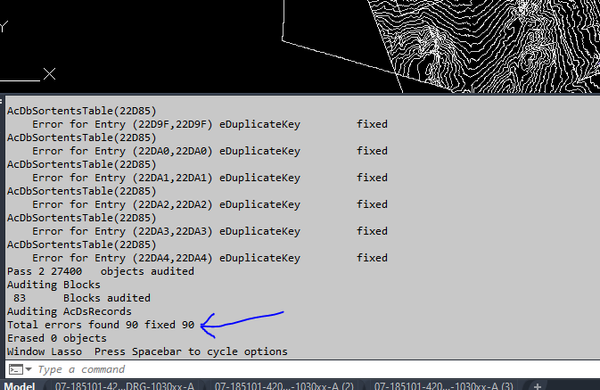
raja_ahmedMXYDY_0-1685379677190.png

AFTER AGAIN AND AGAIN AUDIT THESE 90 ERRORS NOT SOLVED 😭

0 Likes