

Message 1 of 7

- Mark as New
- Bookmark
- Subscribe
- Mute
- Subscribe to RSS Feed
- Permalink
- Report
I can see that Copy Design R2 has several great features, but can't seem to find a way to conveiently set a target folder for the copied designs.
In the old Copy Design, you nominate a target folder - then all the sub folders from the source folder will get copied to the target folder.

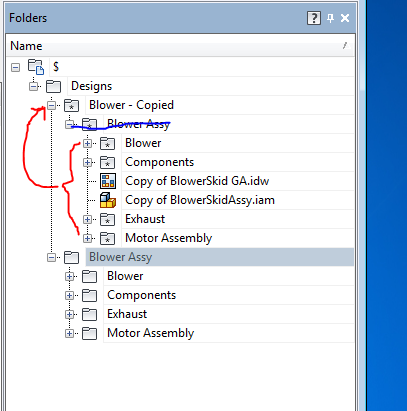
In Copy Design R2, it seems this has to be done manually through the Folders pane? Which is pain staking if you've got plenty of sub folders (including Design Accelerator generated ones).
Surely there's a better way to do it so that the target folder contains exactly the same sub-folder structure as the original?

Solved! Go to Solution.