


New Maya user having problems with shading/edges

- Mark as New
- Bookmark
- Subscribe
- Mute
- Subscribe to RSS Feed
- Permalink
- Report
Hey everyone! I'm not really sure if the title is even correct, since I don't understand what the problem is. I've tried searching the web(probably didn't know the keywords to find a solution) for two days now and I've even re-installed the whole program in hopes of making this normal again.
I'll show you these images since as new to 3D modeling I can't really describe the problem:
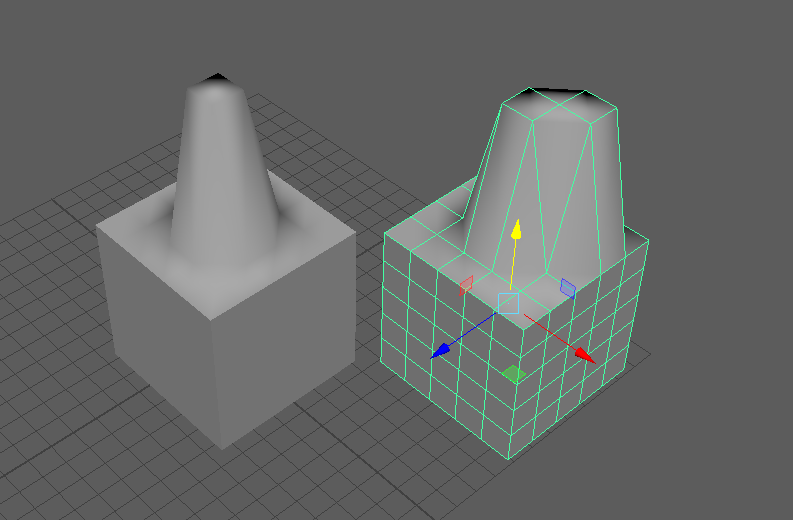
I don't recall fiddling with the settings but at one point during modeling few days ago, this happened. Maya seems to soften the edges and make everything smooth even though I would like it to work like it does by default. These are two 5/5/5 cubes one with 1 face moved along the y axis and the other with 2 diagonal faces moved along the y axis.
The reason I titled this a shading problem is that I found I could make it look quite normal when changing the shading Flat Shade All. This however won't do because every time I change between wireframe and back it changes to this smooth shading. Also flat shading shows like this when rendered which is the biggest problem here. I really don't know what to do and I'm desperate for help!
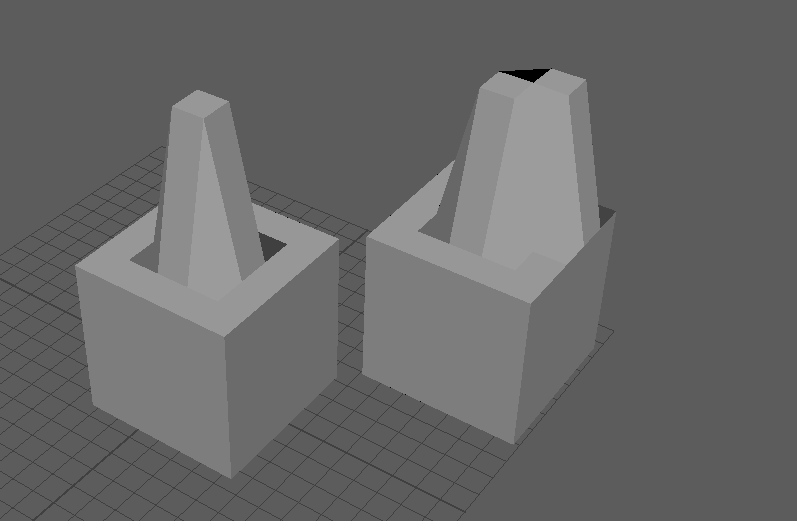
Here's the flat shaded ones which kinda look like how it used to. Might even look normal, I can't even remember anymore since I've been staring those smoothed out ones for two days desperately trying to solve the problem.
I've tried deleting the prefs file and re-installing the whole program, I hope someone has an answer, thanks in advance!