Problem with coverings

Problem with coverings

andrea_pontiggia
Advocate Advocate
959 Views
3 Replies
Message 1 of 4

Problem with coverings

andrea_pontiggia
Advocate
Advocate

I can not understand why in the calculation model which is attached panels 351 353 354 and 363 do not share the load.

The model is imported from Revit, but the other panels are correct.

Thanks

Andrea
0 Likes
Accepted solutions (1)
960 Views
3 Replies
Replies (3)
Message 2 of 4

Artur.Kosakowski
Autodesk Support
Autodesk Support

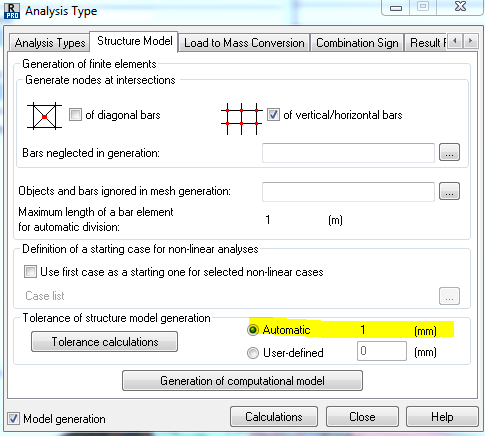
The reason is setting the user defined tolerance for model generation as 0.  Any particular reason for that ?

Anyway I have asked the development team to disable such possibility in the future.


The solution is e.g. to change to Automatic instead.


If you find your post answered press the Accept as Solution button please. This will help other users to find solutions much faster. Thank you.


Artur Kosakowski
Message 3 of 4

andrea_pontiggia
Advocate
Advocate

How can I set the automatic mode?

Andrea
0 Likes
Message 4 of 4

Artur.Kosakowski
Autodesk Support
Autodesk Support
Accepted solution

auto tolerance.PNG


Artur Kosakowski
0 Likes