Not a Body get AGAIN

Not a Body get AGAIN

GabrieleNovembri1027
Advocate Advocate
2,556 Views
6 Replies
Message 1 of 7

Not a Body get AGAIN

GabrieleNovembri1027
Advocate
Advocate

Hi All,

I am trying to modify an already defined structure made of walls as building structure type. I need to make a Boolean sum and cuts of some panels. I was thinking to use the Boolean operator available in the shell type structure. So I have changed the type of the structure with "geometric/structure type" and tried to make the operation I need.

Unfortunately I always get the same error : "NOT A BODY GET".

I have already encountered the same problem: http://forums.autodesk.com/to/Autodesk-Robot-Structural/not-a-BODY-Get/m-p/3114394/highlight/true#M4...


Any suggestion ? 

no body.PNG

0 Likes
Accepted solutions (1)
2,557 Views
6 Replies
Replies (6)
Message 2 of 7

Artur.Kosakowski
Autodesk Support
Autodesk Support

Could you attach the rtd file and make screen capture that shows the definition of the operation you attempted please?


Artur Kosakowski
0 Likes
Message 3 of 7

GabrieleNovembri1027
Advocate
Advocate

Hi Artur,

You will find attached a video with the procedure I used to try to combine with boolean operator two different panels of a very simple RTD file (attached too).

The procedure I used was:

  • Change the type of the structure from Building to Shell (3d);
  • make the boolean sum of the two panels

Thanks 

0 Likes
Message 4 of 7

Artur.Kosakowski
Autodesk Support
Autodesk Support
Accepted solution

Gabriele,


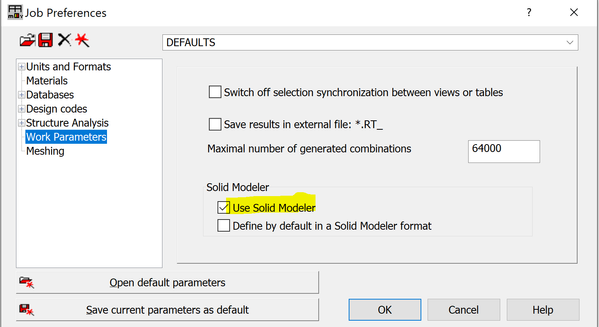
The objects you have in the file you sent are defined as ACIS ones (you can easily see this when you you open their meshing parameters dialog which are different then for 'standard' panels) and this was also my assumption for your previous Not a Body get thread on the forum. Could you create them again in a new project making sure that the solid modeler format is SWITCHED OFF (make sure you re-started Robot after making this change in its Preferences)? Otherwise for ACIS objects use the single-operand Union instead.


If you find your post answered press the Accept as Solution button please. This will help other users to find solutions much faster. Thank you.


Artur Kosakowski
0 Likes
Message 5 of 7

GabrieleNovembri1027
Advocate
Advocate

Hi Artur,

You are right. Changing the type of structure from building to shell (_3D in other words) Robot, in my case, was using as default general setting the option you were talking about. Switching off the option the Boolean operations run correctly.

Thanks

0 Likes
Message 6 of 7

thomas.little9YHXY
Community Visitor
Community Visitor

Mr. @Artur.Kosakowski


I am getting a similar error, however when I go to job preferences, the option to select solid modeler is not present. Is there a reason for this/ is there something I need to do before this will show up?

thomaslittle9YHXY_0-1660770887991.png


0 Likes
Message 7 of 7

okapawal
Autodesk
Autodesk

@thomas.little9YHXY 

It is in the Job Preferences at Work Parameter tab

okapawal_0-1660817257830.png


Waldemar Okapa

Sr Product Owner
0 Likes