How to analyse a hyperbolic paraboloid panel in Robot?

How to analyse a hyperbolic paraboloid panel in Robot?

Anonymous
Not applicable
3,062 Views
22 Replies
Message 1 of 23

How to analyse a hyperbolic paraboloid panel in Robot?

Anonymous
Not applicable

Hello,

I want to analyse a hyperbolic paraboloid panel in Robot, I've created it in Rhino and imported in Robot to a panel element, but I can't successfully caculate it, two main problems:

1 I can't give a surface load on the panel.

2 I can't well mesh it cause there's always some parts that couldn't be meshed

When I assign a surface load to the panel or do the caculation, there's always an error saying "twisty element!"

Could anyone please help with that, thanks!

0 Likes
Accepted solutions (2)
3,063 Views
22 Replies
Replies (22)
Message 21 of 23

Artur.Kosakowski
Autodesk Support
Autodesk Support

Too many bar releases.


If you find your post answered press the Accept as Solution button please. This will help other users to find solutions much faster. Thank you.


Artur Kosakowski
0 Likes
Message 22 of 23

Anonymous
Not applicable

Yes, I released many bars cause they are supposed to work in compression/traction and I think I add enough diagonal bars to keep it to be statically determinate. In fact in the four lateral faces of a block, it only lacks one diagonal which is replaced by the panel itself, and the three bars on the edge of the panel are not totally released, they are fixed between each two of them.
I also tried to add this lacking diagonal bar but it's the same nodes of instability, then I delete the panels and calculate in 3D truss and it works well. So it's quite strange.
The instability happens only to the nodes on the axe X7 Z2 and the axe Y7 Z1.

0 Likes
Message 23 of 23

Artur.Kosakowski
Autodesk Support
Autodesk Support

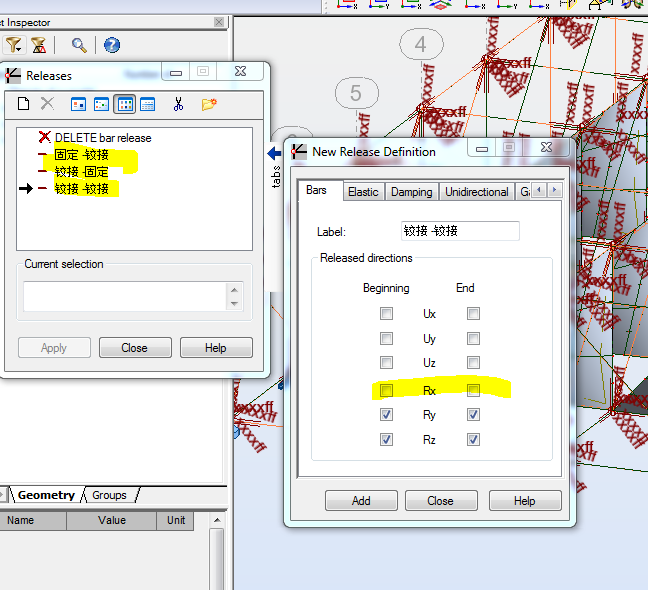
Try to block RX in the definitions of releases. Check MX values and see if you need to apply them in particular locations of the model. You may want to define them as elastic with small value of stiffness (http://forums.autodesk.com/t5/Robot-Structural-Analysis/Steel-design/m-p/3573540)


releases RX.PNG


If you find your post answered press the Accept as Solution button please. This will help other users to find solutions much faster. Thank you.


Artur Kosakowski
0 Likes