Distorted Element

Distorted Element

Anonymous
Not applicable
10,791 Views
21 Replies
Message 1 of 22

Distorted Element

Anonymous
Not applicable

I have "Distorted Element" in a building.

what is the general idea to solve the issue.


regards,

0 Likes
Accepted solutions (1)
10,792 Views
21 Replies
Replies (21)
Message 2 of 22

Jakub.Brozonowicz
Autodesk Support
Autodesk Support
Accepted solution

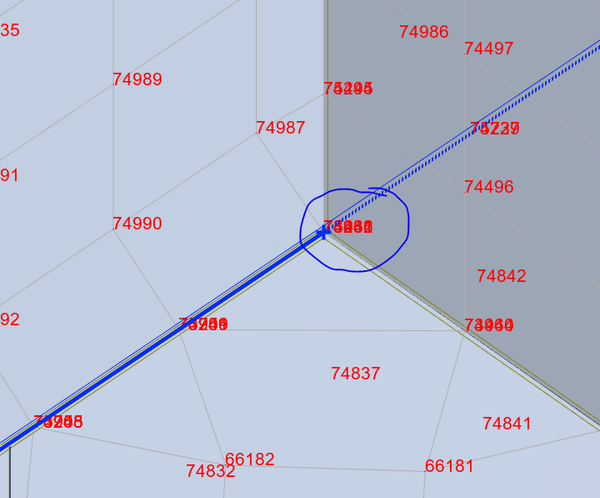
To found it by element number whcih it holds and select panel which it includes probably.

Then try to remesh the panel or manually change the mesh shape where distorted element is.

Sometimes it works, sometimes needs to be recognized by specialist closer.

How it looks like this element?


Jakub Brożonowicz

Global Product Support

0 Likes
Message 3 of 22

Anonymous
Not applicable

it worked,

thanks

0 Likes
Message 4 of 22

Anonymous
Not applicable

I Have the same problem. The warning comes during analysis as shown in the attached image. How to find the distorted element mentioned in the warning?

0 Likes
Message 5 of 22

Rafal.Gaweda
Autodesk Support
Autodesk Support

How to find the distorted element mentioned in the warning?


This way : http://screencast.com/t/B9xSBXcOtFv


Rafal Gaweda
Message 6 of 22

Anonymous
Not applicable

I have problem "Distored element"when I calculate my building.Please help me to solve this problem


0 Likes
Message 7 of 22

Rafal.Gaweda
Autodesk Support
Autodesk Support
File please.


Rafal Gaweda
0 Likes
Message 8 of 22

Anonymous
Not applicable

Hi @Jakub.Brozonowicz

I got the same error and I deleted the panel which included that element and redrew it. Still I get the same problem stating the same element is distorted, and now the element in the error does not even  exist in the model since I deleted the panel. What to do? 

Thanks in advance.

0 Likes
Message 9 of 22

Artur.Kosakowski
Autodesk Support
Autodesk Support

Hi @Anonymous


Could you attach the file with your model?


Artur Kosakowski
0 Likes
Message 10 of 22

Anonymous
Not applicable

Hi @Artur.Kosakowski,

I have attached the file. 

Thank you.

0 Likes
Message 11 of 22

Artur.Kosakowski
Autodesk Support
Autodesk Support

Hi @Anonymous


I'm attaching the model with correctly shaped surface elements but you should consider redefining some parts of your model:


arches2.png


Artur Kosakowski
0 Likes
Message 12 of 22

Anonymous
Not applicable

Thanks a lot @Artur.Kosakowski

By the way how did you resolve the error?

0 Likes
Message 13 of 22

Artur.Kosakowski
Autodesk Support
Autodesk Support

Hi @Anonymous


Buy setting the recommended meshing parameters as presented during the 1st and 2nd Robot webinar which recording I strongly recommend you to watch.

https://forums.autodesk.com/t5/robot-structural-analysis-forum/robot-structural-analysis-webinars/td-p/5523337


Artur Kosakowski
Message 14 of 22

Anonymous
Not applicable

Thanks a lot @Artur.Kosakowski. Will definitely watch that video...

0 Likes
Message 15 of 22

Anonymous
Not applicable

Hi, @Artur.Kosakowski ,

im facing distorted element issue as well here, but when i zoom in, the panels are aligned properly and the opening as well. The meshes look fine too.. but distorted element 80654 error keeps popping up and i cant run my model.MicrosoftTeams-image (5).png MicrosoftTeams-image (6).png

0 Likes
Message 16 of 22

Stephane.kapetanovic
Mentor
Mentor

hi @Anonymous

you have panel junction problems all over your model.

It will take a little while for me to analyze them all. I would come back when I could do the geometric analysis. 

Best regards

report deleted

Stéphane Kapetanovic

Did you find this post helpful? If it gave you one or more solutions,
don't forget to accept the solution and leave a < like !
EESignature
Message 17 of 22

Anonymous
Not applicable

Hi @Stephane.kapetanovic,

how can i generate report like your attached pdf file? so i can know the locations of the issues
Yes seems like alot of this issue in my model, perhaps bcs it was imported from Revit model. I tried to join the panels edges together by re-defining the panels contours again, but the problem persist..

nickanortikno_0-1639379798270.png


0 Likes
Message 18 of 22

Stephane.kapetanovic
Mentor
Mentor

hi @Anonymous 

sometimes, a panel which is twisted cannot be modified, it has to be redone. To do this, copy all the geopoints in Excel for example, modify them and recreate another panel. There is a tool available on the forum to quickly edit the coordinates of the panels.  Rounding up coordinates (API)

When you are in Revit, you do not have any warning for geometry, it is only when you do the calculation approach and the model analysis that you can notice it. On Revit, extra care should be taken with the panel connections.

Best regards

Stéphane Kapetanovic

Did you find this post helpful? If it gave you one or more solutions,
don't forget to accept the solution and leave a < like !
EESignature
Message 19 of 22

Stephane.kapetanovic
Mentor
Mentor

hi @Anonymous 

sorry for confusion with topic of @Anonymous.

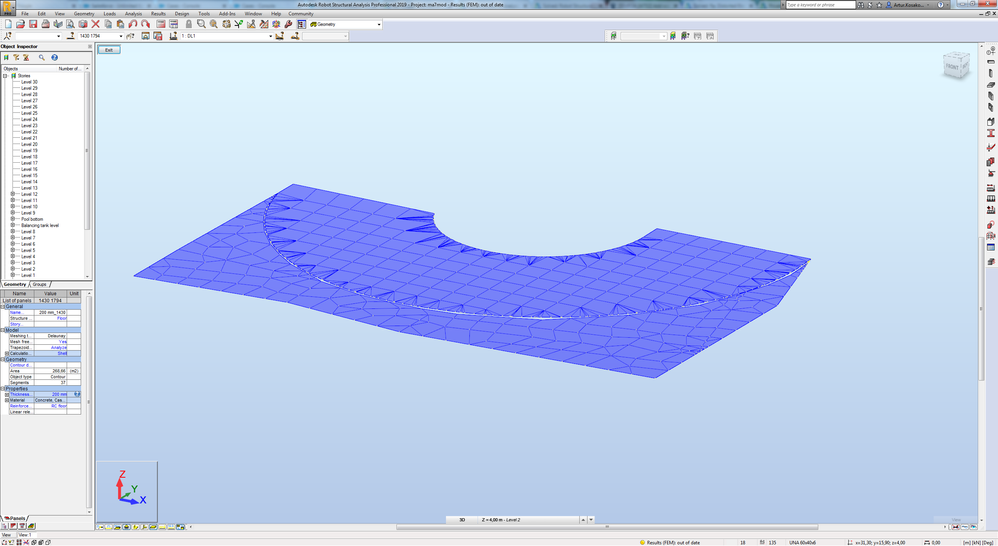
As precisely explained by @Artur.Kosakowski in message 11, panel 1794 must be completely redone to align it with the curve of panel 1430. As the arcs are segmented, it is necessary to take at least the characteristic points of the curve and the number exact division or opt to redefine the panels point by point.

Could you share your corrected file ?

image.png

Curved panels 895 932 959 988A1123P27 could be replaced by straight walls.

image.png

Best regards

Stéphane Kapetanovic

Did you find this post helpful? If it gave you one or more solutions,
don't forget to accept the solution and leave a < like !
EESignature
0 Likes
Message 20 of 22

Anonymous
Not applicable
hi @Stephane.kapetanovic,
please find the link below for the Robot model. Appreciate your help.
https://drive.google.com/drive/folders/1UDFDlwA6S7YHxCbsCeHymlH20amdcQm-?usp=sharing

Thank you.

Regards,
Nickanor
0 Likes