Cyclic Reference Problem

Cyclic Reference Problem

Anonymous
Not applicable
5,912 Views
5 Replies
Message 1 of 6

Cyclic Reference Problem

Anonymous
Not applicable

Hi,


I am trying to analyne a building (see attached file). I have reached upto 4th floor without any problem. But when I add more floors, I cannot analyze the building anymore. When I click on calculate button, it shows the following error message - "model error - a cyclic reference in the definition of kinematic constraints ..."


Why is this happening? From the 3rd floor all the floors above are identical, so I am using the translate option. So if upto 3rd floor is correct, then the rest should be correct also. But it still shows error.


However I tried to change the meshing to 0.5 meters. It works, but it makes the file very large. When I complete upto 18th floor, it generates almost 130000 nodes and it takes almost 30 minutes to calculate.


How can I solve this problem?

0 Likes
Accepted solutions (1)
5,913 Views
5 Replies
Replies (5)
Message 2 of 6

Rafal.Gaweda
Autodesk Support
Autodesk Support
Accepted solution

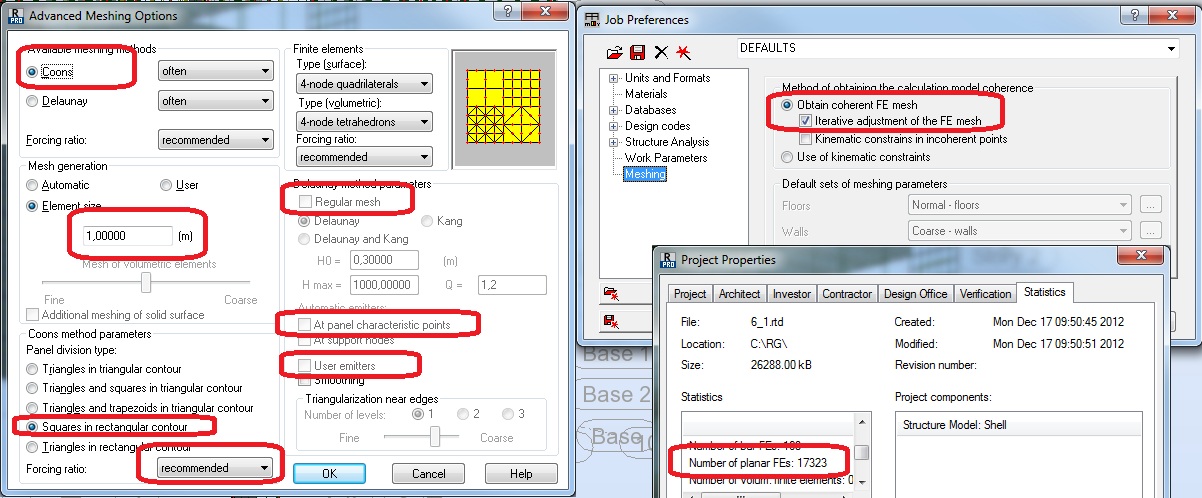
My settings:


moop.jpg


Meshed file: https://www.filemail.com/dl.aspx?id=CPSGMQLMDBUDENN


Rafal Gaweda
Message 3 of 6

Anonymous
Not applicable

Thanks a lot! I also solved it yesterday by complex meshing, but there was 32000 nodes.

0 Likes
Message 4 of 6

Rafal.Gaweda
Autodesk Support
Autodesk Support

If you look at my screen shot settings of greyed out fields are also important


Rafal Gaweda
0 Likes
Message 5 of 6

Anonymous
Not applicable

Could you explain what is behind this error. I keep getting this error with EVERY file I do

Even when i delete the progress from my saved file (there was no error in the saved file e.g added floors) I still keep getting it.

How to remove it? Mesh is already 0.5m and i should take the kinematic constrain away  ?

0 Likes
Message 6 of 6

Artur.Kosakowski
Autodesk Support
Autodesk Support

Should take the kinematic constrain away  ?


Yes, uncheck them as default and mark iterative adjustment instead. 


If you find your post answered press the Accept as Solution button please. This will help other users to find solutions much faster. Thank you.


Artur Kosakowski
0 Likes