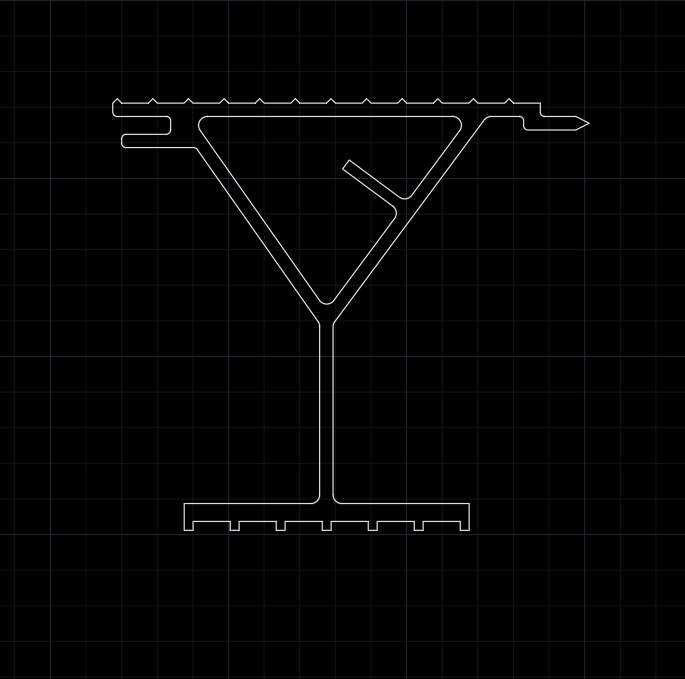
Custom Shape Section imported from Advance Steel

Custom Shape Section imported from Advance Steel

crasmussenGKDV6
Contributor Contributor
790 Views
2 Replies
Message 1 of 3

Custom Shape Section imported from Advance Steel

crasmussenGKDV6
Contributor
Contributor

I have a custom shape I designed into a user defined beam in Advance Steel 2017.  I am trying to get that shape into Robot 2017 so i can analyze it for dead loads and live loads.  How do i either import the shape into robot or design it in robot so I can analyze it.  I have attached pictures of the shape cross section and as a beam.  It is made out of aluminum.


@crasmussenGKDV6 Artur Kosakowski edited the topic for better findability 

0 Likes
Accepted solutions (1)
791 Views
2 Replies
Replies (2)
Message 2 of 3

Rafacascudo
Mentor
Mentor

You will have to build it on tools/section definition , but I'm afraid you will not be able to code check this kind of section

Rafael Medeiros
Did you find this post helpful? Feel free to Like this post.
Did your question get successfully answered? Then click on the ACCEPT SOLUTION button.

EESignature

Message 3 of 3

Artur.Kosakowski
Autodesk Support
Autodesk Support
Accepted solution

As Rafael suggested you should create a similar section in Robot Section Builder tool and save it in the user section database first. Then you should add it to the Section dialog and select it at the mapping stage while importing AS model to RSA (see the third point on the slide from the 11th Robot webinar below):


ASto RSA user sections.PNG


As again Rafael correctly pointed out the steel design module may not be able to accurately design section like this but you may actually just need to check if level of stress is below the limit. If so, you may try to use the stress analysis module of Robot instead  (you may want to check this for the cross section first before running it for the whole beam).


If you find your post answered press the Accept as Solution button please. This will help other users to find solutions much faster. Thank you.


Artur Kosakowski
0 Likes