Move any dimension text like in Autocad

Move any dimension text like in Autocad

ipselute
Advisor Advisor
1,197 Views
4 Replies
Message 1 of 5

Move any dimension text like in Autocad

ipselute
Advisor
Advisor

I need to move some dimension text and i just can't. In Autocad you can move the text of any dimension, just right-click and move it with/without leader, reset text position, etc. In Revit some dimension texts can move, but others are stuck in place, even when their position doesn't seem to fit the right way.

We need the option to move any dimension text with / without leader, even when it fits right, because sometimes it may overlap with other tags, or other text, or whatever other graphical objects may be in vicinity.


0 Likes
1,198 Views
4 Replies
Replies (4)
Message 2 of 5

dplumb_BWBR
Advisor
Advisor

What's preventing you from moving the text?

Every Dimension should have grips when selected that allow you to move the text and/or add a leader

You don't right-click, you left-click the dimension line

dplumb_BWBR_0-1617286424875.png


0 Likes
Message 3 of 5

ipselute
Advisor
Advisor

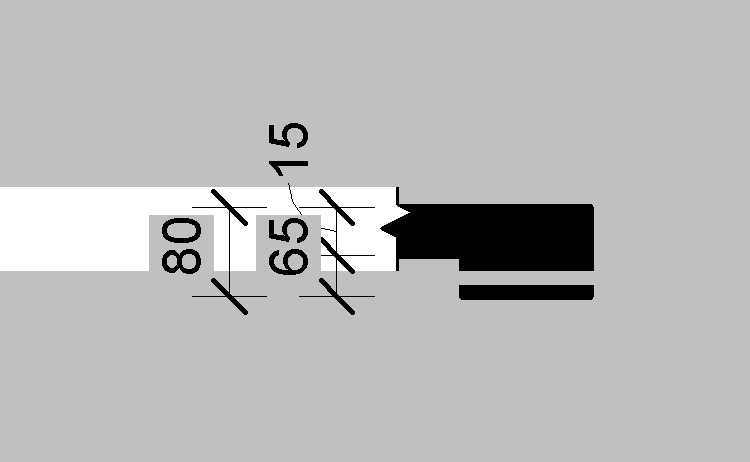
@dplumb_BWBR : I really don't know what's the problem. Underneath my dimension text there is a detail items (breakline family). And clicking on the dimension selects the breakline instead. I hide the breakline and i moved the dimension outside the drawing. The text is just stuck. For the second dimension in the row i can move the text, but for the first one i have no luck.

Screenshot Revit dimension text need move.png

The black fill represents a section view through a concrete slab and a concrete beam. The beam height is very large, so i made a break in the section view to not see the entire height of the beam. In other case i have similar section but with a concrete wall instead of concrete beam. The dimension of wall height is stuck as well. Just like the dimension of the beam height.

My guess is that the section break for the beam (or for the wall) is somehow interfering with the dimension.

 
0 Likes
Message 4 of 5

kimberly_fuhrman-jones
Autodesk
Autodesk

@ipselute  Interesting...have you posted this on the Revit Structure Forum to see if there is a solution?


Kimberly Fuhrman-Jones
Revit Community Manager
0 Likes
Message 5 of 5

Ric_Weber
Advisor
Advisor

@ipselute If you haven't found the answer in the last 5 years, I hope this helps.  This is not an issue with the dimension as much as it is an issue with the dimension string crossing the section crop break.  It is specific to dimensions that cross that section break after they have been moved closer together.   If you move the dimension text outside of the break area first before moving the two parts closer together then you can move the text.  The leader looks a bit funky, but you can move the text at least.  


Ric_Weber_0-1768864918758.png 

Ric_Weber_1-1768864978099.png


Ric Weber
If this post helps you, please like it or mark it as your solution. Thank you.
My Ideas: https://forums.autodesk.com/t5/forums/recentpostspage/post-type/thread/interaction-style/idea/user-id/12292525

0 Likes