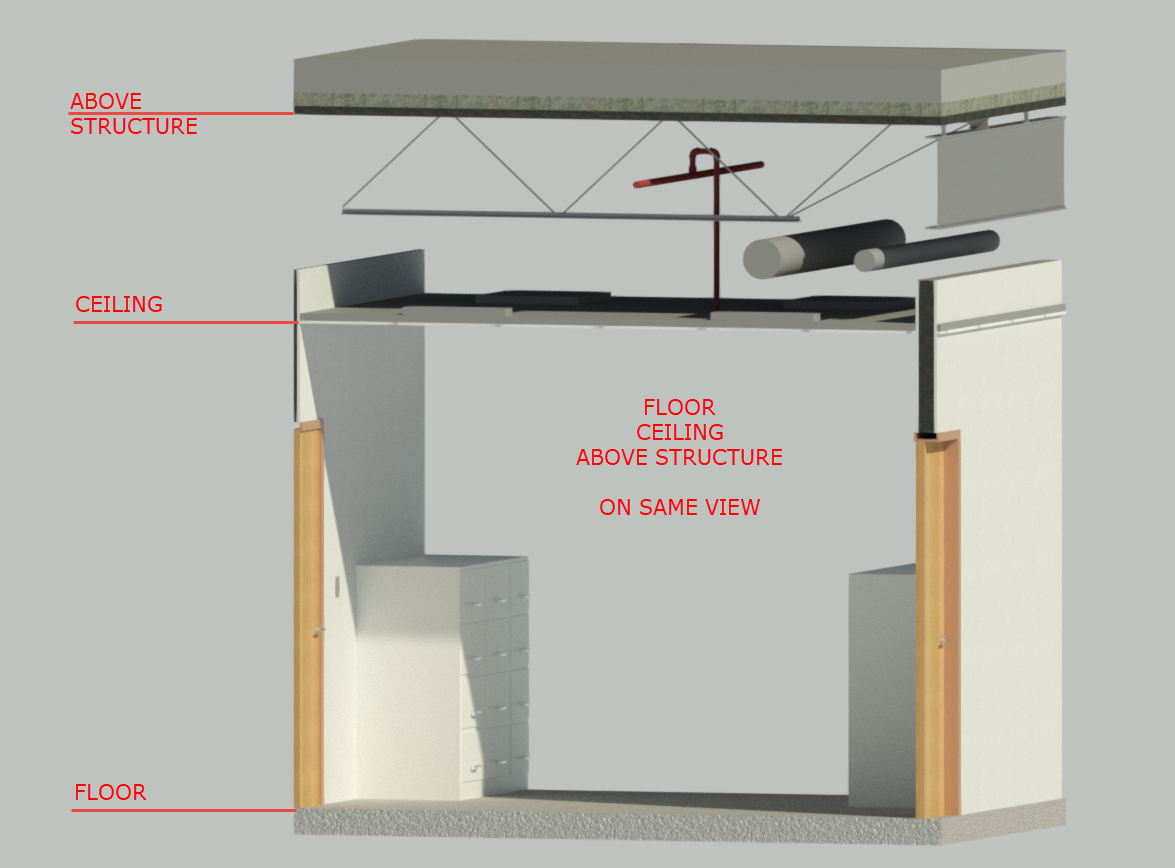
MEP view integrating floor plan + ceiling + structure above

MEP view integrating floor plan + ceiling + structure above

mcorriveau
Advocate Advocate
3,589 Views
9 Replies
Message 1 of 10

MEP view integrating floor plan + ceiling + structure above

mcorriveau
Advocate
Advocate

Hey guys,


What is your workaround to be able to see the floor plan, the ceiling and the structure above?


Thanks,

0 Likes
3,590 Views
9 Replies
Replies (9)
Message 2 of 10

debimmanager
Advocate
Advocate

Hi @mcorriveau


Try this, and 4 ways to set view range.


VR-1.JPGVR-2.JPGVR-3.JPGVR-4.JPG


Thank you!!

Deivis E.
BIM Manager

0 Likes
Message 3 of 10

mcorriveau
Advocate
Advocate

@debimmanagerwrote:

Hi @mcorriveau


Try this, and 4 ways to set view range.


Hi deproject07,


I really like your print screen, can you link them in higher resolution? the text is actually too small for me to read.

I have been able to show ceiling on a floor plan and also the structure above head but never both of them at the same time, am I doing something wrong?


Regards,

0 Likes
Message 4 of 10

RobDraw
Mentor
Mentor

I'm pretty sure that you will not get the desired result in a single plan view. If this is for printing purposes, multiple overlapping viewports is probably the easiest way to do it. It might be the only way.


Rob

Drafting is a breeze and Revit doesn't always work the way you think it should.
0 Likes
Message 5 of 10

debimmanager
Advocate
Advocate

Set a view range and get the best view you want is sometimes very difficult, but I left these configurations for future uses, put your e-mail to send you with good resolution. Maybe you can find the best view for you or you can try that the other guy said. 


Thank you!!

Deivis E.
BIM Manager

0 Likes
Message 6 of 10

RobDraw
Mentor
Mentor

The view range is actually the easy part and, what you posted, is really good information about them.


Mixing plan and RCP graphics is the major stumbling block, because a single view cannot look both up and down at the same time. Depending on the requirements here, it might be impossible to do in a single view.


Rob

Drafting is a breeze and Revit doesn't always work the way you think it should.
Message 7 of 10

debimmanager
Advocate
Advocate

@RobDraw, you're right,  and here I am going to attach to pdf with good resolution  


Thank you!!

Deivis E.
BIM Manager

Message 8 of 10

debimmanager
Advocate
Advocate

Sorry I missed one 


Thank you!!

Deivis E.
BIM Manager

0 Likes
Message 9 of 10

mcorriveau
Advocate
Advocate

Thank you for the pdf file @debimmanager they are very useful.

@RobDraw understand pretty much what I am trying to accomplish, I do overlap Structure + Floor + Ceiling when printing.

However it would be interesting to be able to see all these guys when I do my layout because it's necessary for me to have a global view.

Pipe needs to follow the structure, sprinklers needs to be positioned in the center of the tiles and sprinklers need to be positioned wisely with furniture and special equipment.


The solution that I found is to export in DWG structure and ceiling and import them on my floor plan (see enclosed image).

0 Likes
Message 10 of 10

cvoight
Contributor
Contributor

For electrical RCPs, my solution is to set the cut plane to 0' - 6" (which cuts rooms & doors), the ceilings to transparent, and the view depth to whatever you please. You can then view everything almost as if it were a floor plan.


The best way to achieve consistent results for mechanical, plumbing, or fire protection is to use layered viewports: place an RCP view with only ceilings on the sheet first, and then place a floor plan view with all the usual stuff on top of it. (Match the crop regions so everything will line up properly.) This is necessary for non-electrical views because many items are displayed incorrectly when you look upwards (which is how RCPs work).


(Electrical views can usually get away with a proper RCP view, but you may run into problems with light fixtures hosted above sinks.)

0 Likes