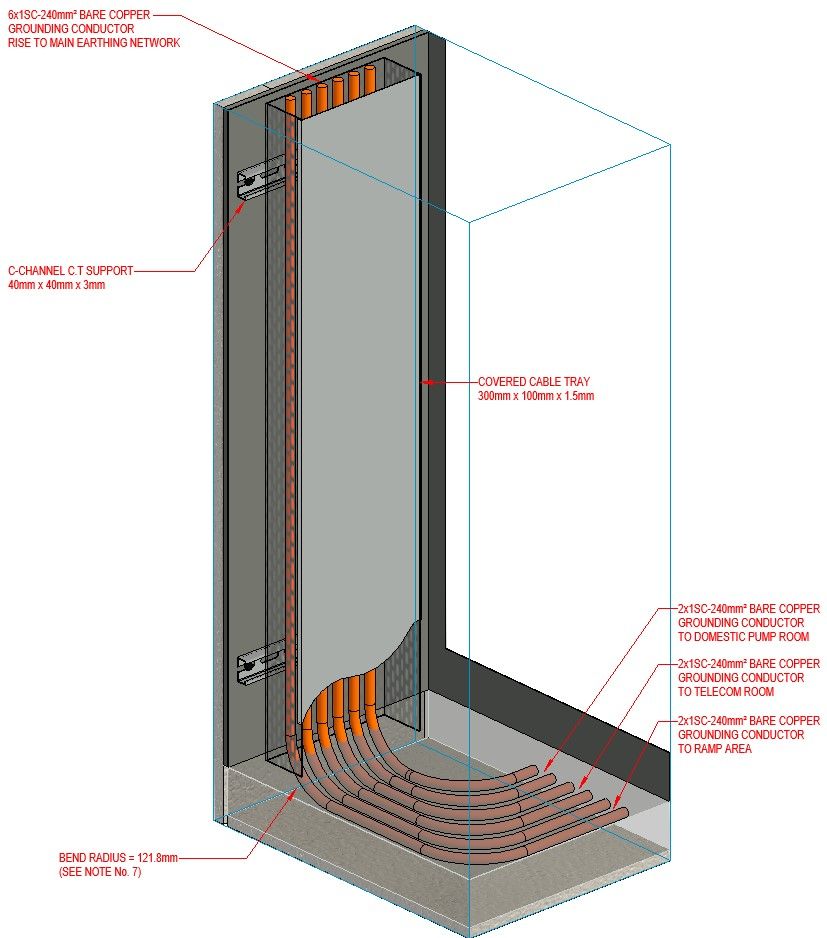
Lid/Cover for Cable Tray

Lid/Cover for Cable Tray

shnabel
Explorer Explorer
4,561 Views
8 Replies
Message 1 of 9

Lid/Cover for Cable Tray

shnabel
Explorer
Explorer

hi all


can any1 please help me and tell me how can i make a Lid/Cover to my cable trays?

when i view sections i want it to appear with Lid/Cover.


ty very much.


maybe u can help with cable try family or somthing close to it.


thanks in advance

4,562 Views
8 Replies
Replies (8)
Message 2 of 9

Anonymous
Not applicable

revit cable tray is always open upwards, you will never be able to close it. revit families are LOD 100 to 200 so dont usually worry about lids etc.


one solution is to model the lid as a seperate family, and place it where required.


FABCAD has much better solutions for trunking with lids and corner, tee pieces etc.


look into fabrication modelling in revit, its so much better than the revit stuff.

0 Likes
Message 3 of 9

fabiosato
Mentor
Mentor

Hello,


Another option is to change the detail level of the cable trays to medium.

You can change one category view detail level in the visibility/graphics overrides.

Fábio Sato
Did you find this post helpful? Feel free to Like this post.
Did your question get successfully answered? Then click on the ACCEPT SOLUTION button.

EESignature

Message 4 of 9

Arkadiusz_Lipski
Autodesk Support
Autodesk Support

Hi there, Would it be possible if you could create a sketch of how you would like it to look like?

Honesty I have never seen a lid covering a cable tray and I am not aware of any of those in Libraries I know.

You would have to create a custom family, or even a detail on the sections where applicable. 

0 Likes
Message 5 of 9

Arkadiusz_Lipski
Autodesk Support
Autodesk Support

Hi again @shnabel,

I would like to know if you have been able to find something that fits your needs. If so it would be great if you could share the solution with us as it would help other users looking for something similar. Thanks

0 Likes
Message 6 of 9

azhar.alikoya
Contributor
Contributor

Hello, Creating an inplace family in cable tray category will be better as it need to be reflected in BOQ. Cable tray lid is required in certain conditions to protect the cables from moisture of the surrounding.

0 Likes
Message 7 of 9

ChitnisPrateek
Advocate
Advocate

Cable Trays in Revit are System Families, you are not able to edit them. 

I would look into creating your own Cable Tray Family and then you can add a Lid/Cover and use the Visiblity parameter to turn it off/on etc. 


The other option is using Fabrication Parts, you should be able to find a cable tray with a cover or lid or create your own. 


If this solution works for you, please accept it as a solution. 

Thank you.

Prateek Chitnis


BIM Manager | AECO (Buildings)


Did you find this post helpful? Feel free to click on the Like button.
Did your question get successfully answered? Then click on the ACCEPT SOLUTION button.
0 Likes
Message 8 of 9

smohiuddinL846Q
Observer
Observer

Batter to make separate family or Model in place familyEarthing detial-2.jpg

0 Likes
Message 9 of 9

johnl5PYL9
Participant
Participant

"Honesty I have never seen a lid covering a cable tray and I am not aware of any of those in Libraries I know." Really? https://www.goactive.nz/storage/media/2020/10/1603842022-2090006atk.pdf PLD_0.webp

0 Likes