Wall Opening Problem

Wall Opening Problem

PhilvK
Advisor Advisor
22,513 Views
20 Replies
Message 1 of 21

Wall Opening Problem

PhilvK
Advisor
Advisor

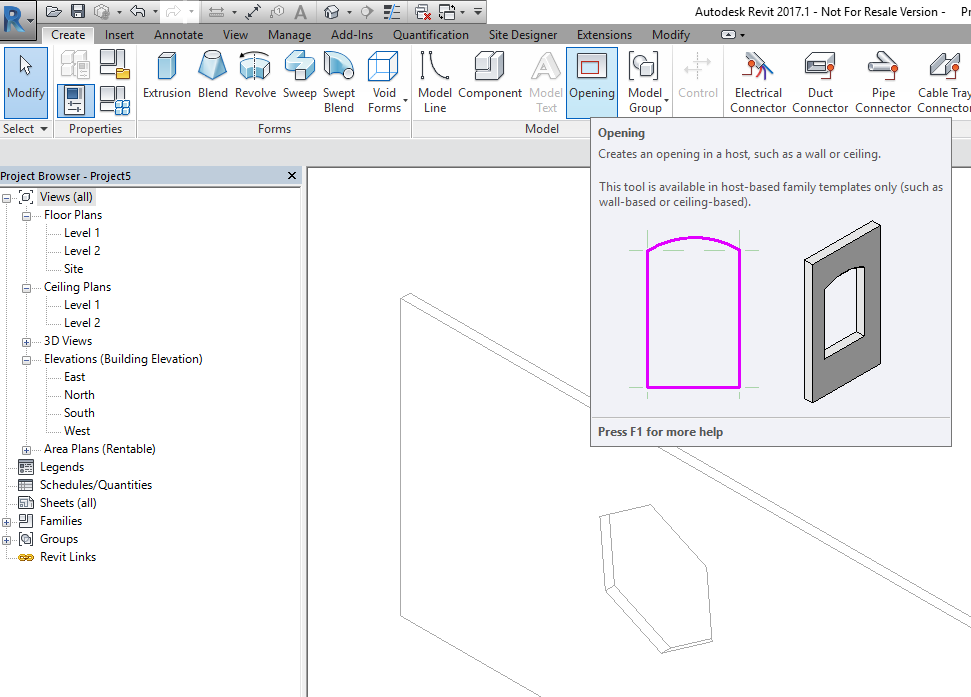
I have a wall opening that I would like to stretch out to be across the entire width of the wall it is cut into. When I select the opening however, I don’t get any horizontal control handles or dimensions in plan, and only vertical dimensions when it is selected in 3D. I also tried creating ref planes and align the edges of the opening to the ref planes, but it won’t do it. Any clues what I am doing wrong?

Wall Opening 2.jpgWall Opening 1.jpg

0 Likes
Accepted solutions (1)
22,514 Views
20 Replies
Replies (20)
Message 2 of 21

ToanDN
Consultant
Consultant
Is it a family or created from the Wall Opening tool?
0 Likes
Message 3 of 21

constantin.stroescu
Mentor
Mentor

Strange behavior .....It doesn't happen to me...at least in R2016


Constantin Stroescu

EESignature

0 Likes
Message 4 of 21

PhilvK
Advisor
Advisor

I created it from the wall opening tool.

0 Likes
Message 5 of 21

ToanDN
Consultant
Consultant
Maybe just delete it and create a new one. As a matter of fact, just delete the opening, edit the wall boundary and bring the bottom up since it spans the entire length.
0 Likes
Message 6 of 21

PhilvK
Advisor
Advisor

Is editing the wall profile and 'drawing' in the openings the same as using the wall opening tool?

0 Likes
Message 7 of 21

ToanDN
Consultant
Consultant
The only difference is that Opening tool can only creates rectangular holes.
Message 8 of 21

RDAOU
Mentor
Mentor
Accepted solution

@PhilvK


On the grips; I tried on my end and I get the grips on all sides of the opening just like in @constantin.stroescu screencast


On whether edit profile is similar to Wall Opening...Both are indeed the same in terms of "makeing openings" BUT they are not the same when it comes to behavior. If you want to use edit profile, use it with care...From my personal experience, it does have the potential of causing all sorts of issues with wall joins or when using trim/extend for instance...Revit may perform the action of trim for instance but in many situations it will not and instead you end up with a bunch of warnings and errors.


I use neither...I prefer family void cuts (using a generic or window/door family template...In my opinion both edit profile and wall openings has more cons and limitations than advantages. example: can't be scheduled. In Analytical model, they are not easy to handle/align...


Example: Used first edit profile, then used Wall opening (the latter is less troublesome if it is just an opening)


YOUTUBE | BIM | COMPUTATIONAL DESIGN | PARAMETRIC DESIGN | GENERATIVE DESIGN | VISUAL PROGRAMMING
If you find this reply helpful kindly hit the LIKE BUTTON and if applicable please ACCEPT AS SOLUTION


Message 9 of 21

ToanDN
Consultant
Consultant

I second the notion that the Opening tool and the Edit Wall Profile tool have more cons and pros.  I never use Wall Opening tool and hardly use Edit Profile tool for the reasons @RDAOU has mentioned.


Beside the loadable void family or door/window family methods, there is another one: model in-place family has its own face based opening tool.  This is useful when you need to punch some odd shaped holes in your walls or floors without creating several external families.  They can be phased and scheduled (limited data) so they are way better than the Wall Opening and Edit Wall Profile tools.


Capture.PNG

Message 10 of 21

RDAOU
Mentor
Mentor

Model in Place voids has a slight bug in the code which has been reported and aknowledged by Autodesk...Namely when the model inplace void does not cut through the full depth of the wall (ie:just to cit out one layer for instance) and the wall is set to wrap at inserts...Wall layers mess up in floor plan views

YOUTUBE | BIM | COMPUTATIONAL DESIGN | PARAMETRIC DESIGN | GENERATIVE DESIGN | VISUAL PROGRAMMING
If you find this reply helpful kindly hit the LIKE BUTTON and if applicable please ACCEPT AS SOLUTION


0 Likes
Message 11 of 21

ToanDN
Consultant
Consultant
It's not a void but a true face based opening. It will always cut through the picked host. Look at my screenshot.
0 Likes
Message 12 of 21

RDAOU
Mentor
Mentor
On mobile 😕 sorry toaN...will do once at a pc

Sent from my iPhone

YOUTUBE | BIM | COMPUTATIONAL DESIGN | PARAMETRIC DESIGN | GENERATIVE DESIGN | VISUAL PROGRAMMING
If you find this reply helpful kindly hit the LIKE BUTTON and if applicable please ACCEPT AS SOLUTION


0 Likes
Message 13 of 21

stingers80-cgarchitect
Advocate
Advocate

If you want to know why the opening doesn't have handles,

I had the same situation and turned out there was a 'Room Separator' that I had added. When I deleted it, the opening handles worked again.

Message 14 of 21

brad_a_tucker
Explorer
Explorer

Try selecting the wall which the opening is cutting through and "disallow join" at the ends of the wall opening.

Message 15 of 21

PhilvK
Advisor
Advisor

Thank you for responding to this even though the original post is so old I had forgotten about it. Anyhow, I just created an opening in a wall and all the grips appear, and it is easily edited. Something must have been fixed in subsequent releases, or I was doing something wrong at the time I originally posted. Thanks again!

0 Likes
Message 16 of 21

infinitedrafting
Explorer
Explorer

I had a similar issue and the culprit was a perpendicular wall above the opening. The opening was acting like a wall in the sense that it was essentially joining the wall above as if at a corner. Once I disallowed the join of the wall above I was able to move the shape handle far enough away from its original position that when I allowed the wall join the opening did not try to connect to it again. I know this is an old post but thought it would help if others are having problems currently. By the way, I am using Revit LT 2017.2.3.

Message 17 of 21

benj
Enthusiast
Enthusiast

Same situation in R2020. 

Never had this issue in '17 & '18.

When the tool decides to take out the grips on hor (L & R sides). . i del. then just edit the wall profile...

Message 18 of 21

atis.sed
Advocate
Advocate

Same in R2022 and previous.. Some times (rather often) rect. wall opening just grips to something and is not editable.

Message 19 of 21

marcelahernandezarq
Community Visitor
Community Visitor

Brilliant. That did the trick for me too. I love forums ❤️

Message 20 of 21

carlos.ngo.archi
Community Visitor
Community Visitor

Try activating controls and dimensions. I was having a problem with this, too. I was able to precisely adjust the dimensions for other wall openings, but I can't understand why a new wall opening did not have the same controls. Fortuna, I checked the ribbon and saw the button for activating controls and dimensions.


(before activating)

No dimension controls.JPG


(after activating)

With dimension controls marked.JPG

With dimension controls.JPG