SCOPE BOX DOESN'T WORK ?!?!?!?

SCOPE BOX DOESN'T WORK ?!?!?!?

bhpka
Enthusiast Enthusiast
3,986 Views
11 Replies
Message 1 of 12

SCOPE BOX DOESN'T WORK ?!?!?!?

bhpka
Enthusiast
Enthusiast

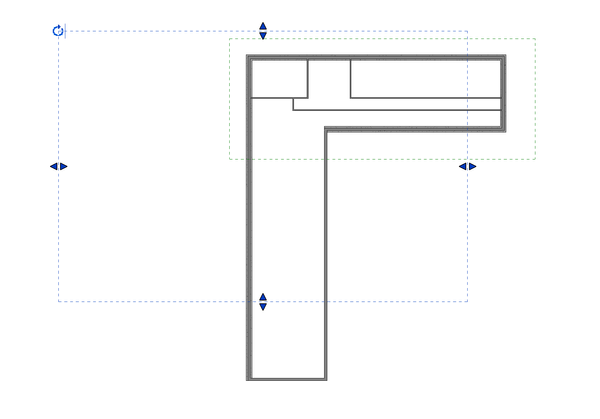
I'm attempting to use :Scope box" for the first time but it doesn't do the same thing as shown in the videos. I have an "L" shaped plan with a matchline at the elbow.

I have set my scope boxes but the column lines from box A show in Box B even though they are "invisible"

I need one leg to be rotated 90D to fit the sheet. This seems impossible.


Just seems like this tool is just overly complicated to be practical????

0 Likes
3,987 Views
11 Replies
Replies (11)
Message 2 of 12

syman2000
Mentor
Mentor

Did you rotate the scopebox? If you rotate the scopebox, it will rotate your view.

Check out my Revit youtube channel - https://www.youtube.com/user/scourdx
0 Likes
Message 3 of 12

bhpka
Enthusiast
Enthusiast

I can't see the scope box in the view, I only get a crop box and it doesn't rotate.


0 Likes
Message 4 of 12

syman2000
Mentor
Mentor

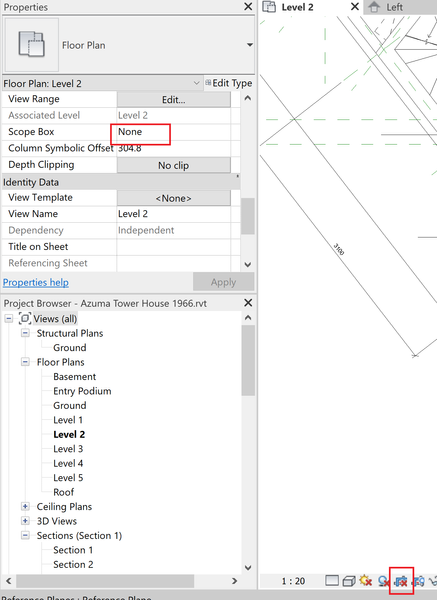
Did you apply the scopebox to the view? Set it too none and then click on the uncropped view. If you still don't see it, go to 3d and check where the scope box. Make sure the scopebox placed in workset that is visible.


syman2000_0-1693588637723.png


Check out my Revit youtube channel - https://www.youtube.com/user/scourdx
0 Likes
Message 5 of 12

bhpka
Enthusiast
Enthusiast

So far I have spend 1/2 a day messing with Scope Boxes and I just don't see the point.

What advantage do I get for fighting with SB compared to just good ole cropping?

I can rotate a cropped view and modify the shape.

I still can't rotate the SB view...

0 Likes
Message 6 of 12

syman2000
Mentor
Mentor

Once you working on tower project, scopebox will make sense. It can also control the extent where your gridline and level so user cannot accidently stretch the grid and level line. The reason you cannot rotate is you have the scopebox set on the view. This is why you cannot see it because scope box is where the crop sit. Go to other view that don't have scopebox and then rotate it.

Check out my Revit youtube channel - https://www.youtube.com/user/scourdx
0 Likes
Message 7 of 12

ToanDN
Consultant
Consultant

@bhpka wrote:

So far I have spend 1/2 a day messing with Scope Boxes and I just don't see the point.

What advantage do I get for fighting with SB compared to just good ole cropping?

I can rotate a cropped view and modify the shape.

I still can't rotate the SB view...


You will come to appreciate scope boxes when you need multiple views sharing the same crop region.  To rotate a scope box, open another non-cropped view with scope boxes turned on, and rotate it in that view.

0 Likes
Message 8 of 12

rhBDHX4
Enthusiast
Enthusiast

https://revitpure.com/blog/10-tips-to-understand-revit-scope-boxes

This link helped me a ton, in terms of finally trying out scope boxes for the first time.  Took a little time to get the hang, but now I regret not learning this tool sooner--huge time-saver for filtering out grid lines and reference planes from other structures on a project, and for creating consistent view/ grid/ annotation crops.  Worth it.

0 Likes
Message 9 of 12

bhpka
Enthusiast
Enthusiast

Thanks for the link but I still can't rotate the scope box.

0 Likes
Message 10 of 12

syman2000
Mentor
Mentor

Upload the sample file and the user will help resolved your rotating issues.

Check out my Revit youtube channel - https://www.youtube.com/user/scourdx
0 Likes
Message 11 of 12

bhpka
Enthusiast
Enthusiast

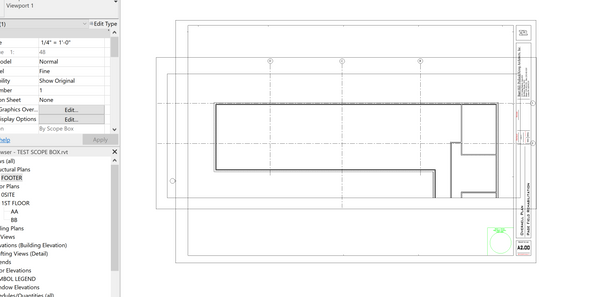
I created a simplified version of the building so I can upload.


I simply want to rotate view AA 90 deg so it fits on a sheet.


I'm probably missing a simple solution, it doesn't seem like it should be this difficult.


Thanks for taking a look.

0 Likes
Message 12 of 12

syman2000
Mentor
Mentor

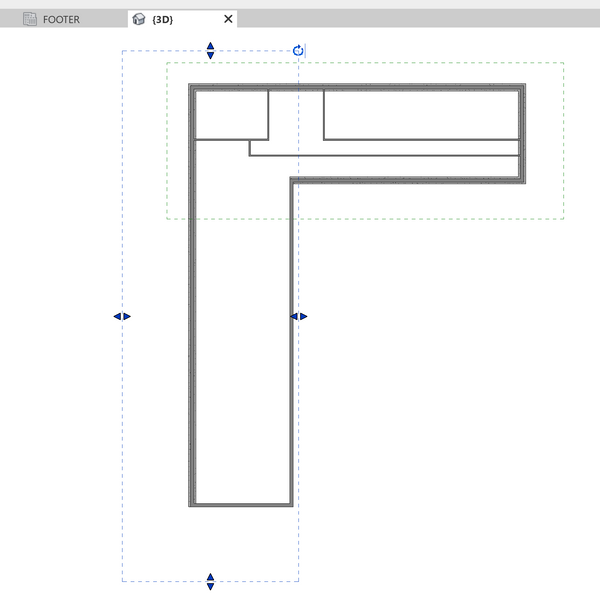
Ok I will do step by step and hopefully it will help you out. Go to the 3d and click on the plan


syman2000_0-1693938963467.png


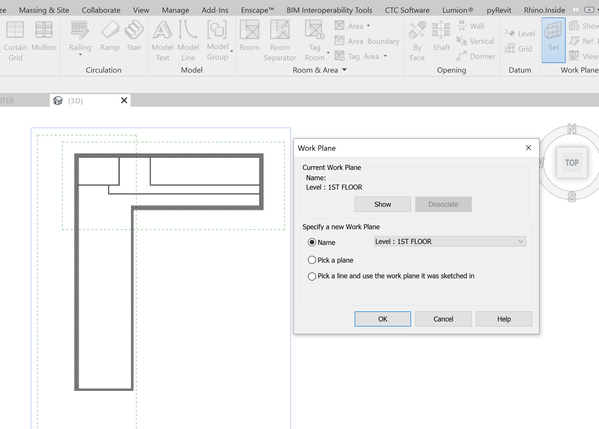
You rotate the scope box here. Make sure you set the workplane to floor plan so the scopebox will rotate.


syman2000_1-1693939029351.png


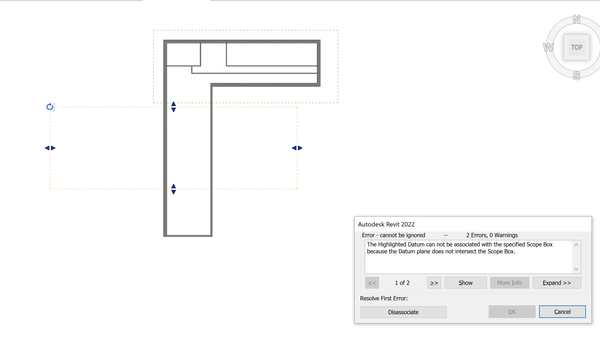
Once you rotate the scopebox, it will show you this warning message. I would disassociate it.


syman2000_2-1693939117051.png


Then the stretch the scopebox to the original location


syman2000_3-1693939150064.png


Once you have done that, the scopebox will adjust and you should see the view rotated


syman2000_4-1693939207920.png


Check out my Revit youtube channel - https://www.youtube.com/user/scourdx
0 Likes