I recently ran into a situation using the purge command. On a weekly basis to maintain file size, I typically will re-write my shared file (central file) barring anyone is in the project, run an audit, and purge the file. When I purge, I generally will click the "check all" button. I will purge until I see the number of elements check is 0 (zero). This usually takes 2-3 times.
My understanding that if an element/component is loaded but not used, then it will be purged. During this process of purging, some Building Sections and related Wall Sections somehow got purged from the project. Initially we thought that a team member was deleting views by mishap. I took the latest local file which was from the night before since I did all this the following morning, therefore not loosing any work or wanting to roll back to an earlier version not knowing when those views were missing from the central file. I began testing to see if it was an audit issue, not thinking that it would be an issue with the purge command. Once the purge command was initiated, and having my building sections expanded to see all building section views, I saw them disappear. I called my Autodesk Product reseller, stumped them with this issue. I tried this on another workstation thinking perhaps it was my workstation - not even, same thing happened on another workstation.
This is a concern with me as well as my firm and think it should be a concern with Autodesk in resolving this issue. To maintain file size on very large projects such as the one I am currently working on a purge is necessary from time to time.
Any relevant feedback is greatly appreciated. I can be contacted at the following below.
J. Kim Candelario, Method Studio
801-532-4422
kim@method-studio.com
Wow that's scary!
I've rarely ever purged a file myself, so I'm only guessing here... Perhaps the Purge feature contains a checkbox for purging views that aren't placed on a sheet or something similar?
YOUTUBE | BIM | COMPUTATIONAL DESIGN | PARAMETRIC DESIGN | GENERATIVE DESIGN | VISUAL PROGRAMMING
If you find this reply helpful kindly hit the LIKE BUTTON and if applicable please ACCEPT AS SOLUTION
N
Define a view in use?! Users create (not to says most of the time) sometimes views for instance to see and understand certain element better while working on certain parts of the project (example 3D oriented sections) are those view all in use just because they were created (in ur understanding)?
"Purge all" one uses when one want to close the project or a phase...one simple reasons is so that one won't have to delete those 100 useless views manually which users created through out the project just because they (the views) seemed convenient at the time.
Interim maintenance you should purge selected...it is not just about views, we don't purge families, we uncheck that and go through browser, same for lots of other elements such as styles and patterns! You don't purge those on a weekly basis...
When u purge all weekly there wouldn't even be any good sense for a project template if from week one all is gone!
what makes the file super inflated is poor modeling and malpractice. Example: importing instead of linking, exploding, bringing in CAD files without proper clean up! One cad file and its line patterns can bloat a REVIT file 5 times as much as 10 views and 50 families! And the CAD residues can't be even purged! That's what bloats the file
Most of the above is even in the product documentation I am not making it up lol
Sent from my iPhone
YOUTUBE | BIM | COMPUTATIONAL DESIGN | PARAMETRIC DESIGN | GENERATIVE DESIGN | VISUAL PROGRAMMING
If you find this reply helpful kindly hit the LIKE BUTTON and if applicable please ACCEPT AS SOLUTION
"Views are one of the purgable Items/titles!"
Really? I've never had this happen in any of my projects.
View Types and such I know you can purge, but the actual views as well?
(Unused view types)
Could you direct me to an Autodesk page which explains this?
Hmmm… a brilliant inquiry! If the circumstances would have been different and the inquiry was from a different individual, I would have gladly looked up the links and even tried to help out with the interpretation…BUT I believe that you are as proficient in Revit as much as you are in English and the product documentation is there (comes along with the product); you can go search and read it thoroughly, interpret it to what your knowledge of both (R&E) serves best and then experiment. If you can’t manage and still got spare time to kill, try Google (I’m sure you are more proficient in that than me)…If you still can’t manage, consider hiring a professional.
Cheers,
YOUTUBE | BIM | COMPUTATIONAL DESIGN | PARAMETRIC DESIGN | GENERATIVE DESIGN | VISUAL PROGRAMMING
If you find this reply helpful kindly hit the LIKE BUTTON and if applicable please ACCEPT AS SOLUTION
I'd suggest submitting a ticket to Autodesk with your file, along with the steps you took in the purge process and the views that were purged as well. I have never heard of views getting purged without some interaction from a power user (BIM Manager or Project Lead)
As for the process of purging on a weekly basis just to save file size...it is bogus. We have projects that range from 500mb to 1.5GB, and purge is never used. Mainly we have lots of families within the project already, and if you purge them it is difficult to load them back in. Sure, you can drag and drop the family back in, but that will require to overwrite the existing parameters, as purge will delete unused types of a family. So reloading the file again will delete any settings you have changed already. Someone would have to manually recreate any types that were purged instead.
If IT is giving you a hard time about disk space, then it is time to get a new IT person that understands that Revit uses lots of space...buy bigger drives.
I'm going to say this is odd behaviour and not what I have seen here on any project. Purging will removed unused view types such as section types but it shouldn't delete views that aren't on sheets (at least this is in 2015 I've not tested this in 2017)
Views that are created whether plans sections or elevations, regardless of whether they are on a sheet or not do not get purged here when I select 'purge all'. Indeed it's specifically written into our methodology for issuing model files that all unplaced views need to be deleted manually.
There are a few things you could try which might help track down the problem;
1) create a new section and see if that gets deleted when you purge
2) create a new project add a section an purge and see what happens
If you can post your results here that would be helpful.
I think that if he would send a ticket he would get the same answer in differnt wording ...The views in questions are not Views' Windows (where the walls and geometries are placed)...What is in question is what you are refering to as Types (In the Revit docs they are refered to as Views)
In the original OP he is referring to placed elements/components being deleted ... i would only assume View objects not view windows - section head (not the family) and the elevation arrow (not the family) => views placed on the floor plan view window ... But as you always say one might be mistaken!
Interpretation
On any Project user creates serveral views and places on a plan view window in his local file for his own convinience. Once he is done working
Hence we do not purge them, we delete the view windows manually and leave those views (the ones you are refering to as types) wherever they reside so they would be there again whenever that user create new local the following morning (otherwise they Need to be recreated)
YOUTUBE | BIM | COMPUTATIONAL DESIGN | PARAMETRIC DESIGN | GENERATIVE DESIGN | VISUAL PROGRAMMING
If you find this reply helpful kindly hit the LIKE BUTTON and if applicable please ACCEPT AS SOLUTION
@RDAOU wrote:
I think that if he would send a ticket he would get the same answer in differnt wording ...The views in questions are not Views' Windows (where the walls and geometries are placed)...What is in question is what you are refering to as Types (In the Revit docs they are refered to as Views)
My understanding from reading the original post is that they are seeing actual views disappearing from the Project, not just a View Type (that would be expected behaviour if there were no view created utilising that type).
Perhaps @MS_jkimc65 can clarify maybe with a screencast to avoid any doubt?
@Keith_Wilkinson wrote:
My understanding from reading the original post is that they are seeing actual views disappearing from the Project, not just a View Type (that would be expected behaviour if there were no view created utilising that type).
Perhaps @MS_jkimc65 can clarify maybe with a screencast to avoid any doubt?
It is my understanding as well. We have tons of Views not placed on Sheets and they are there forever unless we manually delete them via Browser. So I am not convinced unless OP or someone can post a screencast of Views are actually deleted after a Purge All.
And I agree with the sentiment that Purge All periodically just for file size sake is unnecessary. If someone in my team do that to our projects I would be furious. We setup project from Template with lots of families and types, text/dim/line types , view types, materials, etc... which may not yet to be used. A Purge All would virtually erase all of that effort. The only occasion a Purge All is allowed, which IMHO is still a waste of time, is when we send files to a consultant, or archive them.
@MS_jkimc65 wrote:
My understanding that if an element/component is loaded but not used, then it will be purged. During this process of purging, some Building Sections and related Wall Sections somehow got purged from the project. Initially we thought that a team member was deleting views by mishap. I took the latest local file which was from the night before since I did all this the following morning, therefore not loosing any work or wanting to roll back to an earlier version not knowing when those views were missing from the central file.
im not sure anyone is trying to convince anyone else...it's a matter of interpretation ... Someone says it refers to the view windows vanishing and someone else says he is referring to the views placed on the floor plans which as per Autodesk's definition they are called views.
personally when I read the op again and see it referring to placed elements and component! I wouldn't assume it is referring to the whole but more to the element/object placed to create a view...he didn't even make reference to the project browser but anyhow hopefully he replies with a screencast ... He'd better post lol cuz this thread is going to blow the brains of every genius on this forum
Funny it's a post which was at the bottom of the 2nd page lol before that kima fished it up!
YOUTUBE | BIM | COMPUTATIONAL DESIGN | PARAMETRIC DESIGN | GENERATIVE DESIGN | VISUAL PROGRAMMING
If you find this reply helpful kindly hit the LIKE BUTTON and if applicable please ACCEPT AS SOLUTION
@RDAOU
The "convince" part of my post was directed to OP @MS_jkimc65. Sorry I didn't address it more clearly.
And I agree with the sentiment that Purge All periodically just for file size sake is unnecessary. If someone in my team do that to our projects I would be furious. We setup project from Template with lots of families and types, text/dim/line types , view types, materials, etc... which may not yet to be used. A Purge All would virtually erase all of that effort.
It would be annoying for sure, but you could open the template file and use the Transfer Project Standards tool to bring them all back in.
YOUTUBE | BIM | COMPUTATIONAL DESIGN | PARAMETRIC DESIGN | GENERATIVE DESIGN | VISUAL PROGRAMMING
If you find this reply helpful kindly hit the LIKE BUTTON and if applicable please ACCEPT AS SOLUTION
I hope this helps . . .
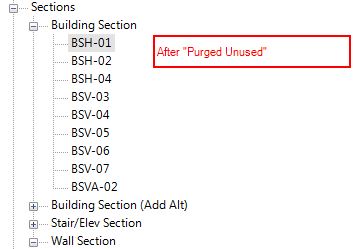
I have included three screenshots, my Project Browser is organized in such a manner that my section types are grouped together, so with some of the Building Sections that are getting purged even when they are on sheets, I am stumped. Hmm, did a search "Purge Unused" from Autodesk Revit 2016 Help . . . in the documentation the first line reads:
"Remove unused views, families, and other objects from the project to improve performance and reduce file size."
To me "unused" is the keyword, in which the views (Building Sections) are used and placed on a sheet, should not get purged even if the check boxes are checked.
I feel I have gotten a lot of feedback that discourages purge unused. I don't feel that "purging unused" on a weekly basis is truly a bad thing.
This is the first time that I have ever experienced views that are "used" are deleted from the project browser as well as the sheet that the view is on.
no, this is odd behaviour - regardless of whether the views are on sheets or not Revit shouldn't remove them when purging as it is effectively purging something that by definitions isn't unused.
The section types that you are able to select should be ones that don't have any actual views attached to them - i.e. that type of section isn't used anywhere in the project. If it is used then it shouldn't show up to be selected in the purge unused command.
can you confirm what section type(s) it is that is being deleted - is it all of one type or a random selection?
As to the merits of purging all your unused content I'll leave that for you to make your own mind up but given the number of people that are saying they don't do it might be worth giving it more thought - you may still arrive at the same conclusion though. ![]()
@MS_jkimc65 Did you send in the ticket to Autodesk with the file? That will get better results than us just scratching our heads and agreeing something is goofy.
Sie finden nicht, was Sie suchen? Fragen Sie die Community oder teilen Sie Ihr Wissen mit anderen.