Revit Architecture Forum
Welcome to Autodesk’s Revit Architecture Forums. Share your knowledge, ask questions, and explore popular Revit Architecture topics.
abbrechen
Suchergebnisse werden angezeigt für 
Anzeigen  nur  | Stattdessen suchen nach 
Meintest du: 

Modify Linework: Blue dots don't show up

6 ANTWORTEN 6
GELÖST
Antworten
Nachricht 1 von 7
Anonymous
2459 Aufrufe, 6 Antworten

Modify Linework: Blue dots don't show up

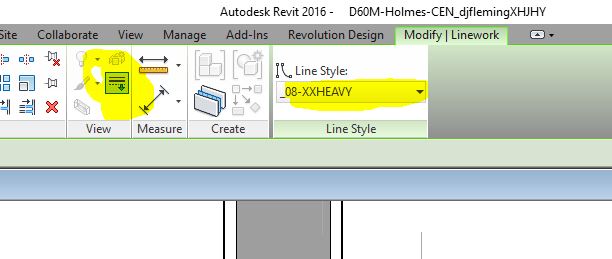
When I am in an elevation (or section/plan for that matter), and go to the modify linework action, I will click on a line that I want to be modified, but the blue dots that control the segment of that line to be changed do not show up. So the entire line is changed to a thicker line without my control of having it shortened or not. Please help me figure out how to change this setting to allow the visibility of those blue dots. 

6 ANTWORTEN 6
Nachricht 2 von 7
barthbradley
als Antwort auf: Anonymous

Convert Line (see contextual tab)

Nachricht 3 von 7
Anonymous
als Antwort auf: barthbradley

Thanks, Barth for you reply.  However, these aren't model nor detail lines, I am trying to modify the edge of a fin wall in an elevation. Also, I am in R2016 if that makes a difference. 

Nachricht 4 von 7
barthbradley
als Antwort auf: Anonymous

Not Linework?  What is it?  

Nachricht 5 von 7
Anonymous
als Antwort auf: barthbradley

It's the edge of a wall in elevation. I am trying to make my elevations have lineweights that help show depth in 2D. Yesterday, I was able to create these thick lines via "modify: linework" command (See attached: linework), and I was able to use the "blue dots" at the end of the lines that allow me to shorten the overridden edge (See attached: linework 2).  Today, those blue dots no longer show up when I go through the same process (See attached: linework 1). 

Nachricht 6 von 7
Anonymous
als Antwort auf: barthbradley

I figured it out! I was in a current workset that was "hidden" in V/G for that view template. All I needed to do was switch my current workset to one that is visible!!! Thanks for you help & time though, Barth. 

Nachricht 7 von 7
Corsten.Au
als Antwort auf: Anonymous

1. If the element is in section ( cut view ) then the LW ( line work ) wont show blue dot to edit .

2. If the element is in Projection line ( ex elevation ) only then the LW ( Linework ) will allow 

you to modify / control the LW using those dots..


Have a go...

Corsten
Building Designer

Sie finden nicht, was Sie suchen? Fragen Sie die Community oder teilen Sie Ihr Wissen mit anderen.

In Foren veröffentlichen  

Autodesk Design & Make Report