Missing Level 1 - Unable to Create Floor Plan View

Missing Level 1 - Unable to Create Floor Plan View

a00812364
Enthusiast Enthusiast
12,585 Views
6 Replies
Message 1 of 7

Missing Level 1 - Unable to Create Floor Plan View

a00812364
Enthusiast
Enthusiast

Hello!


Here's a strange one, any help would be appreciated!


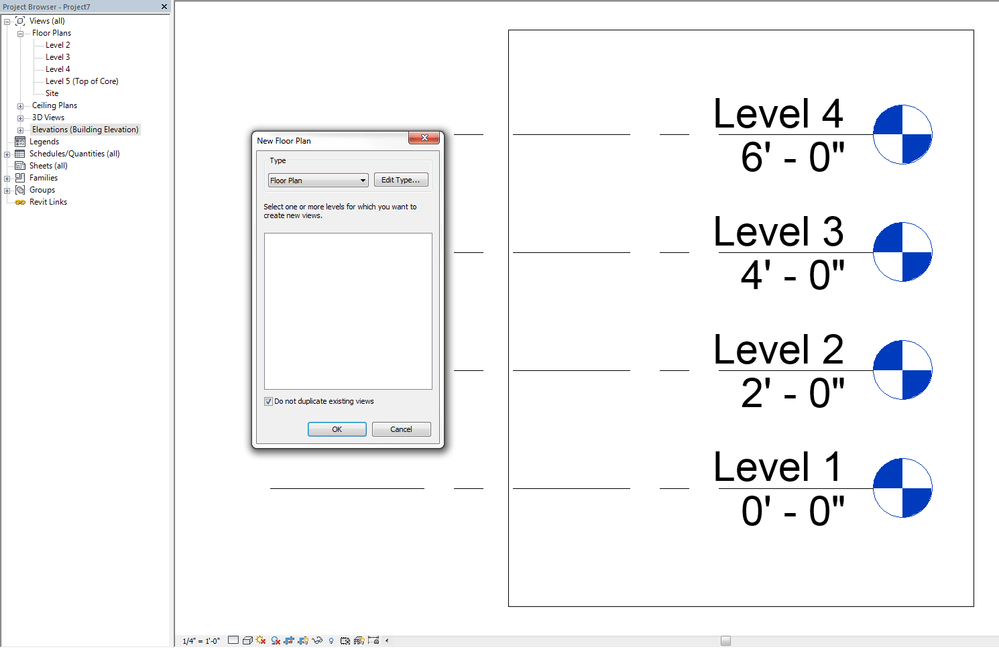
I have a 'Level 1' missing in Views, and going to Views > Plan Views > Floor Plans doesn't give me an option to create a floor plan for this level.


I have elements drawn on Level 1, so I'd prefer not to delete this level and have it delete all the elements on Level 1.


Capture attached shows scenario.

0 Likes
Accepted solutions (1)
12,586 Views
6 Replies
Replies (6)
Message 2 of 7

ToanDN
Consultant
Consultant
Untick that box in your screenshot.
Message 3 of 7

barthbradley
Consultant
Consultant
Accepted solution

You sure it isn't one of the other ones there. Maybe you renamed it and not the corresponding level. 


Just right click on it (the Level itself)  and pick Go to Floor Plan. 

Message 4 of 7

barthbradley
Consultant
Consultant

Missing Level.png

Message 5 of 7

Corsten.Au
Advisor
Advisor

If you have any other floor plan / ceiling / structural etc created already, then it wont give option to recreate the view..

just check in your views...

you can even SCHEDULE Views, and select associated levels, and sort using levels...

you can pinpoint the view created for levels..

easy checking..


best luck

Corsten
Building Designer
0 Likes
Message 6 of 7

RobDraw
Mentor
Mentor

@Corsten.Auwrote:

If you have any other floor plan / ceiling / structural etc created already, then it wont give option to recreate the view..


Of course it will. You can have as many views based on any level as you want. If not, Revit would be pretty much useless. You just need to uncheck the box in the create views dialog box as already pointed out.


Rob

Drafting is a breeze and Revit doesn't always work the way you think it should.
0 Likes
Message 7 of 7

a00812364
Enthusiast
Enthusiast

Looks like this was it!


Thanks!

I was sure I checked all the levels for their corresponding names (but must had skipped the 'Site' level)


I could have created another floor plan by unchecking the 'do not create duplicates' box, but this is a much cleaner way of doing things.

Right-clicking the level marker in Elevation View, then clicking 'Go To View' is a really good way for checking this!


Thanks for the help everyone.

0 Likes