Revit Architecture Forum
Welcome to Autodesk’s Revit Architecture Forums. Share your knowledge, ask questions, and explore popular Revit Architecture topics.
abbrechen
Suchergebnisse werden angezeigt für 
Anzeigen  nur  | Stattdessen suchen nach 
Meintest du: 

Linestyle organization

4 ANTWORTEN 4
GELÖST
Antworten
Nachricht 1 von 5
GREMMELS1
994 Aufrufe, 4 Antworten

Linestyle organization

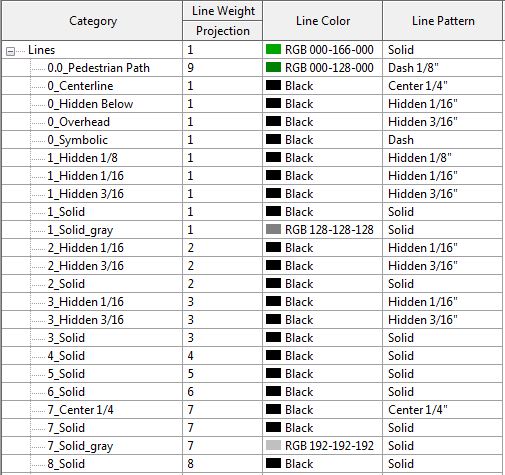
I am in the process of updating linestyles.  Went to create linestyle "0_Symbolic" and it put it below the "00" linestyle as opposed to in the mix of of the other "0" linestyles.  If I change the "00_Pedestrian Path" to be "00_Dedestrian Path" it moves up in between "0_Centerline" and "0_Hidden Below" .  So, even though I tried differentiating the "0" linestyles from the "00" linstyles Revit is still organizing them by the first letter after the underscore.  How can I get my "0" linestyles to show up together and my "00" linestyles to show up together?


In case you are curious the "00" linestyles are going to be reserved for standard linetypes that we use on the design side of drawings and "0" linestyles are reserved for standard linetypes that we use on the construction side of drawings. 0 or 00 linestyles are named by the function whereas 1_Solid, 2_Hidden 1/16 linestyles are defined by weight, patterns, scale, color.  This is just the new naming convention our firm is going to adopt for all details and families.


4 ANTWORTEN 4
Nachricht 2 von 5
Sahay_R
als Antwort auf: GREMMELS1

Are you using an O or a zero? Possibly an O would be helpful?


Another suggestion - try roman numerals...... I, II, III, IV, etc....... (and I'm not being facetious here!)


Capture.PNG


Rina Sahay
Autodesk Expert Elite
Revit Architecture Certified Professional

If you find my post interesting, feel free to give a Kudo.
If it solves your problem, please click Accept to enhance the Forum.
Nachricht 3 von 5
Sahay_R
als Antwort auf: Sahay_R

Looking at our Linestyle organization - we don't have any underscores or whatever. it is just - 


XY ABCD 01

XY ABCD 02

XY ABCD 03


...............and so on and so forth


Rina Sahay
Autodesk Expert Elite
Revit Architecture Certified Professional

If you find my post interesting, feel free to give a Kudo.
If it solves your problem, please click Accept to enhance the Forum.
Nachricht 4 von 5
GREMMELS1
als Antwort auf: Sahay_R

I'm just going to make the "00" a "0.0"and be done with it.  this makes them all group together.  Still confused how revit would put a linestyle beginning with 00_ inbetween two other linestyles that begin with 0_.  Doesn't make any sense to me. Thanks for your suggestions!

Nachricht 5 von 5
GREMMELS1
als Antwort auf: GREMMELS1

Also, notice the difference between these two images.  One is an image from the linestyle dropdown selection when i go to draw a line.  The other is an image of when I access from additional settings - linestyles.  


The 1_Hidden lines are organized differently! How?! 


Sie finden nicht, was Sie suchen? Fragen Sie die Community oder teilen Sie Ihr Wissen mit anderen.

In Foren veröffentlichen  

Autodesk Design & Make Report