Issue: Cant find and/or Edit the Mullion profile

Issue: Cant find and/or Edit the Mullion profile

andrew_criminaleE5MYE
Participant Participant
8,908 Views
2 Replies
Message 1 of 3

Issue: Cant find and/or Edit the Mullion profile

andrew_criminaleE5MYE
Participant
Participant

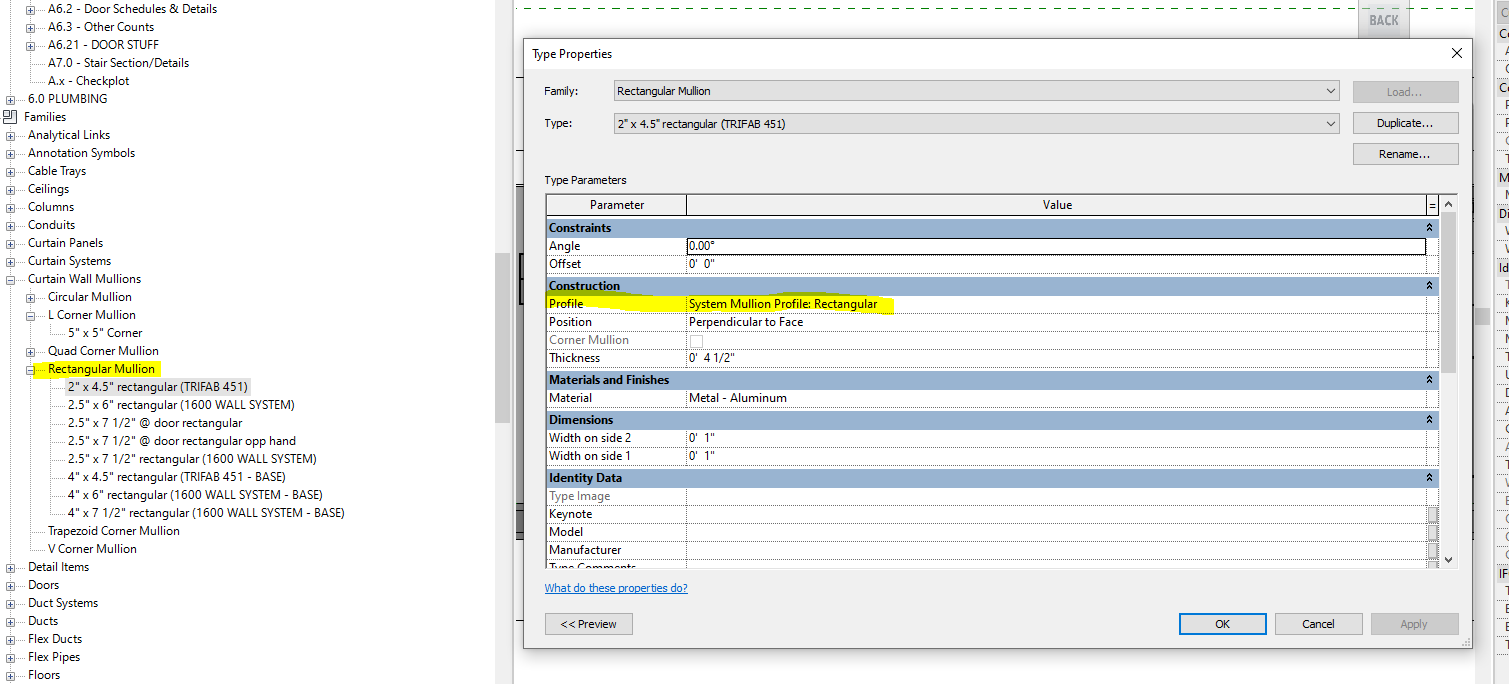
I am trying to take an existing rectangular mullion profile family that is in my revit project, open up the family, and make changes to the profile that i want. in the project browser: families: curtain wall mullions: rectangular mullion I right click and the edit family is greyed out. 

I then open one of the types and see in the type properties: construction: profile, a profile is selected. see image attached.

Is this the profile i need to find to open up the family and make edits? if so i dont see this rectangular in the profile families. I know i can start a mullion profile family from scratch but it be much easier to open one already made with all the stuff included and make my changes.

please help.

Mullion profile issue.PNG

0 Likes
8,909 Views
2 Replies
Replies (2)
Message 2 of 3

ToanDN
Consultant
Consultant

It is System Mullion Profile, not an external Profile, so you edit the parameter directly in the type properties.


ToanDN_0-1679432770864.png


If you want different rectangular profile, then create a new profile family from Curtain Wall Mullion profile template.


0 Likes
Message 3 of 3

20202109010
Enthusiast
Enthusiast

Hi,

how can I open the profile familt filealready installed in Revit document. As you say, I can create a new mullion profile but I'd like to edit the one already installed since the profile length need to be increased and I want to adjust the lines. since I don't know the installed type family's lenght, I can't create a new one without looking at the old one installed. 


Thank you for information.

Ece

0 Likes