Importing 3D-DWG into Revit Family

Importing 3D-DWG into Revit Family

gostia
Contributor Contributor
2,186 Views
13 Replies
Message 1 of 14

Importing 3D-DWG into Revit Family

gostia
Contributor
Contributor

Hi Everyone, 

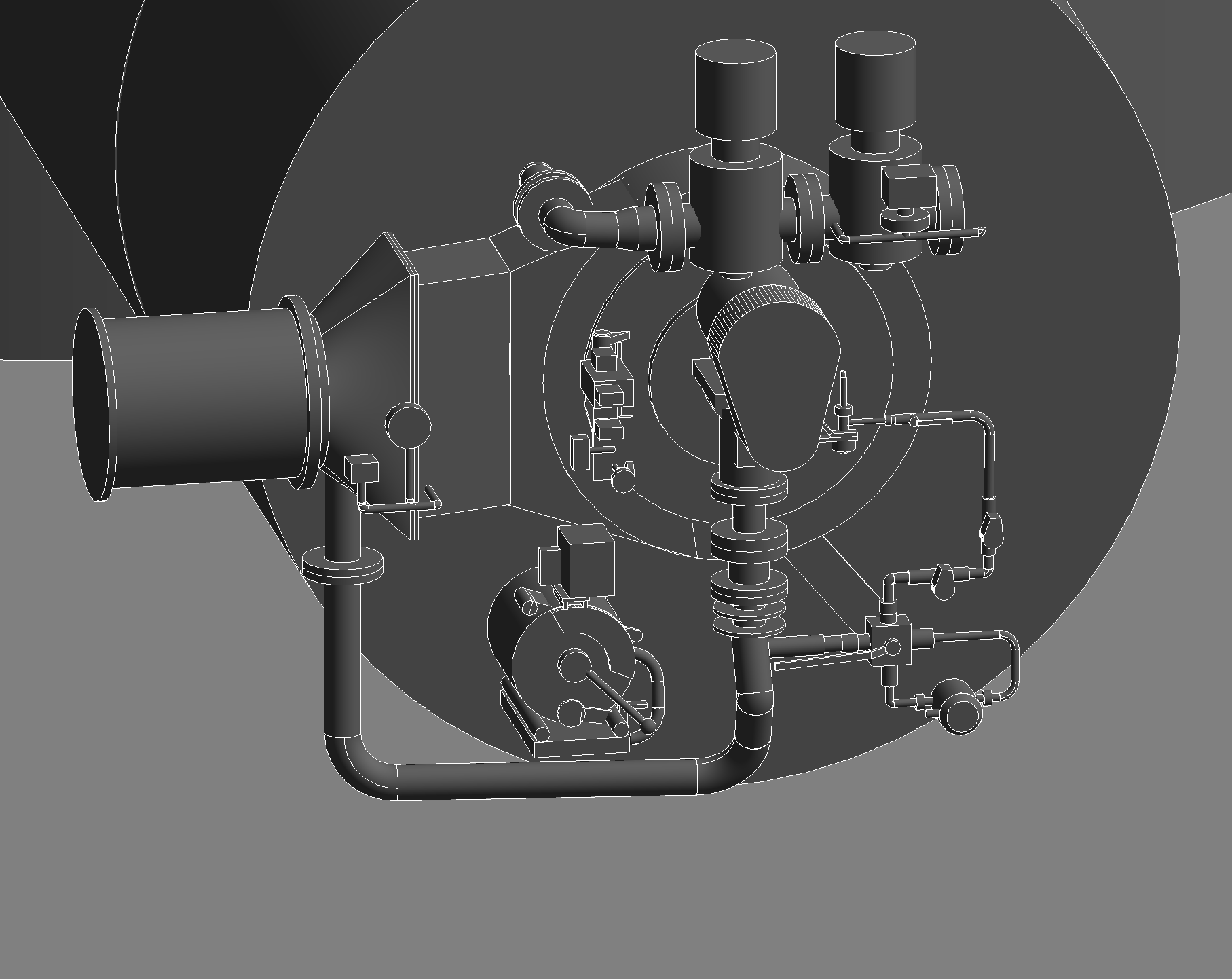
i have some problem, when i try to import 3D-DWG into Revit Family. 

some of the shape are not showing properly in Revit. (see Attachment)

Can some one help me pls?


Thanks in advance!


0 Likes
2,187 Views
13 Replies
Replies (13)
Message 2 of 14

Rafal.Gaweda
Autodesk Support
Autodesk Support

Hi @gostia 


Have You tried exporting object(s) to SAT file and import it to Revit ?

Can You post mentioned dwg file ?


Rafal Gaweda
0 Likes
Message 3 of 14

gostia
Contributor
Contributor

actually i have met this problem many times in my other DWG drawing. And i have already tried that solution. But i feel this solution not good enough, because every time i export my DWG to SAT file, there will be a warning that said, the export is succesfull exporting "E.g. 400 from 800 Objects". Looks like every time there will be a missing object when i export from DWG into SAT file. And again when i try to link this SAT file into Revit, revit will give me another warning, that said some of the object can not be shown properly. So as the result maybe from 800 Objects, i will only got around 200 Objects. That is why i want to know the other solution. by the way, i also have tried exporting into IFC.

but again in IFC i got another problem, some wall penetration not showing correctly.

thats why i want to know, if there are any other solution for importing DWG file into Revit.

you can find my DWG in attachment.

Thanks in advance!

0 Likes
Message 4 of 14

RobDraw
Mentor
Mentor

Anytime you are converting from one format to another there is a good chance that you will have some issues. Have you considered creating these from scratch in Revit?


Rob

Drafting is a breeze and Revit doesn't always work the way you think it should.
Message 5 of 14

gostia
Contributor
Contributor

Hi @RobDraw,

thanks for the advice. Yes i know, if i draw this model new in the Revit this problem will not coming.


I will explain a little bit about my work, my company´s job is to making a layout plan for a whole treatment plant. we got so many different 3D-Models from the supplier of each section and i need to import them all together in one programm and at the end, i need to make a complete layout plan (floor plan, Longitudinal section and cross section) using all that 3D-Models.


I know that, revit can really fast making the floor plan and Longitudinal section.

So i tried to used Revit to do this, but like i said before, every time when i tried to import the 3D-Model, there will be some missing part on each file but sometimes the model is complete. 

Maybe can someone give me advice, how can i importing all that 3D-Model into Revit more accurately?

or is that the only way to work? that i need to create the model from scratch in Revit? 


Until now i am using AutoCAD Plant 3D and Plant 3D can convert/import all model perfectly inside this programm, but Plant 3D need a lot more time than Revit to make the floor plan and Longitudinal Section.

That is the reason, why i tried Revit.

Or maybe can someone tell me another better Programm to do this task?

Thanks a lot in advance!


0 Likes
Message 6 of 14

Rafal.Gaweda
Autodesk Support
Autodesk Support

Hi @gostia 


As far as I can see , using sat these 3 parts are missing in Revit:

I am sorry.

BTW , I used Fusion 360 to generate sat file


ofenneu2.jpg


Rafal Gaweda
Message 7 of 14

gostia
Contributor
Contributor

Hi @Rafal.Gaweda ,

thanks for your effort. Yeah, somehow there are something not correct in Revit import.

Because at first i thought, it must be because of some complicated shape that really hard to convert, but sometimes even normal cylinder also missing. 

thanks a lot by the way, lets see if other people have any other solution for this.

Because i have also tried so many different way to import them inside revit. also with other model. but looks like this problem keep coming.


0 Likes
Message 8 of 14

Rafal.Gaweda
Autodesk Support
Autodesk Support

Hi @gostia 


Yes, I know.

I have escalated this case to dvlp team.

Thank You for reporting.


Rafal Gaweda
Message 9 of 14

gostia
Contributor
Contributor

Hi @Rafal.Gaweda 

Thanks a lot, really nice.


Can i have another question, i tried to import your SAT file into my Revit.

But it shows different with yours. My model is becoming like this. The missing part at my modell is at the top. and the bottom part not missing.


btw can you tell me, how can i show the model with color like yours?

thanks in advance!

0 Likes
Message 10 of 14

Rafal.Gaweda
Autodesk Support
Autodesk Support

Hi @gostia 


I "Imported CAD".

It seems you "Linked CAD" because You have these missing elbows (I know, I see top "deck" is not correct.)


Rafal Gaweda
Message 11 of 14

gostia
Contributor
Contributor

Hi @Rafal.Gaweda 

yes you are right, i linked it just now and when i tried "import", it is the same like yours now.

i thought, it is the same, if i use "link" or "import". this really surprise me.

thanks for another lesson.


0 Likes
Message 12 of 14

Rafal.Gaweda
Autodesk Support
Autodesk Support

Hi @gostia 


FYI opening vs linking IFC may also give you different effects.


Rafal Gaweda
Message 13 of 14

Rafal.Gaweda
Autodesk Support
Autodesk Support
Message 14 of 14

gostia
Contributor
Contributor

Hi @Rafal.Gaweda 

Ok nice, but it was already at 2017. Hope they fix this soon.

thanks a lot!

0 Likes