Duplicate Section Callout

Duplicate Section Callout

Anonymous
Not applicable
12,359 Views
10 Replies
Message 1 of 11

Duplicate Section Callout

Anonymous
Not applicable

I am working on a foundation plan that I would like to place the same section callout at different location long the foundation walls. 


Is there a way to duplicate the same section callout? 


Thanks.

0 Likes
Accepted solutions (1)
12,360 Views
10 Replies
Replies (10)
Message 2 of 11

LisaDrago
Advisor
Advisor

In the oiptions bar you should see reference other view - in the pull-down you should see the other views and you can select the one you want. The callout should be marked with a SIM when it is referencing another view.

LD


If this helped solve your issue - remember to 'accept as solution' to help other find answers!
You can't think AutoCAD and run Revit.
Email: [email protected]
Message 3 of 11

Anonymous
Not applicable

BLESS YOU!!  The options bar....so important, yet does not get all the looks.

Thanks!

0 Likes
Message 4 of 11

LisaDrago
Advisor
Advisor
Accepted solution

You are welcome! Anytime i train anyone on Revit - I tell them as soon as you start a command tat is the first place to look.


LD


BTW - don't forget to accept as soultion if this helped you!


If this helped solve your issue - remember to 'accept as solution' to help other find answers!
You can't think AutoCAD and run Revit.
Email: [email protected]
0 Likes
Message 5 of 11

joekozelka
Enthusiast
Enthusiast

Hello


thank you for the advice on Referencing other views, however When I select the  Callout the Reference other view appears but is greyed out. I have tried to access it throught the sheet the callout is placed on, the sheet that the callout is made and the callout itself with always the same result, greyed out. What have I missed?


Thanks


Joe

0 Likes
Message 6 of 11

chrisplyler
Mentor
Mentor

The option is only available when creating/placing a mark. Make your first section in the usual way. Then make the additional sections, chicking the Reference Other View option prior to placing them.

Message 7 of 11

nduguay
Explorer
Explorer

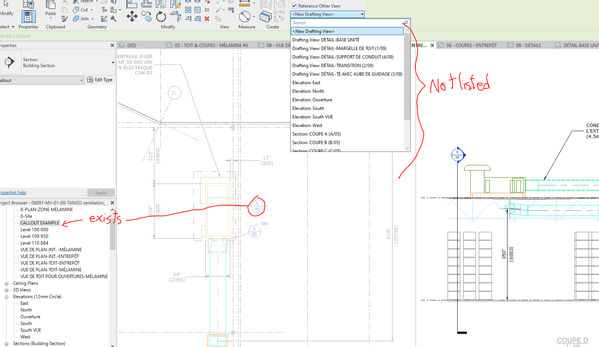
I would like to call out the same detail in two different viewports, Revit doesn't seam to want to allow me to do that, the view I want to refer with the new callout is not present in the list bellow "Reference Other View". Is there a reason? Is there a solution?
Thanks!

0 Likes
Message 8 of 11

joekozelka
Enthusiast
Enthusiast

Hello Chris 


Before placing the call out. Select Callout then at the top select "reference other views" this will create a copy of your callout which can be used multiple times, the callout should be labeled with the sim acronym. 


Joe 

Message 9 of 11

nduguay
Explorer
Explorer

Thank you, but as I ask in my question, this doesn't work when trying from another viewport, the view is not listed in the dropdown menu. For example, let's say I want to refer two different parts with the same detail, one appears in a plan view, the other in a section, I can make a callout of the part in the plan viewport, but when comes the time to use "Reference Other View" in the section viewport, I cannot point to the existing view of this part.
See screen capture; "CALLOUT EXAMPLE" has been created on the plan viewport on the left and when I try to create a callout that refer it, it is not listed in the dropdown menu (even scrolling, please don't answer "try scrolling down")
I hope I am more clear
Thank you!

nduguay_0-1652127608832.png


0 Likes
Message 10 of 11

ToanDN
Consultant
Consultant

So you want a plan callout to reference a section detail?  Reference other view doesn't work that way, it can only refer to a view of the same view orientation or a drafting view.


If you want a list of EVERY view to choose from, use View Reference to place the callout bubble.

Message 11 of 11

Khan_MFJWAM
Community Visitor
Community Visitor
Thank you so much for sharing this!
0 Likes