Changing text size while not modifying scale

Changing text size while not modifying scale

Anonymous
Not applicable
1,969 Views
2 Replies
Message 1 of 3

Changing text size while not modifying scale

Anonymous
Not applicable

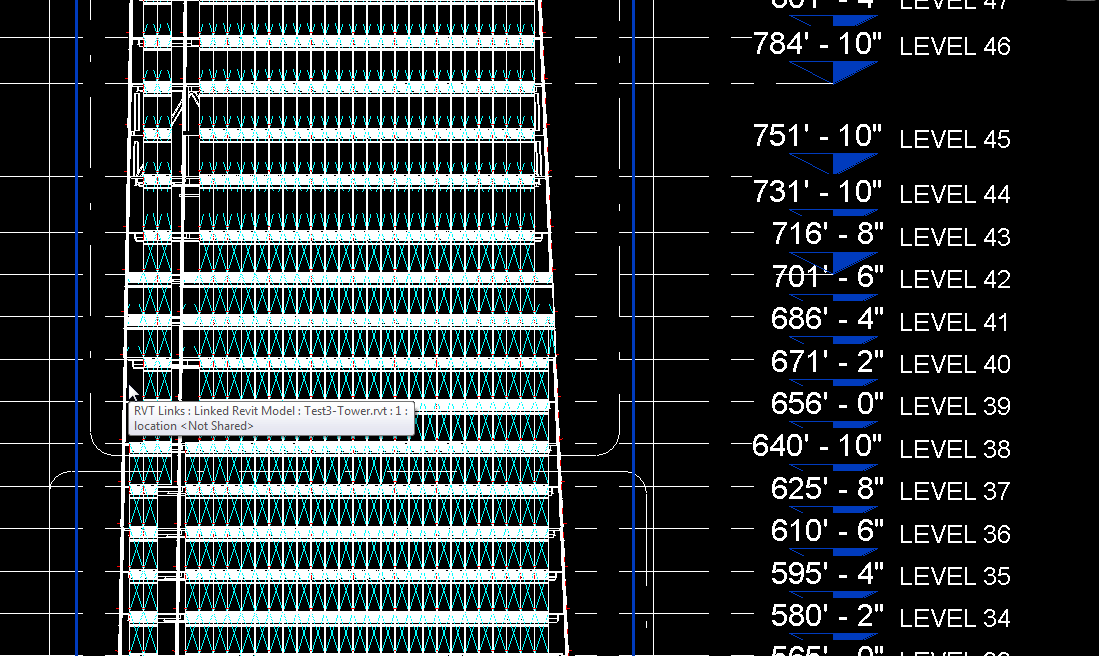
I am trying to change my text height on my elevation views. Based on the scale I have set now, 1/64" you can see in the below picture that my text is overlapping. Is there a way to change this without editing my elevation symbol. Thank you

0 Likes
Accepted solutions (1)
1,970 Views
2 Replies
Replies (2)
Message 2 of 3

ToanDN
Consultant
Consultant
Accepted solution
1. Save the levels to another file. Edit the level symbol in that file to use smaller text. Link it in the project file in a workset set to invisible to all view. Turn off the project levels and turn on the link workset for the elevation view.

2. As such small scale, is it really necessary to show the elevation for every level? How about every 2, or 5, or 10 levels?
Message 3 of 3

barthbradley
Consultant
Consultant

The bigger question I have is bout the scale itself. How the heck can you read all this closely grouped data when it's printed at 1/64" scale?  And what about pen weight? Is there one thin enough? 

0 Likes