


- Mark as New
- Bookmark
- Subscribe
- Mute
- Subscribe to RSS Feed
- Permalink
- Report
I am trying to set different materials to different parts of a wall like shown in the picture below.
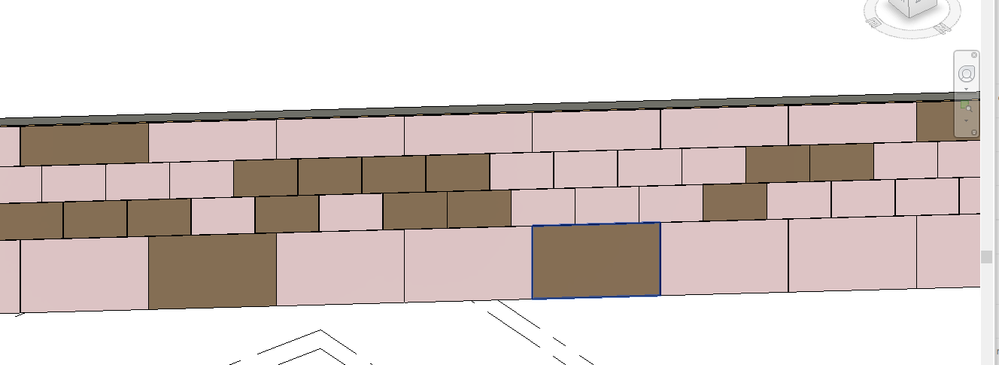
My current method allows me to set all the parts to have the same material, but doesn't let me assign each part its own material. Here is my current approach:
1) Get all the parts in the file (this is a controlled file where I know exactly what parts are there)
2) Check whether a part is currently set to material "Facade Material" -- this is how I've organized my wall ahead of time and I only want to change the material of parts of the wall that have material "Facade Material"
3) Set each part's built in parameter "Material by original" to false
4) Set each part's built-in material parameter to my desired one
The issue is, once I set the material parameter for a given part, then it changes the material parameters for all the other parts. I'm not sure if the concept of instance parameter vs type parameter vs family parameter holds for Parts, but from the object browser in Revit, the material parameter seems to be an "instance" parameter.
IEnumerable<Part> facadePanels2 = new FilteredElementCollector(doc).OfClass(typeof(Part)).Cast<Part>();
                foreach (Part p in facadePanels2)
                {
                    using (var trans = new Transaction(doc, "Modify1"))
                    {
                        trans.Start();
                        Parameter pMat = p.get_Parameter(BuiltInParameter.DPART_MATERIAL_ID_PARAM);
                        System.Diagnostics.Debug.Print(pMat.AsValueString());
                        if (pMat.AsValueString() == "Facade Material")
                        {
                            System.Diagnostics.Debug.Print("Facade Material Found");
                            Parameter pOrig = p.get_Parameter(BuiltInParameter.DPART_MATERIAL_BY_ORIGINAL);
                            if (pOrig.IsReadOnly == false)
                            {
                                pOrig.Set(0);
                            }
                            if (pMat.IsReadOnly == false)
                            {
                                ElementId matId = materialIds[getMaterialOfPart(p, panels, viewDefault3D)];

                                pMat.Set(matId);
                            }
                        }
                        trans.Commit();
                    }
Any thoughts?
Solved! Go to Solution.


 Developer Advocacy and Support +
