Family Document Solids cutting

Family Document Solids cutting

GeomGym
Advocate Advocate
1,103 Views
3 Replies
Message 1 of 4

Family Document Solids cutting

GeomGym
Advocate
Advocate

Hi,


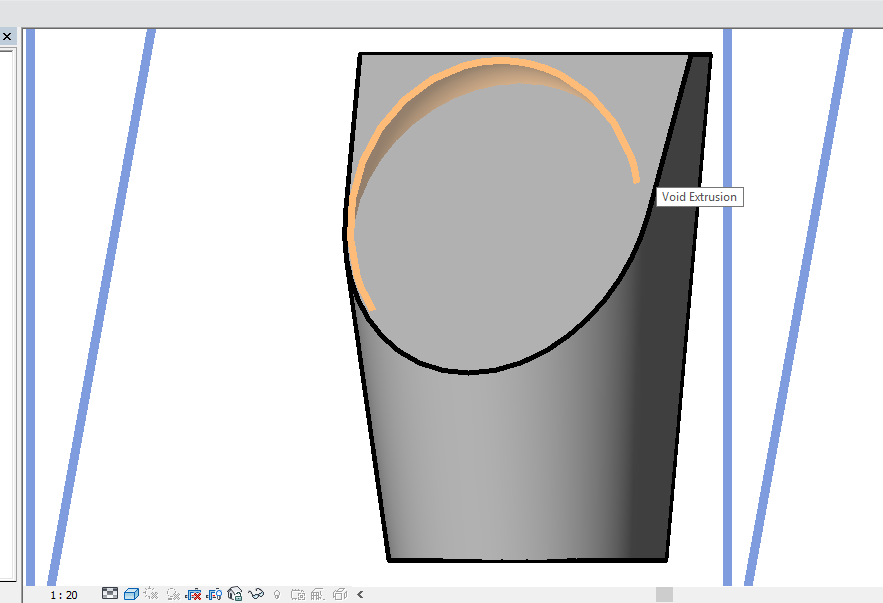
I'm creating a generic model family document, and then trying to cut a blend with an extrusion.

I tried using SolidSolidCutUtils.AddCutBetweenSolids(famDoc,s1,s2); but this throws an exception 

The element must be in a project document or in a conceptual model, pattern based curtain panel, or adaptive component family.


If I manually create a "void extrusion" using the user interface, the generated object automatically cuts the existing blend.

If I set solid to false when creating the extrusion (with blend existing), it displays but does not effect a cut.


Thanks in advance to anyone who can point me to an example or tell me how to cut two solids in a family document.


Thanks,


Jon


140519 family document cutting object.png


0 Likes
1,104 Views
3 Replies
Replies (3)
Message 2 of 4

GeomGym
Advocate
Advocate

I've looked further and found the Document.CombineElements method.  

This works for me for the first operation, to create the blend and then cut with extrusion.

Then I add an ellipse revolution, and try to call on the combine elements with the previous result and it doesn't work.

Actually i can't get this api generated revolution to cut manually (where as when I created the family manually it did).


I've attached the family created from the user interface, the resulting family from the API and the resulting family from the API code.

Is sequential calls to combine elements fine?  Anyone spot anything incorrect?


Thanks,


Jon

0 Likes
Message 3 of 4

jeremytammik
Autodesk
Autodesk

Does the same operation work when driven through the user interface?


Jeremy Tammik
Developer Technical Services
Autodesk Developer Network, ADN Open
The Building Coder

0 Likes
Message 4 of 4

GeomGym
Advocate
Advocate

Hi Jeremy,


Thanks for the reply.


I did study this further today. 


I found if you change the blend depth (there's a parameter in the attached or select the short type), then the both voids are active.

But the manual family I created worked fine so I'm not sure if this is an API issue or something in core revit.


140520 urinal from parametric IFC.png

0 Likes