


Is it Possible to Export the ReCap-derived 3D Placements of the Photos?

- Mark as New
- Bookmark
- Subscribe
- Mute
- Subscribe to RSS Feed
- Permalink
- Report
We are evaluating ReCap for our institution, and we are attempting to use ReCap for a workflow where we can manually stitch the images together using points in the photo (great feature!), and then to export the 3D positions of the image files related to one another as a 3D file type (or the placement data germane to those photos) to manually derive the location of points and features using ray tracing (image 1). The quality of the images and manner of collection will always necessitate this. I do not really require a point cloud output.
Image 1. Depiction of photogrammatic bundle triangulation using derived image locations with respect to overlapping image features. I am looking to derive these locations manually using ReCap and use them in other programs both with Autodesk apps and outside of this family.
ReCap has the ability to manually stitch the photos together using points in the image (Image 2). Other programs depict the image or camera locations and derived azimuths to the object (Image 3, 4). Image 5 and 6 depicts a concept where the images can be placed in a vector-based program for technical analysis (in this case, SketchUp). (Note: I cannot use the Match Photo feature in SketchUp that relies on deriving horizon placement.) What we want is to export these image tiles as a 3D object (obj for example). (also, as long as I have the geometry, I can replace the image on the object to conduct ray tracing)

Image 2. Manual picture-to-picture orientation tool in ReCap


Image 3 and 4. Agisoft and unnamed application depicting image locations, names, sizes, focal lengths, and azimuths with respect to the object area. I am looking to export the image placements (blue tiles in above) as objects within a 3d file type.
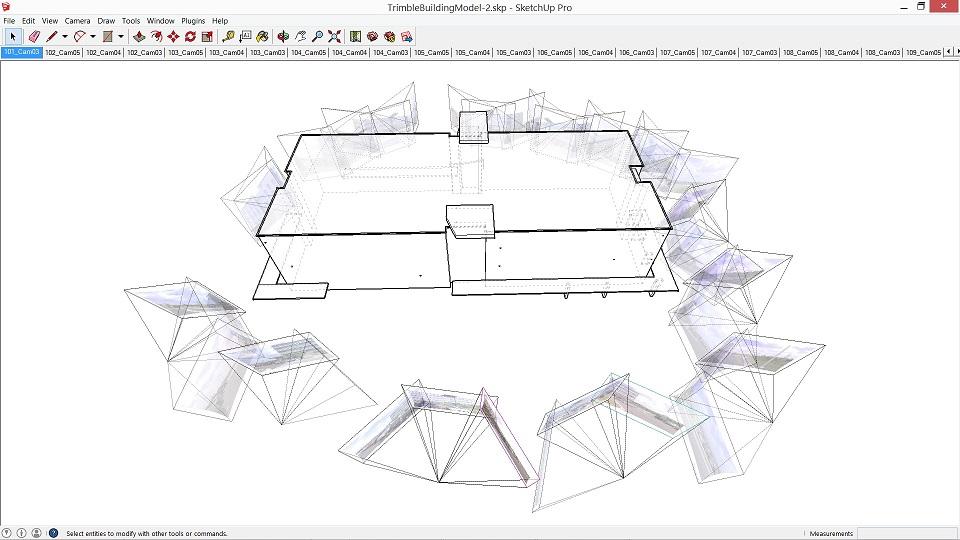

Image 5 and 6. Image placements in a vector-based program (SketchUp) which can be used for ray tracing, orientation, and technical analysis. Image 5 depicts what I am trying to accomplish with the workflow that uses the ReCap software.
Is this somehow possible?