importing .las/.laz files

importing .las/.laz files

m.krajnc
Contributor Contributor
19,255 Views
25 Replies
Message 1 of 26

importing .las/.laz files

m.krajnc
Contributor
Contributor


When i try to open a .las or .laz (LIDAR) file in recap(2021 also try in 2020) it doesnt load the file and then nothing happens. The file size is about 30MB.


Thanks.

0 Likes
Accepted solutions (1)
19,256 Views
25 Replies
Replies (25)
Message 2 of 26

Pointdump
Consultant
Consultant

Metod,
Please post your (zipped)files. This Forum accepts up to 75MB files.
Dave

Dave Stoll
Las Vegas, Nevada

EESignature

64GB DDR4 2400MHz ECC SoDIMM / 1TB SSD
NVIDIA Quadro P5000 16GB
Windows 10 Pro 64 / Civil 3D 2025
0 Likes
Message 3 of 26

m.krajnc
Contributor
Contributor

Thanks for reply,
here is a link to the LIDAR website :http://gis.arso.gov.si/evode/profile.aspx?id=atlas_voda_Lidar@Arso&culture=en-US Before ReCAP i was working with CIVIl 3d (2016) and there were no issues with .las files.

file types .laz and .las  cannot be uploaded to forum.


Thanks


0 Likes
Message 4 of 26

Pointdump
Consultant
Consultant

Metod,
That's a big country. I don't know what area you were interested in.
Please zip together your las/laz files. This Forum will accept anything zipped, up to 75MB.
Dave

Dave Stoll
Las Vegas, Nevada

EESignature

64GB DDR4 2400MHz ECC SoDIMM / 1TB SSD
NVIDIA Quadro P5000 16GB
Windows 10 Pro 64 / Civil 3D 2025
0 Likes
Message 5 of 26

m.krajnc
Contributor
Contributor


here is the attachment (.zlas)
This is a random area,  I have problems with all areas, if you click anywhere on  area in LIDAR it appears window with files. Area in Lidar are 1 sguare km.

0 Likes
Message 6 of 26

Pointdump
Consultant
Consultant

Metod,
The zLas format is a proprietary Esri format, so ReCap can't do anything with it until you >>>Liberate<<< it.
Dave

Dave Stoll
Las Vegas, Nevada

EESignature

64GB DDR4 2400MHz ECC SoDIMM / 1TB SSD
NVIDIA Quadro P5000 16GB
Windows 10 Pro 64 / Civil 3D 2025
0 Likes
Message 7 of 26

Pointdump
Consultant
Consultant
Accepted solution

Metod,
After that zLas file is Liberated, it imports nicely into ReCap. The only problem is that ReCap doesn't know what coordinate system to assign. You'll need to get metadata from the website.


TMR_591_182.png


Dave

Dave Stoll
Las Vegas, Nevada

EESignature

64GB DDR4 2400MHz ECC SoDIMM / 1TB SSD
NVIDIA Quadro P5000 16GB
Windows 10 Pro 64 / Civil 3D 2025
0 Likes
Message 8 of 26

m.krajnc
Contributor
Contributor


🤔

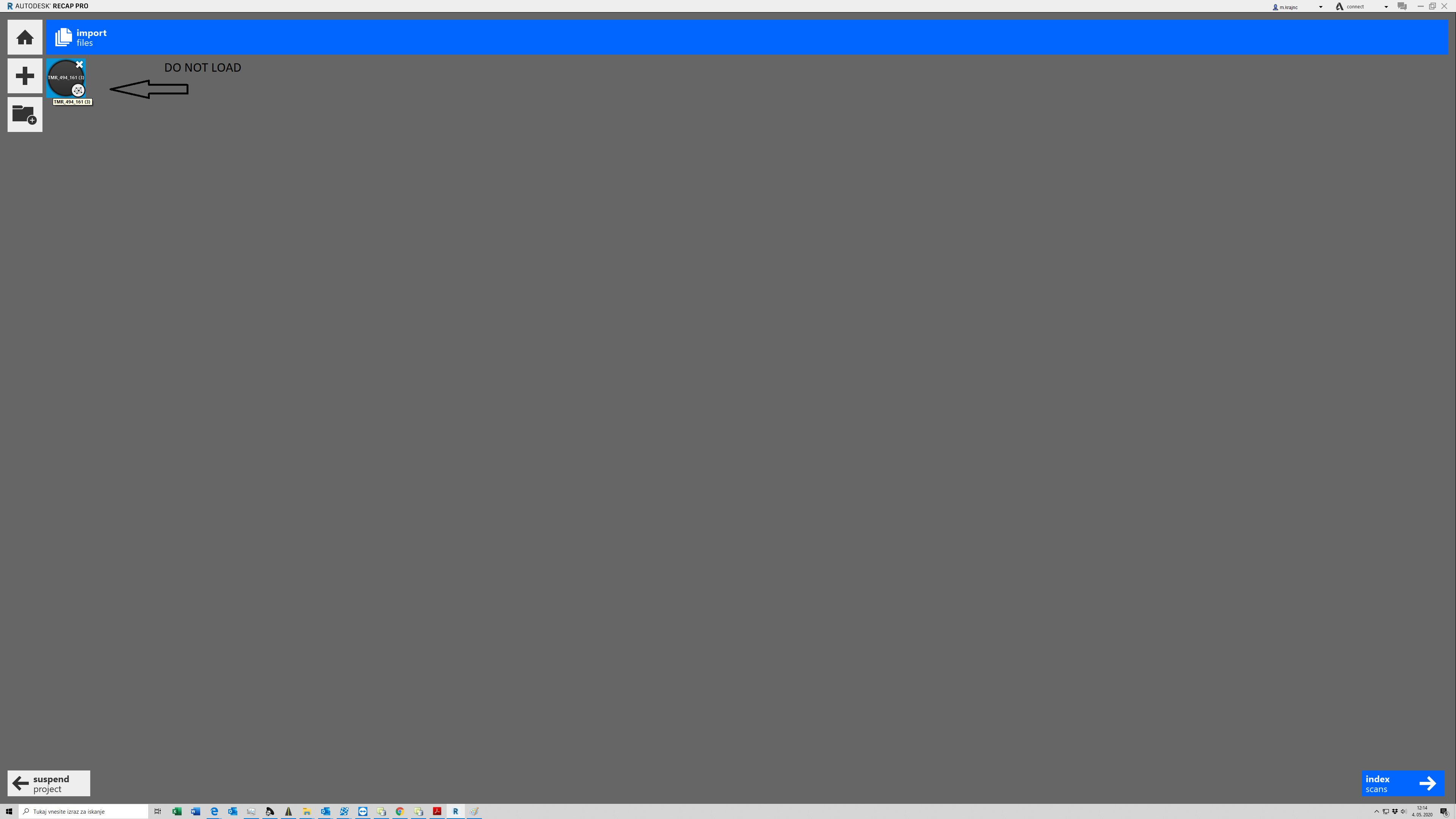
For decompressing or converting from .zlas to .las i use LAS optimizer (https://www.arcgis.com/home/item.html?id=787794cdbd384261bc9bf99a860a374f) i think it is a similar software as LASliberator. I tried with "liberator" and the Recap also did nothing. When i load the file in recap it shows it on upper left corner but doesnt load it. I can also index file. Then it shows me the remaining time which is a few minutes but after a few hours nothing happens. Only one time ReCap load file and made a point cloud from .laz.file and the all process took few seconds so i don't think it's a problem with comp. hardware.

I really don't know what to do.

0 Likes
Message 9 of 26

Pointdump
Consultant
Consultant

Metod,
ESRI's LAS optimizer also works to Liberate a zLAS file.
So getting back to the problem at hand, you may need to do a Repair or Re-Install of ReCap. I think there's a new version out too. (Version 7.0?)
Dave

Dave Stoll
Las Vegas, Nevada

EESignature

64GB DDR4 2400MHz ECC SoDIMM / 1TB SSD
NVIDIA Quadro P5000 16GB
Windows 10 Pro 64 / Civil 3D 2025
0 Likes
Message 10 of 26

m.krajnc
Contributor
Contributor


Thanks for reply

I made a repair and Re-installed Recap  (2020 and 2021 version 7.0.....). The problem remains the same.

is it possible that something is wrong with ReCap settings?


0 Likes
Message 11 of 26

Pointdump
Consultant
Consultant

Metod,
"...is it possible that something is wrong with ReCap settings?"
That's most likely, since I had no problem using the Liberated TMR_591_182 file in ReCap. Please post a Screen Cast or series of Screen Shots of your work flow (steps).
Dave

Dave Stoll
Las Vegas, Nevada

EESignature

64GB DDR4 2400MHz ECC SoDIMM / 1TB SSD
NVIDIA Quadro P5000 16GB
Windows 10 Pro 64 / Civil 3D 2025
0 Likes
Message 12 of 26

Pointdump
Consultant
Consultant

Metod,
I dug into the website and it looks like they also have the data in LAZ, which saves you the step of "liberating". But I can't read Slovenian, so I'm unable to determine the Metadata. Is >>>This<<< the correct Coordinate System?


LAZ_1.png


Dave

Dave Stoll
Las Vegas, Nevada

EESignature

64GB DDR4 2400MHz ECC SoDIMM / 1TB SSD
NVIDIA Quadro P5000 16GB
Windows 10 Pro 64 / Civil 3D 2025
0 Likes
Message 13 of 26

m.krajnc
Contributor
Contributor

D48GK is an older coordinate system and D96GK (ETRS) is a new C.S.  We use both.

GKOT means that buildings and forest are taken into point cloud and

OTR is  clean surface without  forest and buildings.

i tried with .las and laz files.

Slovenia national C.S. is ETRS89

https://epsg.io/4937


0 Likes
Message 14 of 26

m.krajnc
Contributor
Contributor

here is my work flow (attachment)

0 Likes
Message 15 of 26

Pointdump
Consultant
Consultant

Metod,
I used the OTR file(Attached) which removes everything but Ground Points from:


1484263 never classified (0)
2574 unclassified (1)
7968387 ground (2)
116525 low vegetation (3)
800038 medium vegetation (4)
3890419 high vegetation (5)
140085 building (6)
8031 noise (7)


It took me about 30 seconds to import the LAZ file into ReCap. I don't know what the problem might be. Are you using "Run as Administrator" to use ReCap? Have you tried signing in as a different Windows User? That's about all I can think of.


GKR_591_182_1.png


GKR_591_182_2.png


Dave

Dave Stoll
Las Vegas, Nevada

EESignature

64GB DDR4 2400MHz ECC SoDIMM / 1TB SSD
NVIDIA Quadro P5000 16GB
Windows 10 Pro 64 / Civil 3D 2025
0 Likes
Message 16 of 26

m.krajnc
Contributor
Contributor


I installed the recap on another computer and got error message "could not import scan!" I think 
it could be a problem in the .las/.laz files...

0 Likes
Message 17 of 26

tpennerNXGJH
Advocate
Advocate

I'm having a similar problem.  We're still using this ancient Civil3d 2018 version at the moment.  Waiting on IT to get their stuff together so we can FINALLY upgrade.  We got LAZ files from a client.  Everytime I try to load it I get this;


tpennerNXGJH_0-1643309837266.png


Unfortunately the files are 400mb big so I can't attach to this message.  Is there a way to determine if the file is corrupt?  Or is it possible that my Recap 2018 is too out of date?  We really need to get these lidar working but at this point I really don't know what to do.


Travis

0 Likes
Message 18 of 26

m.krajnc
Contributor
Contributor

try to convert .LAZ to .TXT with this LAStools and load into the ReCap.  LAStool is a bit outdated software but it works great for me.

LINK: LAStools: converting, filtering, viewing, processing, and compressing LIDAR data in LAS format (unc....   

         (i hope the connection is correct,  the program looks like this; see the screenshot )las2las screenshoot.png

0 Likes
Message 19 of 26

Pointdump
Consultant
Consultant

Travis,
You can post your LAZ's by using WeTransfer, DropBox, MEGA, OneDrive, or Autodesk Drive.
Dave

Dave Stoll
Las Vegas, Nevada

EESignature

64GB DDR4 2400MHz ECC SoDIMM / 1TB SSD
NVIDIA Quadro P5000 16GB
Windows 10 Pro 64 / Civil 3D 2025
0 Likes
Message 20 of 26

tpennerNXGJH
Advocate
Advocate

Isn't LASTools based on arcGIS? As in - I would need to own a copy of arcGIS to be able to use it?  There's no executables in the zip so I don't know how I'm expected to use it.

0 Likes