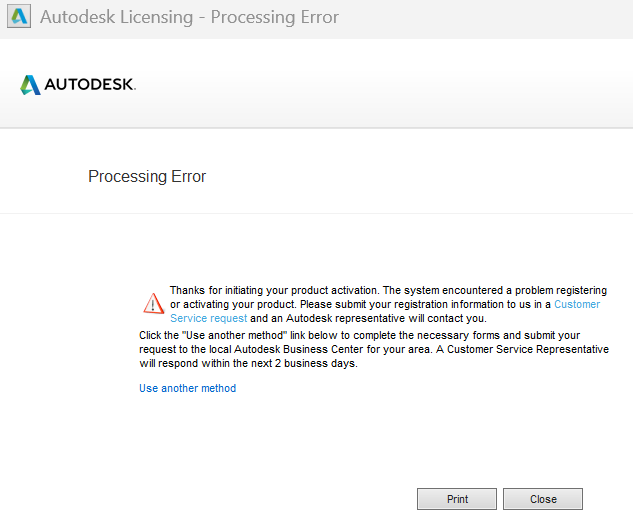
AutoCAD LT 2019 - Processing Error when try to Activate License

AutoCAD LT 2019 - Processing Error when try to Activate License

moeand
Observer Observer
638 Views
4 Replies
Message 1 of 5

AutoCAD LT 2019 - Processing Error when try to Activate License

moeand
Observer
Observer

Hello,

I was directed here by Autodesk Customer Support.


I got Processing Error when try to Activate the Perpetual License for AutoCAD LT 2019.


I already tried all the instructions in this link:

https://www.autodesk.com/support/technical/article/caas/sfdcarticles/sfdcarticles/Processing-error-w...


I also uninstalled, reinstalled, installed on different computers

and still got the same Processing Error message when try to activate the license.


Autodesk Customer Support advised me to post here for the solution.


Any help would be greatly appreciated.


Best,

Moe

0 Likes
639 Views
4 Replies
Replies (4)
Message 2 of 5

pendean
Community Legend
Community Legend

@moeand wrote:

Hello,

I was directed here by Autodesk Customer Support.

...Autodesk Customer Support advised me to post here for the solution.

Any help would be greatly appreciated.


They misdirected you to get you to go away: only Autodesk Staffers can resolve this issue for you, no one else around here can do it

pendean_0-1778246228235.png


LT2019 is not new, so what's behind this? Did you buy a new laptop or PC with Win11? 

Find an old box in the back of the closet and thought you'd give it a try?
Something else?

Do you still have an old PC or laptop where this old software still works just fine?


Reminder: no one except Autodesk can activate a license for you. No one else.

0 Likes
Message 3 of 5

babarbrohi820
Contributor
Contributor

If the error is happening across multiple machines after clean reinstalls, it sounds less like a local install issue and more like an activation server or licensing validation problem tied to the serial/license itself. You may also want to check whether the Autodesk licensing service components are properly installed and updated, since older perpetual versions can sometimes struggle with newer system environments.

0 Likes
Message 4 of 5

moeand
Observer
Observer

yes bought a new W11 laptop and LT2019 with perpetual license works just fine for us.

I'll get back to Autodesk then


thanks

0 Likes
Message 5 of 5

moeand
Observer
Observer

noted, I'll get back to Autodesk


thank you so much

0 Likes