ObjectArx 2019 debugging problem

ObjectArx 2019 debugging problem

zrobert
Advocate Advocate
6.210Aufrufe
23Antworten
Nachricht 1 von 24

ObjectArx 2019 debugging problem

zrobert
Advocate
Advocate

Hi;

I have a project in version 2018 and I compiled it into version 2019. Everything is ok in the release (or debug) version when it is normally loaded to Acad with the APPLOAD command. However, debugging does not work. Visual studio normally started Autocad, load application, but break points are not hit. I've created a new blank project with ObjectArx wizard 2019, compiled it and the problem is the same. Can not hit a break point. However, when compiling a project from an ObjectArx sample folder, debugging works normally!?! I try to compare this project settings, but cannot found differences (at least as far as I know).

Another thing, a project created with ObjectArx wizard, or a project from arx samples can not compile until I add this line to the project settings file.

<PropertyGroup Label="Configuration">
    <ConfigurationType>DynamicLibrary</ConfigurationType>
    <CharacterSet>Unicode</CharacterSet>
    <CLRSupport>false</CLRSupport>
    <UseOfMfc>Dynamic</UseOfMfc>
    <!-- <UseOfAtl>false</UseOfAtl> -->
    <WindowsTargetPlatformVersion>10.0.16299.0</WindowsTargetPlatformVersion>
<PlatformToolset>v141</PlatformToolset> </PropertyGroup>

Here is example project.


P.S.

I do corrections to ObjectARX wizard 2019 files as sugested Mr. Alexander Rivilis in this post.


Thanks;

0 „Gefällt mir“-Angaben
Akzeptierte Lösungen (1)
6.211Aufrufe
23Antworten
Antworten (23)
Nachricht 2 von 24

moogalm
Autodesk Support
Autodesk Support

Hi

I can't reproduce the problem, I have tested wizard 2019 on VS 2017

Wizard.2019.jpg

is it possible run the command, and send me out.txt ?

msbuild ArxProject1.vcxproj /t:Build /p:Configuration=debug;Platform=x64 /pp:out.txt
0 „Gefällt mir“-Angaben
Nachricht 3 von 24

Alexander.Rivilis
Mentor
Mentor

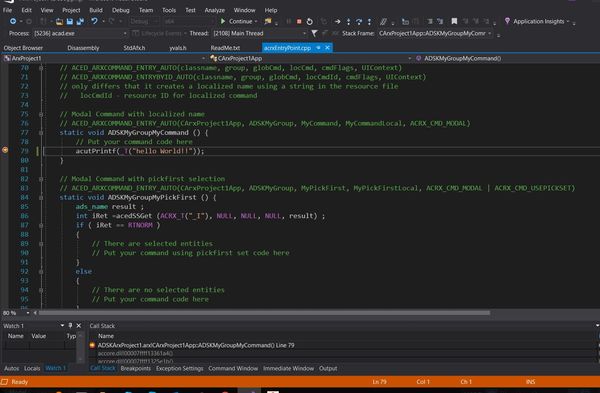
I have not problem with debugging AutoCAD 2019:


Відповідь корисна? Клікніть на "ВПОДОБАЙКУ" цім повідомленням! | Do you find the posts helpful? "LIKE" these posts!
Находите сообщения полезными? Поставьте "НРАВИТСЯ" этим сообщениям!
На ваше запитання відповіли? Натисніть кнопку "ПРИЙНЯТИ РІШЕННЯ" | Have your question been answered successfully? Click "ACCEPT SOLUTION" button.
На ваш вопрос успешно ответили? Нажмите кнопку "УТВЕРДИТЬ РЕШЕНИЕ"


Alexander Rivilis / Александр Ривилис / Олександр Рівіліс
Programmer & Teacher & Helper / Программист - Учитель - Помощник / Програміст - вчитель - помічник
Facebook | Twitter | LinkedIn
Expert Elite Member

0 „Gefällt mir“-Angaben
Nachricht 4 von 24

zrobert
Advocate
Advocate

Thanks for fast replay. Here is out.txt from previous example project.

0 „Gefällt mir“-Angaben
Nachricht 5 von 24

moogalm
Autodesk Support
Autodesk Support

Thanks for the file.


You are using VS 2017 community edition, I don't have the environment at my end to test and find problem.

1) I feel the either problem is with order of property sheets, ideally explicity mentioning of this element is not required it already defined in parent props.


I.e  <WindowsTargetPlatformVersion>10.0.16299.0</WindowsTargetPlatformVersion>

 2) I noticed  - \ObjectARX 2019\inc\rxsdk_common.props

	  <TargetMachine>MachineX86</TargetMachine>

Please replace above with following code

<!--<TargetMachine Condition="'$(Platform)'=='Win32'">MachineX86</TargetMachine>
      <TargetMachine Condition="'$(Platform)'=='x64'">MachineX64</TargetMachine>-->

3) What are errors you got ?

0 „Gefällt mir“-Angaben
Nachricht 6 von 24

Alexander.Rivilis
Mentor
Mentor

@moogalm wrote:

Thanks for the file.


You are using VS 2017 community edition, I don't have the environment at my end to test and find problem.


I also using VS 2017 community edition and has not problem such as @zrobert

Відповідь корисна? Клікніть на "ВПОДОБАЙКУ" цім повідомленням! | Do you find the posts helpful? "LIKE" these posts!
Находите сообщения полезными? Поставьте "НРАВИТСЯ" этим сообщениям!
На ваше запитання відповіли? Натисніть кнопку "ПРИЙНЯТИ РІШЕННЯ" | Have your question been answered successfully? Click "ACCEPT SOLUTION" button.
На ваш вопрос успешно ответили? Нажмите кнопку "УТВЕРДИТЬ РЕШЕНИЕ"


Alexander Rivilis / Александр Ривилис / Олександр Рівіліс
Programmer & Teacher & Helper / Программист - Учитель - Помощник / Програміст - вчитель - помічник
Facebook | Twitter | LinkedIn
Expert Elite Member

0 „Gefällt mir“-Angaben
Nachricht 7 von 24

zrobert
Advocate
Advocate

I try this .props changes, but with no success.

About "<WindowsTargetPlatformVersion>10.0.16299.0</WindowsTargetPlatformVersion>", if I don't make this change, I got this error when compile: 1>C:\Program Files (x86)\Microsoft Visual Studio\2017\Community\Common7\IDE\VC\VCTargets\Platforms\x64\PlatformToolsets\v141\Toolset.targets(36,5): error MSB8036:The Windows SDK version 8.1 was not found. Install the required version of Windows SDK or change the SDK version in the project property pages or by right-clicking the solution and selecting "Retarget solution".


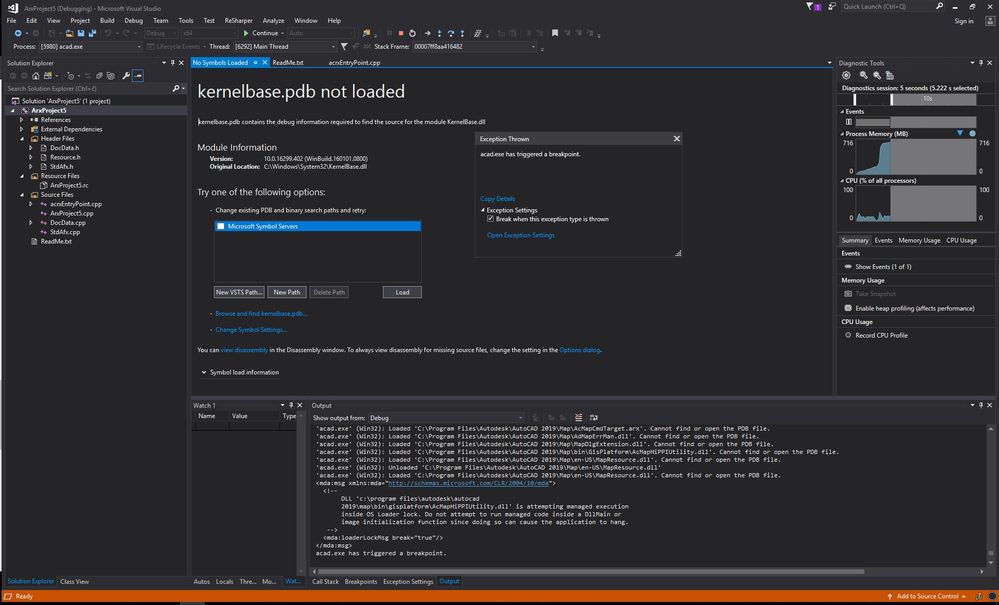
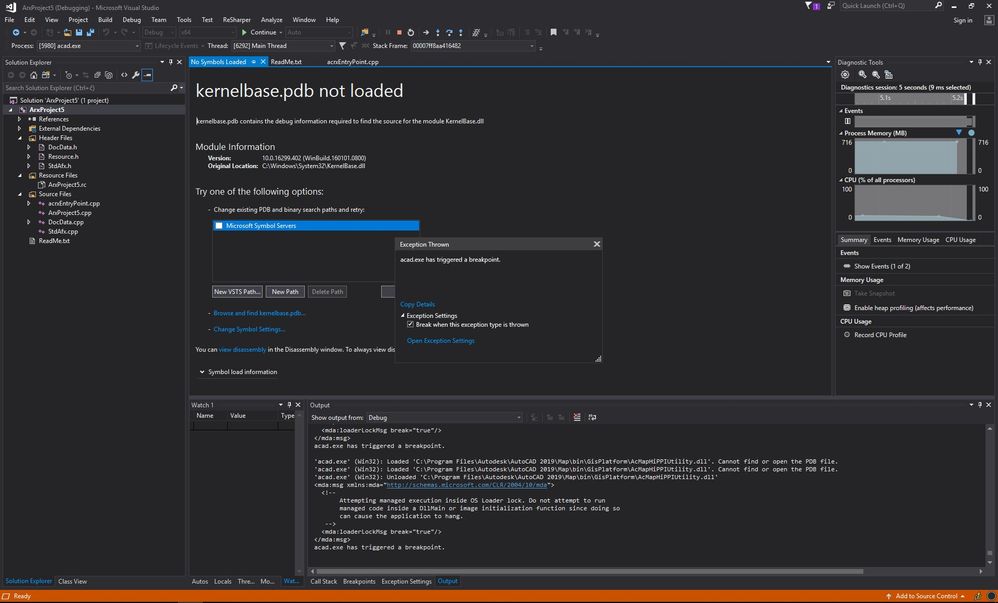
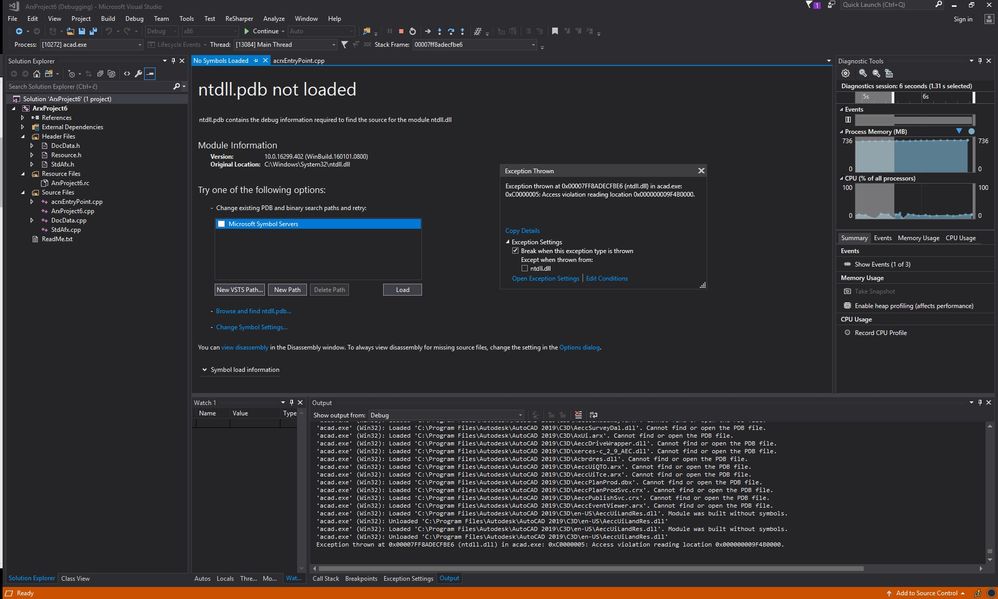
And, here is errors when start debuging proccess from VS:

exception 1exception 1exception 2exception 2exception 3exception 3

0 „Gefällt mir“-Angaben
Nachricht 8 von 24

Alexander.Rivilis
Mentor
Mentor

@zrobert

1. I see you using not pure AutoCAD 2019 but AutoCAD Map 2019 (or AutoCAD Civil 3D 2019).

2. I see LoaderLock error: https://kishordgupta.wordpress.com/2011/02/01/c-tricks-how-to-remove-loader-lock-error-in-visual-stu...

Відповідь корисна? Клікніть на "ВПОДОБАЙКУ" цім повідомленням! | Do you find the posts helpful? "LIKE" these posts!
Находите сообщения полезными? Поставьте "НРАВИТСЯ" этим сообщениям!
На ваше запитання відповіли? Натисніть кнопку "ПРИЙНЯТИ РІШЕННЯ" | Have your question been answered successfully? Click "ACCEPT SOLUTION" button.
На ваш вопрос успешно ответили? Нажмите кнопку "УТВЕРДИТЬ РЕШЕНИЕ"


Alexander Rivilis / Александр Ривилис / Олександр Рівіліс
Programmer & Teacher & Helper / Программист - Учитель - Помощник / Програміст - вчитель - помічник
Facebook | Twitter | LinkedIn
Expert Elite Member

Nachricht 9 von 24

zrobert
Advocate
Advocate

Hi Aleksander;

Yes, I using Autocad Civil 3d and Map. I using this last 5 years with no problems. 

Disabling Loader lock not solve problem. I found this option in arx example project (AsdkAcUiDialogSample) and this option is checked. This project I can compile and debugging without any problems. 

I've lost a bit of nerves and ideas ... I do not have enough knowledge about c ++ compilling, settings etc ...

0 „Gefällt mir“-Angaben
Nachricht 10 von 24

zrobert
Advocate
Advocate

And, when I load arx app in Autocad and switch to VS code editor, breag point has "!" sign and report "The breakpoint will not currently be hit. No symbols have been loaded for this document".

0 „Gefällt mir“-Angaben
Nachricht 11 von 24

moogalm
Autodesk Support
Autodesk Support

Hi ,


is it ok for you to have On line screen sharing session.

let me know I will privately DM you the link.


India 2:00 PM IST (GMT +5:30 PM) Today.

Nachricht 12 von 24

zrobert
Advocate
Advocate

Hi;

Yes, please send me link.

0 „Gefällt mir“-Angaben
Nachricht 13 von 24

moogalm
Autodesk Support
Autodesk Support

This is a symptom of program database is not being generated.

I have attached a project, please unzip.

Edit *.vcxproj

Find 

<ObjectARXPath>D:\ObjectARX 20$(ArxVersion)</ObjectARXPath> 

and change it to correct SDK Path

Find 

<WindowsTargetPlatformVersion>8.1</WindowsTargetPlatformVersion>  

and change it to correct Windows SDK version 

Save

Build


And, test if you are able to hit breakpoint.


Nachricht 14 von 24

zrobert
Advocate
Advocate

Uff....I can't compile:

1>------ Rebuild All started: Project: createTemplates, Configuration: Debug x64 ------
1>main.cpp
1>c:\autodesk\autodesk_objectarx_2019\inc\axboiler.h(204): error C2061: syntax error: identifier 'AcColor'
1>c:\autodesk\autodesk_objectarx_2019\inc\axboiler.h(207): error C2061: syntax error: identifier 'AcColor'
1>c:\autodesk\autodesk_objectarx_2019\inc\axboiler.h(210): error C2061: syntax error: identifier 'IAcadAcCmColor'
1>c:\autodesk\autodesk_objectarx_2019\inc\axboiler.h(213): error C2061: syntax error: identifier 'IAcadAcCmColor'
1>c:\autodesk\autodesk_objectarx_2019\inc\axboiler.h(234): error C2061: syntax error: identifier 'AcShadowDisplayType'
1>c:\autodesk\autodesk_objectarx_2019\inc\axboiler.h(237): error C2061: syntax error: identifier 'AcShadowDisplayType'
1>c:\autodesk\autodesk_objectarx_2019\inc\axboiler.h(308): error C2061: syntax error: identifier 'AcExtendOption'
1>c:\autodesk\autodesk_objectarx_2019\inc\axboiler.h(317): error C2061: syntax error: identifier 'ACAD_LWEIGHT'
1>c:\autodesk\autodesk_objectarx_2019\inc\axboiler.h(320): error C2061: syntax error: identifier 'ACAD_LWEIGHT'
1>c:\autodesk\autodesk_objectarx_2019\inc\axboiler.h(324): error C2061: syntax error: identifier 'IAcadHyperlinks'
1>c:\autodesk\autodesk_objectarx_2019\inc\axboiler.h(331): error C2061: syntax error: identifier 'IAcadDictionary'
1>c:\autodesk\autodesk_objectarx_2019\inc\axboiler.h(383): error C2061: syntax error: identifier 'AcColor'
1>c:\autodesk\autodesk_objectarx_2019\inc\axboiler.h(386): error C2061: syntax error: identifier 'AcColor'
1>c:\autodesk\autodesk_objectarx_2019\inc\axboiler.h(389): error C2061: syntax error: identifier 'IAcadAcCmColor'
1>c:\autodesk\autodesk_objectarx_2019\inc\axboiler.h(392): error C2061: syntax error: identifier 'IAcadAcCmColor'
1>c:\autodesk\autodesk_objectarx_2019\inc\axboiler.h(425): error C2061: syntax error: identifier 'AcShadowDisplayType'
1>c:\autodesk\autodesk_objectarx_2019\inc\axboiler.h(428): error C2061: syntax error: identifier 'AcShadowDisplayType'
1>c:\autodesk\autodesk_objectarx_2019\inc\axboiler.h(486): error C2061: syntax error: identifier 'AcExtendOption'
1>c:\autodesk\autodesk_objectarx_2019\inc\axboiler.h(495): error C2061: syntax error: identifier 'ACAD_LWEIGHT'
1>c:\autodesk\autodesk_objectarx_2019\inc\axboiler.h(498): error C2061: syntax error: identifier 'ACAD_LWEIGHT'
1>c:\autodesk\autodesk_objectarx_2019\inc\axboiler.h(502): error C2061: syntax error: identifier 'IAcadHyperlinks'
1>c:\autodesk\autodesk_objectarx_2019\inc\axboiler.h(509): error C2061: syntax error: identifier 'IAcadDictionary'
1>c:\autodesk\autodesk_objectarx_2019\inc\axboiler.h(526): error C2061: syntax error: identifier 'AcWireframeType'
1>c:\autodesk\autodesk_objectarx_2019\inc\axboiler.h(529): error C2061: syntax error: identifier 'AcWireframeType'
1>d:\createtemplates\main.cpp(30): fatal error C1083: Cannot open type library file: 'acax22ENU.tlb': No such file or directory
1>Done building project "createTemplates.vcxproj" -- FAILED.
========== Rebuild All: 0 succeeded, 1 failed, 0 skipped ==========

0 „Gefällt mir“-Angaben
Nachricht 15 von 24

zrobert
Advocate
Advocate

Ok, I do all this, and I can debugging and hit breakpoints... All working OK in your app.

0 „Gefällt mir“-Angaben
Nachricht 16 von 24

zrobert
Advocate
Advocate
Akzeptierte Lösung

I found a solution, thank God!


Huge problem due to very small things.


I do not know the real reason because no one else complained about it, but my computer can not debug if I do not change the following settings.
 
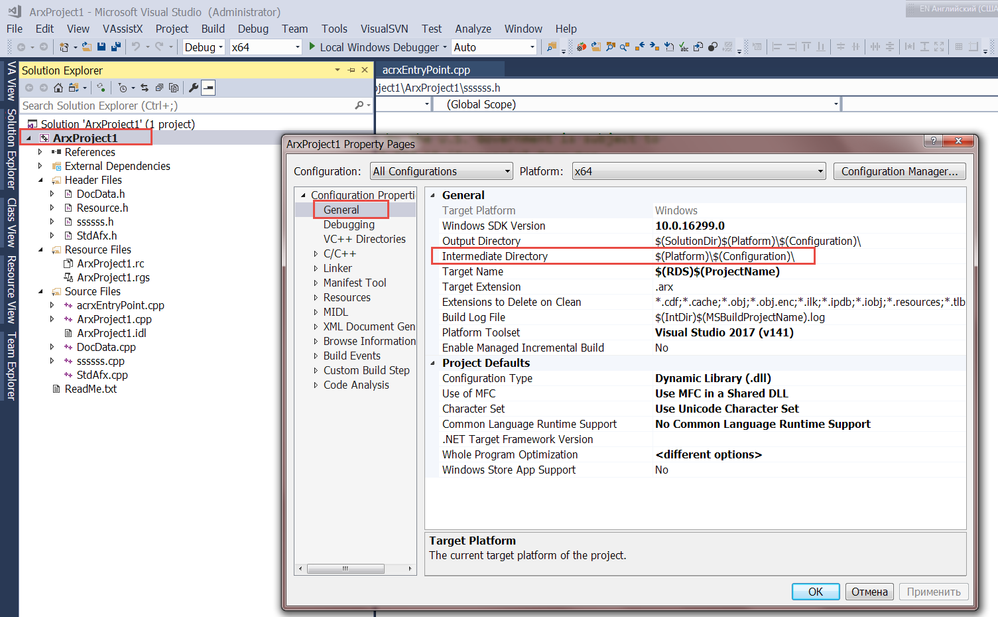
By default, ObjectArx wizard create project with this settings:
In Configuration Properties->General->Intermediate Directory is set to $(Platform)\$(Configuration)\. With this settings I can't hit break point when debugging.
 
When I change this settings to $(SolutionDir)$(Platform)\$(Configuration)\, everything works great!
Honestly, I do not know what these setting mean and what it is, but now everything works normally. Smiley (überglücklich)
 
Thank Mr. Madhukar for the time spent and help.
0 „Gefällt mir“-Angaben
Nachricht 17 von 24

TEK1
Participant
Participant

I have the same problem but I cannot find the tab you are referring to In Configuration Properties->General->Intermediate Directory is set to $(Platform)\$(Configuration)\. 

0 „Gefällt mir“-Angaben
Nachricht 18 von 24

Alexander.Rivilis
Mentor
Mentor

2019-04-21_14-09-02.png

Відповідь корисна? Клікніть на "ВПОДОБАЙКУ" цім повідомленням! | Do you find the posts helpful? "LIKE" these posts!
Находите сообщения полезными? Поставьте "НРАВИТСЯ" этим сообщениям!
На ваше запитання відповіли? Натисніть кнопку "ПРИЙНЯТИ РІШЕННЯ" | Have your question been answered successfully? Click "ACCEPT SOLUTION" button.
На ваш вопрос успешно ответили? Нажмите кнопку "УТВЕРДИТЬ РЕШЕНИЕ"


Alexander Rivilis / Александр Ривилис / Олександр Рівіліс
Programmer & Teacher & Helper / Программист - Учитель - Помощник / Програміст - вчитель - помічник
Facebook | Twitter | LinkedIn
Expert Elite Member

0 „Gefällt mir“-Angaben
Nachricht 19 von 24

TEK1
Participant
Participant
Thank you for that reply. I don't get that screen. This is what I get. It
is a C# project
[image: image.png]
0 „Gefällt mir“-Angaben
Nachricht 20 von 24

TEK1
Participant
Participant

I dont get that screen.

I get only this screen


0 „Gefällt mir“-Angaben