Managing Versions of AutoCAD and ARX

Managing Versions of AutoCAD and ARX

Kyudos
Advisor Advisor
2,249 Views
10 Replies
Message 1 of 11

Managing Versions of AutoCAD and ARX

Kyudos
Advisor
Advisor

We are trying to develop a source/version management strategy for our ARX and I wonder how other developers approach this.


Do you use host-centric or ARX-centric branching?

Our initial thought was to have our trunk as the current ACAD version, with 'dead-end' branches for previous versions. But then how to manage / differentiate ARX versions? Tags for ARX versions? (In some respects, this depends on how we approach maintenance. If users are on subscription we can say 'most recent ACAD only'. Initially however, we don't necessarily want to exclude perpetual license holders).


Do you use build configurations or separate projects?

One VS solution with lots of build configurations for different hosts versions? Different projects for different versions? Different solutions for different versions? How do you approach this? We started with using build configs, but they are so tedious to manage in Visual Studio we are leaning away from them.


Any advice/experience from people who are up-and-running with this?


Thanks!

0 Likes
2,250 Views
10 Replies
Replies (10)
Message 2 of 11

tbrammer
Advisor
Advisor

For C++ ARX projects we use projects with configurations for all AutoCAD versions that we support.

In our case this includes OEM versions as well.


We use separate property sheets (.props)-Files for each AutoCAD Release that define user macros:

property-sheet.png


These user macro "variables" are used in the project settings. So all project configurations have the same settings 🙂

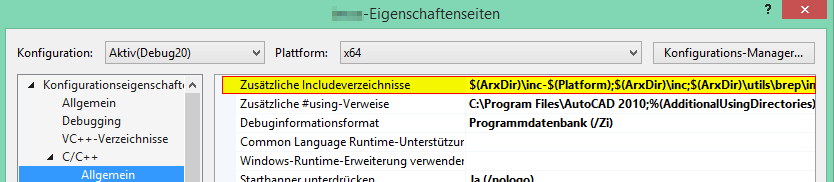
I.e. for the ARX include paths:

includes.png

Here we set preprocessor #defines.

preprocessor.png

In the code we may have expressions like

  #if ACADVER>20

    ...

  #endif


You could even set include paths etc. directly in the .props files instead of using user macros. But we prefer it this way, because it is easier to see.

The only AutoCAD-Version-dependant setting, that we set directly in the confiigurations, is the platform toolset.


Thomas Brammer ● Software Developer ● imos AGLinkedIn
If an answer solves your problem please [ACCEPT SOLUTION]. Otherwise explain why not.

Message 3 of 11

Anonymous
Not applicable

Wait wait wait


What exactly do you mean "all AutoCAD versions that we support"?


I thought that for every AutoCAD version you need to have different version of VS with appropriate update and different ObjectARX SDK directory etc. otherwise the compiled arx file will not be loaded properly.


Do you use only one version of VS?


0 Likes
Message 4 of 11

BerndCuder8196
Advocate
Advocate
You can use VS 2015 and also install 2010 and 2012.
Then you can compile all (AutoCAD 2010-2017) with VS 2015. For different ARX SDK i use environment variables in the project settings.
0 Likes
Message 5 of 11

Kyudos
Advisor
Advisor

As Bernd mentioned, with VS2015 you can 'impersonate' other versions of VS you have installed, thus building all from one environment.

0 Likes
Message 6 of 11

tbrammer
Advisor
Advisor

If you have multiple versions of VS installed, you can choose the so called "Platform Toolset" for each project configuration.


Platformtoolset.png


The only problem I know arises for AutoCAD 2017 and AutoCAD 2018:

For both versions VS2015 is the official supported compiler version - but the Service Pack versions differ:

  • for ARX2017 it is the "RTM" version without any Service Pack
  • for ARX2018 it is Service Pack 3

This makes it impossible to have the "officially supported environment" on the same machine :-((.

So we decided to stop supporting Acad2017 when Acad2018 was released.

I wonder how other developers deal with this problem. Virtual machines? Multiple build servers?


Thomas Brammer ● Software Developer ● imos AGLinkedIn
If an answer solves your problem please [ACCEPT SOLUTION]. Otherwise explain why not.

0 Likes
Message 7 of 11

Kyudos
Advisor
Advisor

But 2017 does build with VS 2015 SP 3?

0 Likes
Message 8 of 11

Anonymous
Not applicable

Yes it does.

The specified service pack for each version ("RTM" without any Service Pack for 2017) is minimum Service Pack required.

0 Likes
Message 9 of 11

tbrammer
Advisor
Advisor

The VS 2015 RTM Version is the "officially supported compiler version" and the compiler version AutoCAD 2017 was build with.

@Anonymous is right - Modules build with VS 2015 SP3 will "probably" run without problems on AutoCAD 2017.

Anyway - it is not the official compiler for AutoCAD 2017 and there could be compatibility issues.


Thomas Brammer ● Software Developer ● imos AGLinkedIn
If an answer solves your problem please [ACCEPT SOLUTION]. Otherwise explain why not.

0 Likes
Message 10 of 11

Anonymous
Not applicable


Probably... Probably, my clients don't work with my programs and write all data and logs manually everyday...

Probably I am mistaken so I have questions.

1. Where "officially supported compiler version" is mentioned? Documentation, official site?

2. How do you know that AutoCAD 2017 build with VS 2015 without any service pack?

2.1. What about Service Pack 1 for AutoCAD 2017? Is it compiled same as AutoCAD 2017?

2.2. If you build your ARX's without any service pack - are you sure that your clients have not installed

latest version of vcredist and run it in the same environment?


So. I don't have any answer for topic starter - I am not supported "old" AutoCAD (older then 2007).

But all version of MSVC that I use (2005, 2008, 2010, 2012, 2015) - all is with latest updates.

If anybody wants to use old buggy versions of compiler - it is their choice.


0 Likes
Message 11 of 11

Alexander.Rivilis
Mentor
Mentor

>>1. Where "officially supported compiler version" is mentioned? Documentation, official site?<<


Documentation: Autodesk ObjectARX for AutoCAD 20XX: Readme >   Release Notes


>>So. I don't have any answer for topic starter - I am not supported "old" AutoCAD (older then 2007).

But all version of MSVC that I use (2005, 2008, 2010, 2012, 2015) - all is with latest updates.

If anybody wants to use old buggy versions of compiler - it is their choice.<<


I want to remind you of the incompatibility of VS 2002 SP1 with AutoCAD 2005 & 2006: http://adn.autodesk.com/adn/servlet/devnote?siteID=4814862&id=5415823&linkID=4900509

Also about supporting Visual Studio 2005 SP1 and AutoCAD 2007: http://adn.autodesk.com/adn/servlet/devnote?siteID=4814862&id=8777935&linkID=4900509


So in general, you should use the recommended Autodesk version of Visual Studio with (or without) Service Packs.

Відповідь корисна? Клікніть на "ВПОДОБАЙКУ" цім повідомленням! | Do you find the posts helpful? "LIKE" these posts!
Находите сообщения полезными? Поставьте "НРАВИТСЯ" этим сообщениям!
На ваше запитання відповіли? Натисніть кнопку "ПРИЙНЯТИ РІШЕННЯ" | Have your question been answered successfully? Click "ACCEPT SOLUTION" button.
На ваш вопрос успешно ответили? Нажмите кнопку "УТВЕРДИТЬ РЕШЕНИЕ"


Alexander Rivilis / Александр Ривилис / Олександр Рівіліс
Programmer & Teacher & Helper / Программист - Учитель - Помощник / Програміст - вчитель - помічник
Facebook | Twitter | LinkedIn
Expert Elite Member