How to iterate through object attributes?

How to iterate through object attributes?

Anonymous
Not applicable
3,101 Views
1 Reply
Message 1 of 2

How to iterate through object attributes?

Anonymous
Not applicable


Fairly new to C# .net so I am a bit lost with the flowchart below. I have blocks with custom attributes and I want to iterate through each object within the model space ( found in the blocktablerecord?) to find them. Then I want to access their attributes to look for the word "notes" within the Tags value. I found this tutorial on Extract Attribute info but I don't understand how AttributeCollection works. is it like the blocktablerecord that constains all entities?
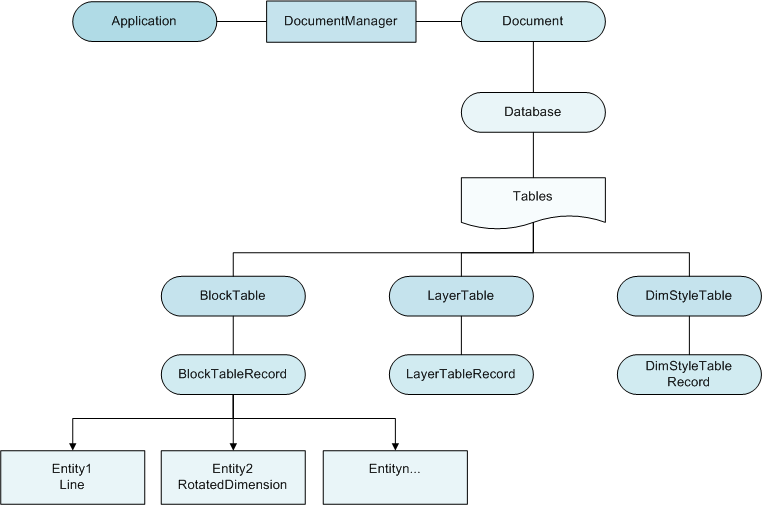
 

https://knowledge.autodesk.com/search-result/caas/CloudHelp/cloudhelp/2015/ENU/AutoCAD-NET/files/GUI...


using System;
using System.Collections.Generic;
using System.ComponentModel;
using System.Data;
using System.Drawing;
using System.Linq;
using System.Text;
using System.Threading.Tasks;
using System.Windows.Forms;
using Excel = Microsoft.Office.Interop.Excel;
using Autodesk.AutoCAD.ApplicationServices;
using Autodesk.AutoCAD.DatabaseServices;
using Autodesk.AutoCAD.EditorInput;
using Autodesk.AutoCAD.Geometry;
using Autodesk.AutoCAD.LayerManager;
using Autodesk.AutoCAD.Runtime;
using ACADapp = Autodesk.AutoCAD.ApplicationServices.Application;
using ATTCOL = Autodesk.AutoCAD.DatabaseServices.AttributeCollection;


namespace Get_Notes_v0._1
{
    public partial class Form1 : Form
    {
        public Form1()
        {
            InitializeComponent();
        }

        private void FindNotes_Click(object sender, EventArgs e)
        {

            // Get the current document and database
            Document Doc = ACADapp.DocumentManager.MdiActiveDocument;
            Database DB = Doc.Database;
            Editor ED = Doc.Editor;

            // Start a transaction
            using (Transaction TRANS = DB.TransactionManager.StartTransaction())
            {
                // Open the Block table for read
                BlockTable Btable = TRANS.GetObject(DB.BlockTableId, OpenMode.ForRead) as BlockTable;
                BlockTableRecord BTR = TRANS.GetObject(DB.BlockTableId, OpenMode.ForRead) as BlockTableRecord;

                //look at each objects attributes for key word note or notes
                foreach (ObjectId OBJID in BTR)
                {
                    ATTCOL ATTREF = OBJID.GetObject(OBJID.Database, OpenMode.ForRead) as ATTCOL;             
                    {
                        if (ATTREF.Tag == "CONST_REMARKS")
                        {
                            if (ATTREF.Value == "NOTE" || ATTREF.Value == "NOTES")
                            {

                            }
                        }
                    }
                }
            }
        }
    }
}


0 Likes
Accepted solutions (1)
3,102 Views
1 Reply
Reply (1)
Message 2 of 2

ActivistInvestor
Mentor
Mentor
Accepted solution

Here is what your FindNotes_Click() handler should look like.


   private void FindNotes_Click(object sender, EventArgs e)
   {
      Document Doc = Application.DocumentManager.MdiActiveDocument;
      Database db = Doc.Database;
      Editor ed = Doc.Editor;

      using(Transaction trans = db.TransactionManager.StartTransaction())
      {
         ObjectId modelSpace = SymbolUtilityServices.GetBlockModelSpaceId(db);
         BlockTableRecord btr = trans.GetObject(modelSpace, OpenMode.ForRead) as BlockTableRecord;

         RXClass rxclass = RXClass.GetClass(typeof(BlockReference));
         foreach(ObjectId id in btr)
         {
            if(id.ObjectClass.IsDerivedFrom(rxclass))
            {
               BlockReference blkref = (BlockReference) trans.GetObject(id, OpenMode.ForRead);
               AttributeCollection attributes = blkref.AttributeCollection;
               foreach(ObjectId attId in attributes)
               {
                  AttributeReference attref = (AttributeReference) trans.GetObject(attId, OpenMode.ForRead);
                  if(attref.Tag == "CONST_REMARKS")
                  {
                     if(attref.TextString == "NOTE" || attref.TextString == "NOTES")
                     {
                        // Or do something else with it.
                        ed.WriteMessage("\nFound attribute {0} = {1}", attref.Tag, attref.TextString);
                     }
                  }
               }
            }
            trans.Commit();
         }
      }
   }


Visit the resources >here< for more help and examples on using the .NET API.


Also, it is customary to not use all CAPS for identifiers/varaibles in C#.


@Anonymouswrote:


Fairly new to C# .net so I am a bit lost with the flowchart below. I have blocks with custom attributes and I want to iterate through each object within the model space ( found in the blocktablerecord?) to find them. Then I want to access their attributes to look for the word "notes" within the Tags value. I found this tutorial on Extract Attribute info but I don't understand how AttributeCollection works. is it like the blocktablerecord that constains all entities?


https://knowledge.autodesk.com/search-result/caas/CloudHelp/cloudhelp/2015/ENU/AutoCAD-NET/files/GUID-BA69D85A-2AED-43C2-B5B7-73022B5F28F8-htm.html


using System;
using System.Collections.Generic;
using System.ComponentModel;
using System.Data;
using System.Drawing;
using System.Linq;
using System.Text;
using System.Threading.Tasks;
using System.Windows.Forms;
using Excel = Microsoft.Office.Interop.Excel;
using Autodesk.AutoCAD.ApplicationServices;
using Autodesk.AutoCAD.DatabaseServices;
using Autodesk.AutoCAD.EditorInput;
using Autodesk.AutoCAD.Geometry;
using Autodesk.AutoCAD.LayerManager;
using Autodesk.AutoCAD.Runtime;
using ACADapp = Autodesk.AutoCAD.ApplicationServices.Application;
using ATTCOL = Autodesk.AutoCAD.DatabaseServices.AttributeCollection;


namespace Get_Notes_v0._1
{
    public partial class Form1 : Form
    {
        public Form1()
        {
            InitializeComponent();
        }

        private void FindNotes_Click(object sender, EventArgs e)
        {

            // Get the current document and database
            Document Doc = ACADapp.DocumentManager.MdiActiveDocument;
            Database DB = Doc.Database;
            Editor ED = Doc.Editor;

            // Start a transaction
            using (Transaction TRANS = DB.TransactionManager.StartTransaction())
            {
                // Open the Block table for read
                BlockTable Btable = TRANS.GetObject(DB.BlockTableId, OpenMode.ForRead) as BlockTable;
                BlockTableRecord BTR = TRANS.GetObject(DB.BlockTableId, OpenMode.ForRead) as BlockTableRecord;

                //look at each objects attributes for key word note or notes
                foreach (ObjectId OBJID in BTR)
                {
                    ATTCOL ATTREF = OBJID.GetObject(OBJID.Database, OpenMode.ForRead) as ATTCOL;             
                    {
                        if (ATTREF.Tag == "CONST_REMARKS")
                        {
                            if (ATTREF.Value == "NOTE" || ATTREF.Value == "NOTES")
                            {

                            }
                        }
                    }
                }
            }
        }
    }
}


0 Likes
