COM API - Context Menu Item - Focus On Item

COM API - Context Menu Item - Focus On Item

Anonymous
Not applicable
1,971 Views
5 Replies
Message 1 of 6

COM API - Context Menu Item - Focus On Item

Anonymous
Not applicable

I would prefer to use my own Context Menu rather than the default that fires from the TNWControl but I wish to add the default option “Focus on Item” functionality that exists in the default menu to my own popup menu. Can you tell me how I could perform this option programmatically?


I know I can add my own options to the default Context menu, but there are options in the context menu that I don’t wish to display. Maybe there is a way of hiding certain options in the default menu?

0 Likes
1,972 Views
5 Replies
Replies (5)
Message 2 of 6

xiaodong_liang
Autodesk Support
Autodesk Support
Hi, In the past, I have investigated the similar issue. Unfortunately, I did not see a way to disable the contextmenu unless you veto OnContextMenu entirely. This means you cannot fire your own context menu, either. But you can add additional menus to the standard menu, as you have known. The following is a code snippet, in case others want to know how to do. It is based on the SDK sample: ActiveXSimpleExample. ( It looks the forum is problematic, I cannot find the edit menus, so pasting the code directly.) private void axnwControlSDI1_OnUserContextMenuCmd(object sender, AxNavisworksIntegratedAPI9._InwControlEvents_OnUserContextMenuCmdEvent e) { switch (e.cmd_ndx) { case 1: MessageBox.Show("mytest1"); break; case 2: MessageBox.Show("mytest2"); break; case 3: MessageBox.Show("mytest3"); break; case 4: MessageBox.Show("mytest4"); break; case 5: MessageBox.Show("mytest5"); break; } } private void axnwControlSDI1_OnEnableContextMenuCmd(object sender, AxNavisworksIntegratedAPI9._InwControlEvents_OnEnableContextMenuCmdEvent e) { e.bEnable = true; // Event fired to allow addition of custom context menu commands switch (e.cmd_ndx) { case 1: e.display_name = "mytest1"; break; case 2: e.display_name = "mytest2"; break; case 3: e.display_name = "mytest3"; break; case 4: e.display_name = "mytest4"; break; case 5: e.display_name = "mytest5"; break; } } private void axnwControlSDI1_OnContextMenu(object sender, AxNavisworksIntegratedAPI9._InwControlEvents_OnContextMenuEvent e) { //e.bHandled = true; //veto entirely }
0 Likes
Message 3 of 6

Anonymous
Not applicable

Hi,

So does that mean I can't replicate the functionality of “Focus on Item”  programmatically?

0 Likes
Message 4 of 6

xiaodong_liang
Autodesk Support
Autodesk Support
Hi,

what I talked about is whether it is possible to disable the built-in context menu, instead of the functionality itself.

about 'Focus on Item', there is not a direct API, but it is just to move the selected items at the center of the viewpoint. So you can get the boundingbox of the selected item, and change the viewpoint looking at the center of the boundingbox
Message 5 of 6

Anonymous
Not applicable

Hi Liang,

Greetings.


May I please know if there is any possibility where, I can add a new context menu to a selected object in the tree and as soon as I select my custom context menu, browser should open say, www.google.com and search for the name of the selected object in the search window?


It would be really helpful for my work if I am able to achieve this.


Thanks in advance for solutions.


Best regards

Bangera


0 Likes
Message 6 of 6

Anonymous
Not applicable

Hi,


I am putting another question here instead of the solution. Please help me if you can.


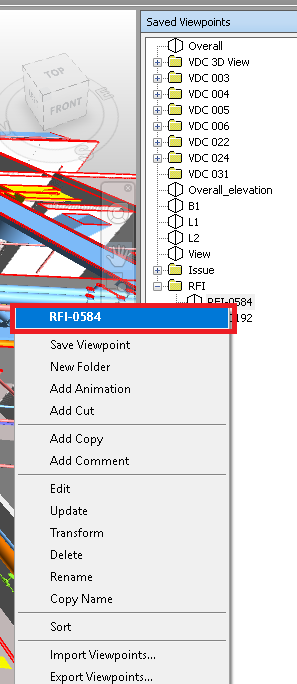
I want to customize the context menu that appears when we right click the Saved viewpoint. For reference, I am sharing a Image.


nav 1.png


When we right click the Viewpoint, Context Menu appears, I want to perform some custom actions when I click the Viewpoint Name(marked with red color).

Please let me know how to achieve so, if possible, with a code snippet.


Thank you.

0 Likes