Message 1 of 3
How to expand one end of a Object

- Mark as New
- Bookmark
- Subscribe
- Mute
- Subscribe to RSS Feed
- Permalink
- Report
Hello to all,
i would like to make a silikon prosthosis for a finger.
For this i have already a hollow model i can use and that i will fill up with silikon.
But to fit the finger stump to the silikon i have to extend the joining part of the prostosis model.
So i can create a "connection socket".
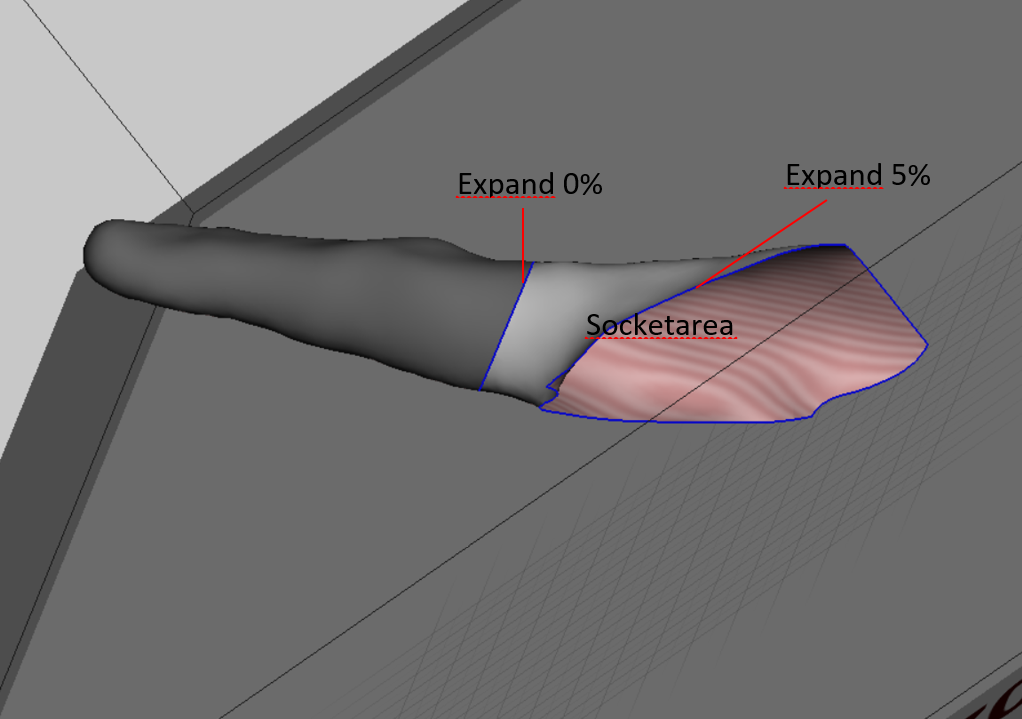
I already was splitting the model in 2 parts so the area that has to be extendes is defined.
How to expand the "socket" area in a way that i will be able to combine the 2 parts afterwards ?
The trimming line of the "socket part" joining to part 1 should have zero expansion, the other end of the socket should have full expansion (lets say 5%).
I was attaching a picture for better understanding what i mean.
Thank you for helping