How to render Z values from camera plane

How to render Z values from camera plane

Anonymous
Not applicable
2,171 Views
8 Replies
Message 1 of 9

How to render Z values from camera plane

Anonymous
Not applicable

 While rendering Z values, how can we convert the distance of pixels from camera to distance of the pixel from camera plane.

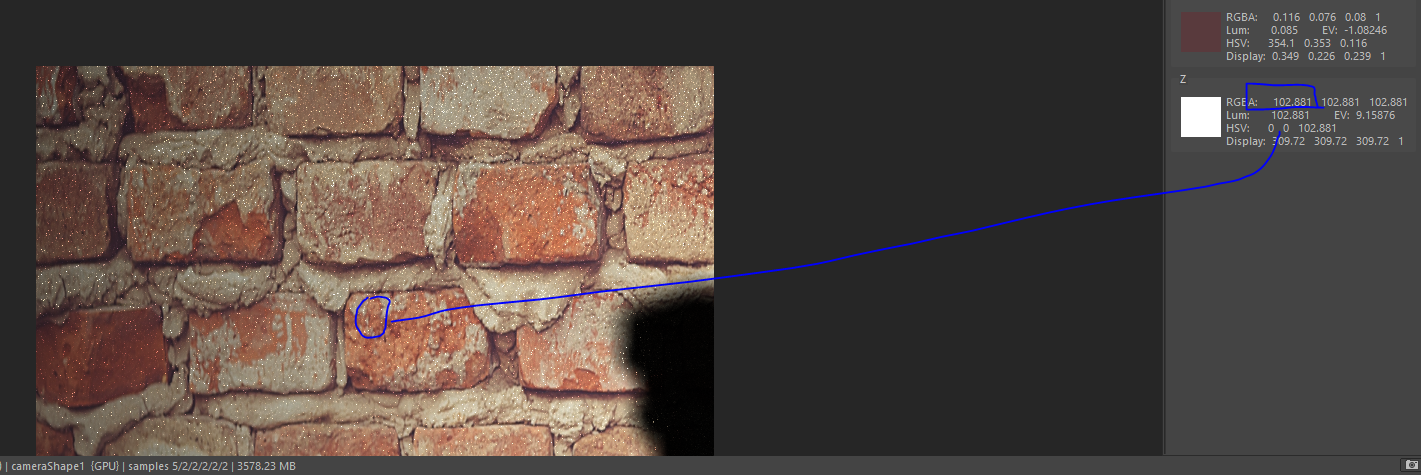
For example, if I render the depth value of a plane wall, all the Z values of the rendered depth should be same but pixels at the corner have more values then pixels at the center indication that it computes distance of the pixel from the camera not the camera plane. 

As indicated in the two screenshots of the plane wall at 100cm, Z values should be same but they are different.


How can I planarize the Z values of the plane wall? 


Render settings are following. 


Width - 3840

Height - 2560

Resolution - 72 pixels/inch

Device Aspect Ratio - 72

Camera angle of view is 54.43 

Focal Distance - 35


0 Likes
2,172 Views
8 Replies
Replies (8)
Message 2 of 9

_sebastian_f
Advisor
Advisor
is the camera perfectly perpendicular to the plane? if not the distance would be different.
Message 3 of 9

_sebastian_f
Advisor
Advisor
the marking menu appears that way to be displayed completely on screen. if it would be always in the same position relative to the cursor you would not be able to access all of it.
0 Likes
Message 4 of 9

_sebastian_f
Advisor
Advisor
lol! interesting forum glitch...
that answer above was posted in a totally different topic. not even in shading, lighting and rendering forum.
0 Likes
Message 5 of 9

Anonymous
Not applicable

Thank you very much for the response. 

Yes camera is perpendicular to the wall. 

0 Likes
Message 6 of 9

Anonymous
Not applicable

I opened the image in MATLAB and Python and when I read the Z values they are all different. 

0 Likes
Message 7 of 9

_sebastian_f
Advisor
Advisor
ok i was finally able to reproduce it here. when rendering with gpu i get a similar result. so for now you might need to render using the cpu to get a plane depth pass.
Message 8 of 9

Anonymous
Not applicable

Thank you very much for the solution. Even though rendering from CPU takes lot of time. I will use it. But is there any way we can do it with GPU. 

I also tried to transform the GPU rendered image to planer image, using the angle of field. 

I know the horizontal angle is 54.43. What would be the vertical angle of view with a focal length of 35mm for a image of resolution 3840x2560.

0 Likes
Message 9 of 9

_sebastian_f
Advisor
Advisor
right now it seems to me arnold is doing it like this when rendering on the gpu. so if it matters you need to use the cpu for now.
if you are really only render a plane perpendicular to the cam you probably don´t need that zdepth at all, if you render a scene which really has some depth you need to try if it´s visible. also i want bring up the question if the depth of the gpu rendering is more correct than on the cpu ?
the angles are dependent on the focal length and the aperture. you´ll find all the math to calculate and also some tables based on common lenses online. all that is not really important in a pure 3d workflow in my opinion. the resulting picture is what matters. if you plan to compose it with live action footage then for sure you should match the original camera.