Begginer mistakes and how to avoid them ?

Begginer mistakes and how to avoid them ?

Anonymous
Not applicable
2,038 Views
6 Replies
Message 1 of 7

Begginer mistakes and how to avoid them ?

Anonymous
Not applicable

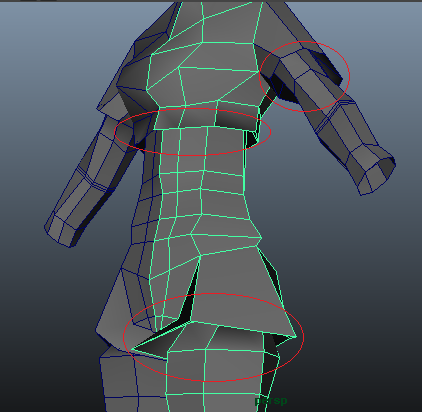
Hi, I'm modeling my real first character (without tutorials) and I came across a doubt that maybe experience modelers can help with.

I'm trying to make the clothes silhouete in the model but to make it look right my model in low polys gets all weird...

So my questions are:
- Is this aceptable to do?
- Is there another good practice way to go around it?
- Should I only add details in the end?

thanks!
 

g1.png


g2.png

0 Likes
Accepted solutions (1)
2,039 Views
6 Replies
Replies (6)
Message 2 of 7

_sebastian_f
Advisor
Advisor
depends! my rule of thumb for subD modeling: work from low to high (once you have the basic shapes in place go to more detail) and add as less geometry as possible but as much as necessary. in this case i would add more in those areas to avoid 1. the sharp angles 2. come a bit closer to the final siluette in the low poly 3. prevent to much streching of uv´s when texturing 4. if you plan to animate it later you maybe want to have more geo there as well.
Message 3 of 7

Anonymous
Not applicable
I'm doing it for a game.
I didn't think of the UV stretching in the texturing.. so you are right. I'll try to avoid the sharp angles!
Any more tips you can give on things I should avoid so i don't regret them when I'm texturing, rigging and animating?
0 Likes
Message 4 of 7

_sebastian_f
Advisor
Advisor
Accepted solution
if you are doing it for a game, do you plan to use normal maps?
how far do you plan do go with your highpoly model?

a general tip: do it in the right order.
get your model finished (high and low if you want to bake normals), and uv map it before you rig and animate. maybe do a simple test-rig in between to check deformations. if you have to change topology to get better deformations your uvs and therefore your texture can get damaged.
while there are always ways to go a step back it´s usually the longer and not the easiest way.
0 Likes
Message 5 of 7

Anonymous
Not applicable
Thanks.. But I'm new so I don't know what you actually mean by normal maps because I never got past modeling... where can I search more about that?

as for as far I plan to go with my highpoly model: I want to make it a playable character..so..I'll animate it too..minimally just the enough to be playable.

Thanks a lot for the tips!
0 Likes
Message 6 of 7

_sebastian_f
Advisor
Advisor

normal mapping means to transfer detail from a high poly object to a low poly version of the same object with a special texture (normal map) to fake details which are otherwise to heavy to load in a game engine. just google "normal mapping for games" or something like this.


the question for your project will be if you need all this!? if you want to do it you´ll find tons of tutorials online for this kind of work. if you don´t plan to do it, subD modeling is maybe not even necessary! doing models for games is a lot of "depends...what is this model exactly meant to do? how close will you see it? etc. etc."


at this point i´ll ask you to try to find some tutorials about modeling for games and work your way trough it. when you are so much at the beginning it´s impossible to cover everything with a post here (one could easiely - and people already did - write a book about this stuff) . if you have specific more narrow questions i´ll try to answer them.

0 Likes
Message 7 of 7

callumblackall
Contributor
Contributor

I don't know if you have heard of all of these or seen them but this is and Image to show you what they look like. the different kinds of Layers

0 Likes