Persp Camera NaN

Persp Camera NaN

Anonymous
Not applicable
47,600 Views
47 Replies
Message 1 of 48

Persp Camera NaN

Anonymous
Not applicable

Hello,


I get this weird issue where after some time, my default perspective camera goes completely blank.
The geometry still shows in top/side/bottom/etc. and I can even click in the empty space of the persp and it will select the asset in outliner, but nothing shows up in persp. The only temp solution I have is to create a new persp camera everytime it does this, but after a while, it will do it again.
I want to know if there's another solution besides creating 30 something cameras.
I deleted prefs, I tried framing the assets, and I even put any number where it shoes "NaN", it nothing happens.
Anybody have suggestions? 
Thank you!

(Update, it seems like the only way I can replicate the error is when I accidentally select the camera and snap its location to an object. No errors come up in the script  editor. I use the "v" tool a lot, is there any way around this?)
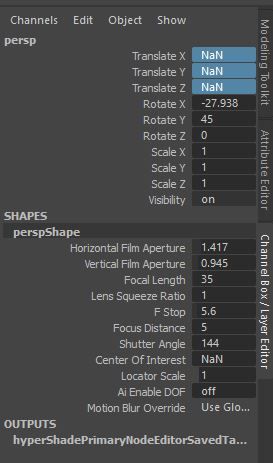

NaN.JPG

Accepted solutions (4)
47,601 Views
47 Replies
Replies (47)
Message 41 of 48

Anonymous
Not applicable

Thanks for the info.


but reseting the transformations, and adding a small amount of the value certainly retains your viewport issue

but when I press F to focus on a praticular object, it agains goes back to the same issue with the persp camera


0 Likes
Message 42 of 48

mspeer
Consultant
Consultant

Hi!


Check Fit factor value in Preferences -> Cameras -> View Fit.

Fit factor should be >= 0.01 (default is "0.95").


You can also update Maya.

0 Likes
Message 43 of 48

Anonymous
Not applicable

Thanks Scott, this is the simplest and only fix that worked. 

0 Likes
Message 44 of 48

Anonymous
Not applicable

Thank you so much for this solution. I tried all the others and none of them were working. I was afraid I'd have to spend a lot of time searching for the files so I could uninstall the whole program successfully then reinstall. You've saved a student!

0 Likes
Message 45 of 48

Anonymous
Not applicable

para mi funciono perfectamente

0 Likes
Message 46 of 48

Anonymous
Not applicable

my god, this one worked for me.
Thanks-man, I'm in a crunch and i was about to lose it.

0 Likes
Message 47 of 48

Anonymous
Not applicable

If the Persp Camera doesn't work or remains an error, just create a new Camera and drag it towards the persp area to replace it.

Message 48 of 48

Anonymous
Not applicable

This still helps in 2021 😄