iLogic to change the view representation in a part file

iLogic to change the view representation in a part file

Anonymous
Not applicable
10,310 Views
11 Replies
Message 1 of 12

iLogic to change the view representation in a part file

Anonymous
Not applicable


Hi,

There is an existing thread on this forum showing how to change the view rep in an assembly (using oAsmCompDef.RepresentationsManager.DesignViewRepresentations.Item("Red").activate) - Thank you to Curtis Waguespack - however I am trying to achieve the same with iLogic in a part file (multi-solid). Is this possible please?

Many thanks

Accepted solutions (1)
10,311 Views
11 Replies
Replies (11)
Message 2 of 12

bobvdd
Alumni
Alumni
Accepted solution

Following iLogic rule activates "View1" and should work both in a part or in an assembly.

Keep in mind that viewreps capture the part and body appearance in a multi-body part but not the face or feature appearance.


Dim odoc As Document
Dim ocompdef As ComponentDefinition
odoc = ThisApplication.ActiveDocument
ocompdef = odoc.ComponentDefinition
Try
ocompdef.RepresentationsManager.DesignViewRepresentations.Item("View1").Activate
Catch
MessageBox.Show("This viewrep does not exist", "Error")
End Try

 Bob


Bob Van der Donck


Principal UX designer DMG group
Message 3 of 12

Anonymous
Not applicable

Superb! works perfectly thank you very much for the quick response

0 Likes
Message 4 of 12

Anonymous
Not applicable

Excellen!!!!. it solved my major problem with View representations

0 Likes
Message 5 of 12

RoyWickrama_RWEI
Advisor
Advisor

It is really working for creating the view representations in the part. However, they are kind of not saved. I mean,  when I click the view representtions from the browser, they are not consistent with what the respective ilogic created.

I need them to be consistent because down the road, I need these view representations to be used in the assemly level.

Please see the file attached here to.

I request help.

0 Likes
Message 6 of 12

bobvdd
Alumni
Alumni

If you are talking about the two view represenations that make the sketch dimensions visible or invisible, then yes you have a good point.

We do not store the dimension visibility state in view representations. 😞


If you are interested to have identical drawing views but one with and the other without drawing views, my suggestion would be to create a separate solid body from your sketches first and then create two identical views, all without dimensions.

After that it is sufficient to retrieve the sketch dimensions on one of the views via the context menu.


See attached image on how the result would look like.


Cheers

Bob 


Bob Van der Donck


Principal UX designer DMG group
Message 7 of 12

Anonymous
Not applicable

How could i run this code with configurator 360

0 Likes
Message 8 of 12

bobvdd
Alumni
Alumni

I am not a Configurator360 expert but I don't think Configurator360 preserves viewreps when opening the part in the on-line viewer.


Bob Van der Donck


Principal UX designer DMG group
Message 9 of 12

Jon.Balgley
Alumni
Alumni

That is correct, C360 does not utilize the "active" design view representation (DVR) when showing a single-part (IPT-only) design.  


However, there is some limited support if you make the part be an occurrence in an assembly, and change the DVR of the occurrence.  In that scenario, C360 still does not show the DVR immediately, but will update the display to show the correct DVR in the secondary "overlay" which comes in within a second or two after moving the view or changing the model.  This may or may not be sufficient for your needs.


In addition, C360 respects the DVR specified in drawing-views (in IDW's or DWG's).


Jon Balgley
Message 10 of 12

Jon.Balgley
Alumni
Alumni

PS.  Here are the files I used to test it.  Use the IPT by itself, and you'll see it won't really work.  Use the IAM (i.e., upload the whole zip file to C360), and you'll see the drawing works, and the IAM display works after a delay.


Jon Balgley
Message 11 of 12

Anonymous
Not applicable

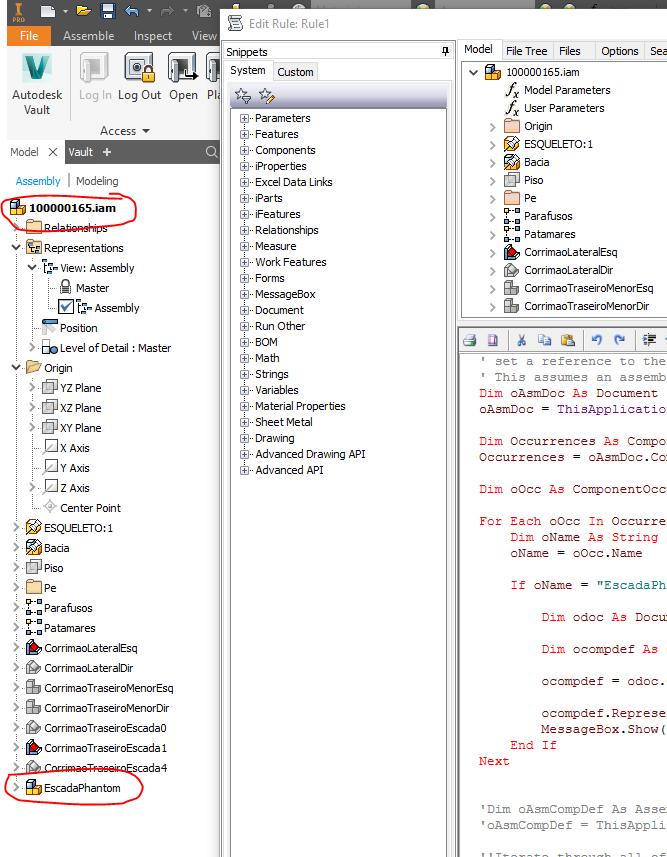
is that possible to do the same action but inside an Children occurence?

i mean: to change the view representation inside an assembly?

i want to change a view of EscadaPhantom using ilogic from 100000165.

is that possible?

Capturar (1).PNG

kelly.young has embedded your image for clarity.

0 Likes
Message 12 of 12

caroline_ccc
Enthusiast
Enthusiast

Hi. see code below. 

first part for the actual assembly. Second part for a specific subcomponent.

-------------------------------------------


Sub Main()


''this is for main assembly


Dim oDoc As Document

oDoc = ThisDoc.Document


Dim oAssyDoc As AssemblyDocument

oAssyDoc = TryCast(oDoc, AssemblyDocument)


If oAssyDoc Is Nothing Then

        MessageBox.Show("Document not of Assembly Type")

        Exit Sub

End If


Try


oAssyDoc.ComponentDefinition.RepresentationsManager.DesignViewRepresentations("Default").Activate

oAssyDoc.ComponentDefinition.RepresentationsManager.LevelOfDetailRepresentations("Custom").Activate


Catch

        MessageBox.Show("Unable to find 'Custom' LOD on " & oAssyDoc.DisplayName)

End Try


'this Is For Specific Occurrences


Dim oOccs As ComponentOccurrences

oOccs = oAssyDoc.ComponentDefinition.Occurrences


For Each oOcc As ComponentOccurrence In oOccs


        If oOcc.Name = "Specific Subcomponent" Then


               Try

                       oOcc.SetDesignViewRepresentation("Default")

                       oOcc.SetLevelOfDetailRepresentation("Custom")


               Catch

                       MessageBox.Show("Unable to find 'Custom' LOD on " & oOcc.Name)

               End Try

        End If


Next

End Sub


---------