Help me please!

Help me please!

Anonymous
Not applicable
474 Views
5 Replies
Message 1 of 6

Help me please!

Anonymous
Not applicable

http://forums.autodesk.com/t5/inventor-customization/select-all-parts-in-assembly-and-change-iproper...


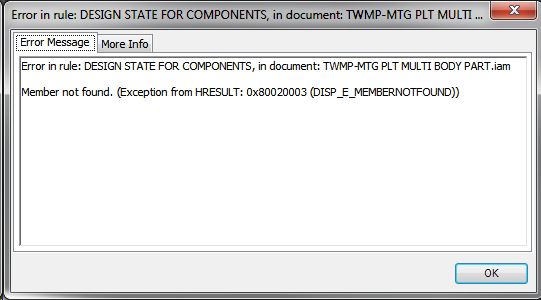
The code I was supplied in the linked thread worked perfectly but has stopped working and I haven't got a clue why. It is designed to pass the design state of the top level assembly file through to all of the components and I have created a working instruction based on it.

Anybody please help me on this one?
 

Clipboard01.jpg

0 Likes
475 Views
5 Replies
Replies (5)
Message 2 of 6

salariua
Mentor
Mentor

I would first check if the files are not read only (vaulted maybe) and that you have permission to change their iproperties.

Adrian S.
blog.ads-sol.com 

AIP2012-2020 i7 6700k AMD R9 370
Did you find this reply helpful ?
If so please use the Accepted Solutions or Like button - Thank you!
Message 3 of 6

Anonymous
Not applicable

Yeah I've checked all that. I think I've found the problem but in a way I hope not.

I have the rules in a folder on the network (external rules) and they are contained in another folder ("company" standard) which contains a copy of the project file. We have written a script which replaces the project file in each users workspace with a copy of this one and I have the check out and keep it up to date (this is because nobody ever bothers to update it when requested) Looks like the rules have lost their way somewhere and I assume it is because of this as the script is also placing an empty external rules folder in the workspace as well (should be placed directly on the C drive).

Clear as mudSmiley Very Happy

Thanks for taking the time to help.

0 Likes
Message 4 of 6

salariua
Mentor
Mentor

What path are you using for the files, complete path //netowork or do you have a mapped network drive?

Adrian S.
blog.ads-sol.com 

AIP2012-2020 i7 6700k AMD R9 370
Did you find this reply helpful ?
If so please use the Accepted Solutions or Like button - Thank you!
0 Likes
Message 5 of 6

Anonymous
Not applicable

The folder is found on the server inside the folder where we keep our Inventor templates, design data etc. This sub folder (containing ipj file and external rules folder) is then placed onto each individual machine directly onto the 'C' drive. This is where I have mapped the ilogic to, 'C'/PEL_STANDARD/EXTERNAL_RULES. This was done to avoid any changes by certain operators who cannot help themselves! They can alter the rules but they will be updated the next day from the main folder on the server which they have no easy access to.

The project file is then copied from there and placed into each workspace folder, replacing the one currently residing in there. Hopefully if I keep my end of the bargain this will ensure the operators always have an up to date copy without relying on them to get from vault whenever I make a change. We had an issue with content centre recently and it would appear the root of the problem was the out of date project file.

Any clearer?

0 Likes
Message 6 of 6

salariua
Mentor
Mentor

I don't think it's a problem with the code or the path of the external rule. You error tells us that the component cannot be found so it could be a deleted file from disk while still open in memory of Inventor. Are you having the correct project open, correct library and workspace paths?


Try and test it on several computers, can you replicate this problem?

Adrian S.
blog.ads-sol.com 

AIP2012-2020 i7 6700k AMD R9 370
Did you find this reply helpful ?
If so please use the Accepted Solutions or Like button - Thank you!
0 Likes
