cancel
Showing results for 
Show  only  | Search instead for 
Did you mean: 

Repeat Components in Assembly Mode

Repeat Components in Assembly Mode

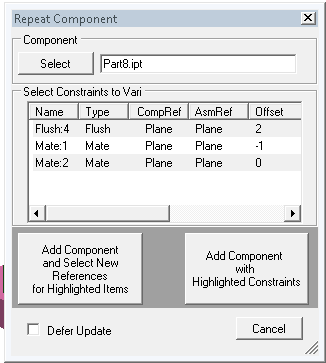
 Repeat Component functionality could significantly reduce some repetitive assembly tasks.


A good use for this is when assembling fasteners or bolt connections that are assembled with an Insert.  each addtional occurrence should only require a single click, selecting the new circular edge, before imediately prompting for the next occurrences' circular edge and so on. 

some assemblies have a few hundred bolted connections and fasteners.


Each new occurrence of the component already has the component references selected.  Only the assembly references for the highlited constraints need to be selected.


I wrote an API function to do this but it would be nice to have it out of the box.
 

RepeatComponent.PNG

52 Comments
Anonymous
Not applicable

Try using Kwiksert for fasteners in the meantime. It does exactly what you are describing.

karthur1
Mentor

I own Kwiksert as well, but you have to purchase Kwiksert.  This functionality should be included in Inventor.

SteveMDennis
Autodesk
Status changed to: Comments Requested
Your mockup seems to look a lot like what iMates deliver. If you have iMates defined on the part being placed and free iMates in the open Assembly you can place multiple compenents using those iMates. Doesn't that workflow satisfy this at least on some level? If not can you explain why anything more is needed?
JoeBarnes4076
Advocate

You dont have to stop and setup any iMates.  Imported legacy and vendor components?  Kwiksert works pretty good for fasteners.  Creo (Pro/e) has something like this and it works great.  Creo has iMate type functionality but the repeat command doesn't require any setup.

Anonymous
Not applicable

It would be nice to be able to select more than one feature at a time to constrain. For example when I have ten parts in my assembly that I want to constrain flush with each other I have to click face of A to face of B then face of B to face of C then face of C to face of D and so on. It would be much quicker to just select the face on each part and constrain all of them at once. Along with that if I end up having to delete one of those parts such as C I loose the constraints between B and D so I end up having to remember to connect them again. So it woud be nice if that flush constraint remained between the remaining parts after deleting the one part.

Tags (1)
Anonymous
Not applicable

Or you could constrain one of them and use a pattern...

Anonymous
Not applicable

That doesn't allow you to delete one in the middle and keep the constraints. Also sometimes you want to line up different parts. One of our main products uses up to 50 pins that are similar but have 15 different lengths and for custom orders sometimes they individual pins have to be removed.

Anonymous
Not applicable

I understand that there are other ways to accomplish this like setting up a work plane and constraining all of them to the plane. But a simple multi-select would be alot quicker.

A_Sima
Enthusiast

just a simple REPLACE as in proe. Why imates, that's stupid!

Anonymous
Not applicable

It looks like a change to intuitivness and integration, rather than new functionality.  For one thing, this can be done from within the assembly environment rather than the part environment.  In addition, imates is buried in the Manage ribbon instead of the Modeling tab.  Maybe if it were over in the Modeling/Work Feature block? Having to rifle through the ribbons looking for commands is bad UI.


I suppose if you've got a shaft that you're going to be mounting in multiple ways, imates would be a clunky way of doing it as it would like to stick to imates.

Anonymous
Not applicable

I did not choose Inventor. I miss Pro/E because I AM an engineer, and want all the hard to use features. Like equation curve that will work in Cartesian instead of only parametric-which stinks.


I vote Inventor buys, bundles and simply pushes kwiksert so Inventor is at least competitive with Pro/E on some level with respect to this function.


To be fair, I tried using Imate on the fastener, and that is a bit faster. Still, repeat in Pro/E was a very good function, and was available back in 2008.

Anonymous
Not applicable

I will second everything said here. iMate works, but as with many things Inventor, is clunky to set up compared to other systems. I will also agree it works well once configured for a specific part/assembly, but legacy parts in large repositories (containing several hundred repeatable components) won't have iMates.


It's much more extensible to allow a part to be constained once, then copied with those constraints and quickly re-applied througout an assembly. iMates also don't handle cases where a part may not be consistently constrained but may be repeatable. Do look at other CAD packages to see some very slick workflows for this sort of procedure.


Thanks for the consideration behind this.

Mark_Wigan
Collaborator

I VOTE to integrate kwiksert and...


generally speaking, can we consider to try to add some more of this kind of 'sticky' or 'repeatable' functionality for similar functions...

drawings
Advocate

I have found that the content center imates often merily and arbitrarily find a hole when you insert hardware. Then you have to go find your errant part. This would be more controllable and not require prior setup.

stuartmp
Advocate

I agree this area of inventor could be improved. I to have written my own VBA to allow constraints to be copied from one item to another.


Anonymous
Not applicable

The whole constraint menu needs an overhaul. 

There also seems to be a weird lag time between selecting a constraint and when it actually occurs.

Kelly_Shuman
Advocate

Easily record a temporary macro:


After highlighting a constrained set of parts...


Ctrl+Z copies parts; and learns everthing until [SPACEBAR]


Ctrl+V 

1) Pastes the clipboard


2)[C] creates a constraint (Not a Circle!)

2a) Create an insert constraint

2b) Select the washer

2c) Select the bolt hole to constrain.

3) [SPACEBAR]

3a) Repeat 1)


[ESC]

Kelly_Shuman
Advocate

I should have edited that previous comment to start the command with Alt+C, Ctrl+M, or something other than Ctrl+Z.

Anonymous
Not applicable

Is the API from the first Post available somewhere ? 

karthur1
Mentor

The thing I don't like about iMates (especially with fasteners) is that it does not allow an offset.  I thought that when the removed the CTRL+C ? CTRL+V from being active while the constraint command is enabled, they were going to add something to take the place of it.  I guess not, cause its been what 2 or 3 releases and nothing yet.

Can't find what you're looking for? Ask the community or share your knowledge.

Submit Idea