RAL-color library

RAL-color library

TobiasZetterberg2067
Enthusiast Enthusiast
64,420 Views
39 Replies
Message 1 of 40

RAL-color library

TobiasZetterberg2067
Enthusiast
Enthusiast

Hello!
I work a lot with industrial equipment and components which are often delivered painted in RAL-colors (4 digits).
Therefore I created a complete RAL-color library with a painted look (gloss and reflectivity).
I believe in sharing useful things to others so here is the RAL-color library.

I had to split the file into a mutlivolume zip due to the file size-limitations for this forum (<5 Mb).

The first part is in this post and the second is in the post below.
You can see how to attach it in:
http://help.autodesk.com/view/INVNTOR/2015/ENU/?guid=GUID-98E276B9-ACFC-40CF-8FFB-D9D081D4C207
Below is a overview of the library.
I hope someone find this useful!
/Tobias, Toze AB
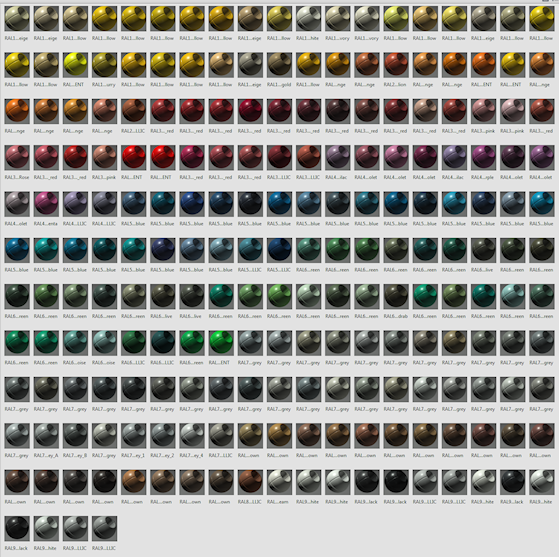
 

RAL-colors.png

Accepted solutions (4)
64,421 Views
39 Replies
Replies (39)
Message 21 of 40

Anonymous
Not applicable

I used the file but Revit LT says the library is empty.. any solutions?

0 Likes
Message 22 of 40

AlexFielder
Advisor
Advisor

This Library is formatted for Autodesk Inventor. Not Revit. (hope that helps)

Message 23 of 40

chris
Advisor
Advisor

what is the correct method and location for adding these colors?


edit: sorry missed that initial link


edit: Okay followed the method in the link as well as stated in the other replies. computer won't unzip the first folder nor will it allow me to copy out the .absklib from that zipped folder.... so I am unable to make this work. Could someone do a screen capture for myself or anyone else who might be having trouble getting this to work?


0 Likes
Message 24 of 40

TobiasZetterberg2067
Enthusiast
Enthusiast
Accepted solution

Hi!

Try using the unnzipped file from my googledrive instead:
https://drive.google.com/open?id=0B9_OlPHjbi6wUkIzaml2dUp6THc

Once you download it you should be able to move it to your desired location and attach the library by managing your project folder (or from appearance browser if you just need the colors for a specifik part).

/Best regards Tobias

Message 25 of 40

tvb
Observer
Observer

Thank you so much Tobias Smiley Happy

Just imported your RAL colours - it works nice and is a great help for me - again thanks a lot.

Kind regard

Tove Virkelyst

0 Likes
Message 26 of 40

Anonymous
Not applicable

I have downloaded both of the links in the solved post and nothing works?


I might add I am trying to do this in Revit. 

0 Likes
Message 27 of 40

TobiasZetterberg2067
Enthusiast
Enthusiast

Try the link to googledrive in a post above, it should work just fine.

I dont know if it works in revit since it is an Inventor-library.

/Best Regards T

0 Likes
Message 28 of 40

Anonymous
Not applicable

Thanks, I managed to download the file fine, it is just empty when I tried to use it in Revit Material Library.


Not to worry! 

0 Likes
Message 29 of 40

AlexFielder
Advisor
Advisor

That's because as previously stated in this thread, the library is for Inventor, not Revit.

0 Likes
Message 30 of 40

Anonymous
Not applicable

Thanks, to be honest, I didnt read the whole thread as I was in the middle of design work!


Hopefully someone will make the same for Revit Smiley Happy

0 Likes
Message 31 of 40

AlexFielder
Advisor
Advisor
Accepted solution

Actually, this Library does work in Revit but you have to do two things:


  1. Remember that this is an appearance library, NOT material library.
  2. Use the Revit Asset Browser to open the Library, in the same way that you use the Inventor Appearance Browser to open the file.

2018-01-10 11_08_26-Autodesk Revit 2017 - Not For Resale Version - [Floor Plan_ Level 0 - Project1].png


Once you have them open in Revit, you can apply the appearance to any material you choose as per Inventor.


🙂

Message 32 of 40

Anonymous
Not applicable

Thanks thats great news as we work with RAL colours every day!! 

0 Likes
Message 33 of 40

AlexFielder
Advisor
Advisor

You're welcome!

Message 34 of 40

thom-g
Advocate
Advocate

@TobiasZetterberg2067: Great work!


By the way: I was able to unzip your zip files with 7Zip and winzip. All I had to do was to rename the second zip fie from "RAL_colors_001.zip" to "RAL_colors.z01" (7Zip told me that). Maybe you could rename the file and/or upload it again...

0 Likes
Message 35 of 40

Anonymous
Not applicable

Thank you for taking the time to do this.


It'll be really useful for me and nodoubt hundreds of other users.


Many thanks


Stuart

0 Likes
Message 36 of 40

J.J.Kucharczyk
Contributor
Contributor

Great job Tobias! Thank you ! 

0 Likes
Message 37 of 40

Manuelcamposcosta
Advocate
Advocate

THANK YOU SO MUCH! I WOULD KISS YOU! HAHAHA


If someone is finding problems with the original files I attached them again in a simple way.

Manuel Campos Costa
Message 38 of 40

Anonymous
Not applicable

Tobias


YOU'RE AMAZING!!

0 Likes
Message 39 of 40

kbuM6G4J
Community Visitor
Community Visitor

Im using the 2022 pro version of inventor. 


Im new to materials and appearances. 


It says it fails to load the libary at the current location. Does anyone have a little "how to" guide to put this in use? 


Im properbly doing it the wrong way.


Does the adsklib files have to be in a specific folder? I just put them somewhere and added them to the libary insde appearence browser. 


I hope im not alone with this, lol. 


Best regards. 

Message 40 of 40

AlexFielder
Advisor
Advisor

You need to add the .adsk library to whichever Inventor Project you are currently using:


2022-10-11 11_15_56-Window.png

🙂