extrude/revole profile selection problem

extrude/revole profile selection problem

Anonymous
Not applicable
1,785 Views
11 Replies
Message 1 of 12

extrude/revole profile selection problem

Anonymous
Not applicable

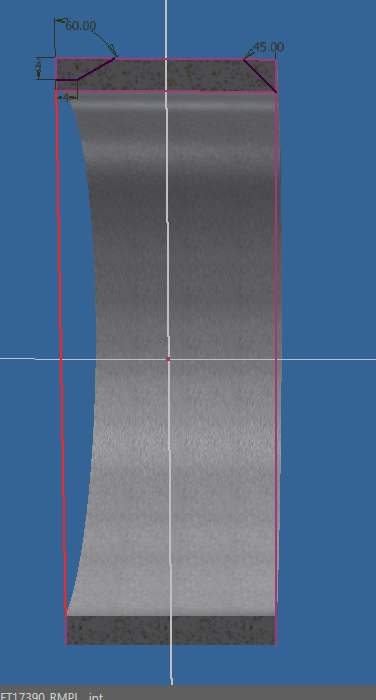
I have problem with selecting profile for extrude or revolve operation. I have probably changed some setting by accident and I don't know how to get it the way it was before. When I choose EXTRUDE I can't select profile, instead I can select line then new profiles are created and I can select them (screenshot 3 & 4). Screenshot 2 shows how it was done before. Now I can't change selected profile in old files. Thanks in advance.

 

0 Likes
1,786 Views
11 Replies
Replies (11)
Message 2 of 12

mcgyvr
Consultant
Consultant

Check your sketch constrain settings..

Did you possibly turn off Infer Constraints or Presist Constraints from the Interference tab of the Constrain settings dialog box?

Its also usually much more helpful to post actual Inventor files vs images.. 


-------------------------------------------------------------------------------------------
Inventor 2023 - Dell Precision 5570

Did you find this reply helpful ? If so please use the Accept Solution button below.
Maybe buy me a beer through Venmo @mcgyvr1269
0 Likes
Message 3 of 12

Cadmanto
Mentor
Mentor

I agree.  Having the actual part file would be helpful.  When I look at images 3 and 4, it almost looks as though the profile sketch is not closed all the way around.  I see the projected geometry edges, but there needs to be a sketched closed profile to extrude.


Windows 10 x64 -16GB Ram
Intel i7-6700 @ 3.41ghz
nVidia GTS 250 - 1 GB
Inventor Pro 2018


Best Regards,
Scott McFadden
(Colossians 3:23-25)


Message 4 of 12

johnsonshiue
Community Manager
Community Manager

Hi! Please attach the file here. And, read #6 post of the following thread.


https://forums.autodesk.com/t5/inventor-forum/having-a-problem-selecting-an-entire-loop-of-sketched-...


Many thanks!


Johnson Shiue (johnson.shiue@autodesk.com)
Software Test Engineer
0 Likes
Message 5 of 12

neljoshua
Advisor
Advisor

@Anonymous,


Just a guess, but I have had issues with projected geometry not making closed sketches when combined with new sketch elements (even if the projected geometry was created based on a closed sketch). I suggest being careful about what you project. Sometimes I project things that do not really need to be projected.


An example of simplifying a projection is to project a line rather than a face or a point rather than a line. When projecting sketch geometry I have found that simpler is better.

__

If this post answered your question, please select "Mark as Solution" in order to help others who may have the same (or a similar) question.

Lenovo Thinkpad P1, 2.70 GHz Intel Xeon, 32.0 GB, Windows 10 Pro
Message 6 of 12

leowarren34
Mentor
Mentor

Ensure all sketches are closed and constrained fully as I have misclicked previously leading to the extrude failing.

Also keep any sketches as simple as possible as that will also avoid mistakes, especially funky thinks like project have a tendancy not to fully link.

Any parts you can send would be appreciated.

Leo Warren
Autodesk Student Ambassador Diamond
Please accept as solution and give likes if applicable.
Message 7 of 12

Anonymous
Not applicable

@mcgyvr both Infer Constraints or Persist Constraints are turned on, sketch looks fine for me and I've always done sketches this way  but I've attached file so you can check it.

Cheers

0 Likes
Message 8 of 12

SBix26
Consultant
Consultant

I am not able to fix your Sketch3 to enable choosing either of the profiles for a revolve cut.  Sketch Doctor found duplicate points and duplicate lines, but once I deleted the overlapping projected geometry and reconstrained everything, it still could not find the corner profiles.


However, deleting Sketch3 and recreating it allowed me to select the corner profiles... I have no idea what the problem is with your original sketch.


Sam B
Inventor Pro 2019.3 | Windows 7 SP1
LinkedIn

0 Likes
Message 9 of 12

pawel.gromanski
Enthusiast
Enthusiast

@SBix26 deleting sketch and creating another one helps, but only sometimes. sometimes I am creating new sketch and have the same problem. I am creating sketches this way for last 2 years (6 months using Inventor 2019) and it have never happen before and now i had few other files with the same problem do it would be nice to find out why it is happening. 

Cheers 


Still @Anonymous logged on another account by accident

0 Likes
Message 10 of 12

WHolzwarth
Mentor
Mentor

I don't know, why Sketchdoctor can't solve such a simple issue.

But I'd better use Project cut edges in this case. After that a successful revolved cut can be done


2019 IPT attached.

Walter Holzwarth

EESignature

0 Likes
Message 11 of 12

johnsonshiue
Community Manager
Community Manager

Hi! Many thanks for attaching the original file! Indeed, something is intriguing in the part file. Somehow of the end points of the lines do not carry coincident constraints. Although, the sketch is fully constrained, some constraints are missing for no apparent reason. This is a like a corruption. Do you know how to reproduce the behavior from scratch?

Thanks again!


Johnson Shiue (johnson.shiue@autodesk.com)
Software Test Engineer
0 Likes
Message 12 of 12

Anonymous
Not applicable

I can recreate this behavior by creating for example ring, then I just project inner, outer and side surfaces. In created rectangle I  draw line from corner to the edge and I can not select profile in closed loop. Using Project Cut Edges instead of Project geometry solves problem.  

Cheers

0 Likes