Create Tweak Failled

Create Tweak Failled

Anonymous
Not applicable
5,146 Views
17 Replies
Message 1 of 18

Create Tweak Failled

Anonymous
Not applicable

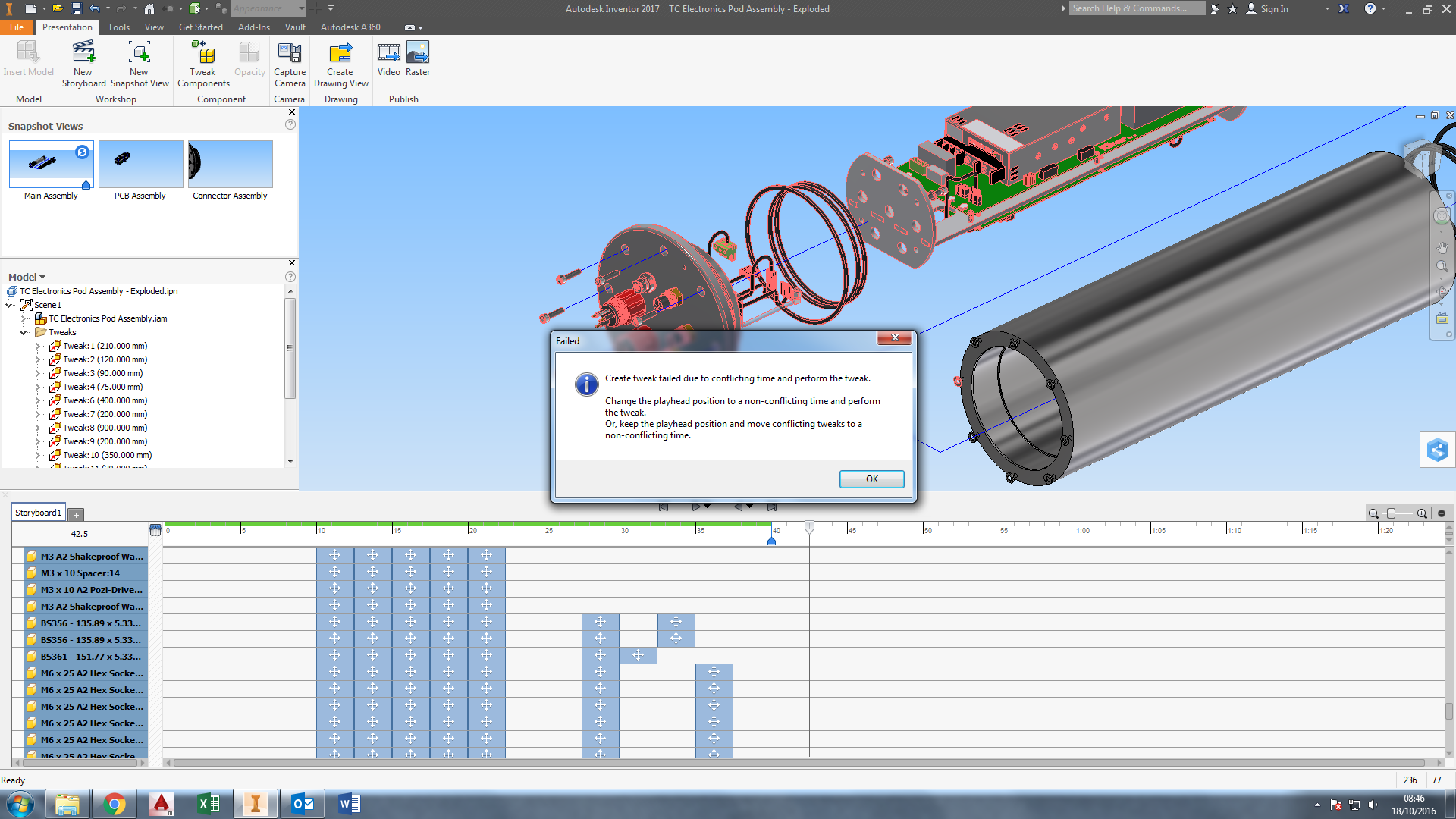
Trying to add a competent which I have recently added to an assembly to an older tweak. however I keep getting this error message. I have tried for two days with this yet I cannot fix it. It doesn't help that the error message makes no sense and is apparently just a bunch of random words.


Can anyone help?

0 Likes
5,147 Views
17 Replies
Replies (17)
Message 2 of 18

SBix26
Consultant
Consultant

How are you adding this component to the tweak?  Is this component part of any other tweaks?  Without the actual parts, assemblies and presentation files, I don't think I can be very much help, though.

Sam B

Inventor Professional 2017 R2
Vault Basic 2017.0.1
Windows 7 Enterprise 64-bit, SP1
Inventor Certified Professional

0 Likes
Message 3 of 18

Anonymous
Not applicable
Thank you for getting back to me.

To try and add this new component to the original tweak, which contains many other parts, I was just double clicking on the tweak line and then trying to select the part. I have tried some other ways too but they result in the same outcome.
0 Likes
Message 4 of 18

Anonymous
Not applicable

I absolutely hate how tweaks work in 2017. Anyways, I believe the issue is that there is a space in the timeline where nothing is happening. Try moving the position marker (I don't know what it's called, but the top arrow with the line under it that defines where you are in the timeline) to the end of the last tweak and try it again.

0 Likes
Message 5 of 18

christian_smith
Autodesk
Autodesk

Hello,

The create tweak failed due to overlapping time can happen a couple different ways. However, the issue should be the same. If you are trying to add a component, that already has a tweak applied to it,  to an a different tweak where the two tweak occur at the same time then you will see the message.


If you resolved the overlapping time issue you should be able to add the component to the existing tweak.


Christian Smith

0 Likes
Message 6 of 18

christian_smith
Autodesk
Autodesk


here's the video: https://youtu.be/KnlU-bjmTgM

0 Likes
Message 7 of 18

Anonymous
Not applicable

Thank you all for your assistance with this!


However I still cannot resolve it. I have ensured that the tweak I am trying to add another component to is not overlapping with any other tweak, only the other components that are already in the tweak share it. (please see screenshot to see what I mean). Also the component I am trying to add has no other tweaks performed on it.


One other thing that I noticed was that if I delete the tweaks on 1 component that had previously worked alright and then try to re add it, I get the same error message. (Hope that makes sense).


Don't worry, Aaron. You are not alone in your dislike of this new system 😞

0 Likes
Message 8 of 18

Anonymous
Not applicable

Looking carefully at your second screenshot, I noticed that your tweaks dont quite line up, that is assuming they all should be the default length of 2.5 seconds. If every tweak 2.5 seconds, it should line up with every 5 and 10 second mark perfectly, but it doesn't. Perhaps one of them got lengthened greater than 2.5, and that's throwing everything else off.


Ignore if you intentionally changed the duration from 2.5 seconds, but from what I can tell in the screenshot2, it seems like they should be. 


Despite using the .ipn's frequently at work, I've never come across this error, mostly because I never animate, therefore I completely ignore the storyboard, so I'm just kinda shooting from the hip.

Message 9 of 18

Anonymous
Not applicable

Ahh, you are right about the tweaks not being aligned with the 2.5sec intervals! However, after changing this, I still get the error message.


But what you said got me thinking and I released that this presentation is not needed for animation so I just created a new snapshot and broke the link. It will now allow me to add the new parts to the tweak!


Seeing as that is the case, it must be, as christian said, an issue that I have caused somewhere along the line with the tweak times.


I know that components don't *have* to have the same tweak line, but I find it makes it easier to edit if someone comes along later and wants to make a change to a tweak distance etc..


I will keep the original file and continue trying suggestions though as I really would like to know why this error happened!!

0 Likes
Message 10 of 18

Anonymous
Not applicable

This is another reason why I don't like how tweaks are done now, it's un-necessarily difficult to edit tweaks. Oh well, at least you found a workaround.

0 Likes
Message 11 of 18

christian_smith
Autodesk
Autodesk

As a summary for those that might read this later here is how I understand how you would get the "Create tweak failed due to conflicting time..." error message.


  1. Create a Tweak for some component, or set of components, in your model 
    1. Result: this will create a tweak in the time line with a default duration or 2.5 seconds
  2. Drag the play head, or click the time, such that falls within the time the first tweak will be executed. Note: you could also have an issue if you set the play head less than 2.5 seconds before the tweak created in step 1.
  3. Create a second tweak on for another component Y that is not in the set of components for the first tweak that was created.
    1. Result: you will now have 2 tweaks in your timeline and at some point their execution in the timeline will over lap
  4. If you now edit the first tweak and add component Y you will see the error message.

Another way to get overlapping tweaks in the time line is to create your 2 tweaks and drag one of the tweaks in the timeline such that it over laps with the other tweak. You can visually see this by playing the animation and see if your component(s) for the first tweak are moving at the same time as your component Y.


How to resolve this issue:

Drag one of the tweaks, or shorten the duration of the tweak that occurs first in the timeline, so that they do not overlap in the timeline. Then you can edit the first tweak and add component Y.


There is a video higher in this conversation that demonstrates the issue and resolution.


Respond to this post if you have any confusion or additional questions.

Message 12 of 18

Anonymous
Not applicable

This IPN was updated to 2017 by opening the IDW and saving it.  Today I opened the IPN to fix things that were changed in the IAM.  I am getting the Create Tweak Failed message.  As you can see there is no overlaps,  The space between tweaks in the timeline was done to make sure.

 failed.JPG


0 Likes
Message 13 of 18

david.tunnard
Enthusiast
Enthusiast

Sorry it took so long for a reply! I have only just seen this message!


Maybe I can help, But I myself am no expert on this error message. When exactly does it pop up (what are you trying to do?)

0 Likes
Message 14 of 18

Anonymous
Not applicable

Hi David,


Thanks for the reply.    Some components were changed in the assembly, so I am just trying to add the new components to existing tweaks.

0 Likes
Message 15 of 18

SBix26
Consultant
Consultant

Kent,


Two things in your image that might be worth checking out:


  • One of your views is out of date and needs a refresh
  • Can't say for sure, but just possibly there is an overlap in time at the 10 s mark-- the gaps are obvious everywhere else, but that one is either line to line or maybe a slight overlap


Sam B

Inventor Professional 2017.3
Vault Basic 2017.0.1
Windows 7 Enterprise 64-bit, SP1
Inventor Certified Professional


Message 16 of 18

david.tunnard
Enthusiast
Enthusiast

Hmm.. I don't usually get the error when I add a new component to an assembly. Usually when I replace a part for a different one.


Are all of the items in a tweak group starting at the same time? i.e. Applying one tweak to two bolts (bolt A & bolt B) and making sure that the one tweak applied starts at the same time for them both? I hope that makes sense.


However, if it's a rush job and you don't need to animate the presentation, I would suggest just breaking the link. That normally allows you to do things more freely.

Message 17 of 18

Anonymous
Not applicable

Thanks for the replies.


It was something I needed to get done, so luckily it was small and I just did a new one from scratch.   David, I am not sure what you mean by breaking the link, so I opened the oldversions one, and to my amazement it worked.  So apparently closing the file, Inventor or rebooting would have fixed it.  But I am still curious about breaking the link. 

0 Likes
Message 18 of 18

david.tunnard
Enthusiast
Enthusiast

Glad that you found a 'fix'!


To break the link you need to create a new snapshot (1) an then when it appears in the snapshot browser, double click it and the border should turn blue (2). 


Once you make a change a pop up should ask you if you want to break the link.

0 Likes