3D DWG to Inventor .iam/.ipt

3D DWG to Inventor .iam/.ipt

brettQ8JNM
Participant Participant
1,998 Views
9 Replies
Message 1 of 10

3D DWG to Inventor .iam/.ipt

brettQ8JNM
Participant
Participant

Hi,

I have a 3d DWG model generated from a 3D scan of a site we are working on, That i need to do some further detailing on. I would like to use inventor for the detailing as there is a mix of mechanical and structural components but when I try and import the DWG into inventor it is generating a jumbled mess unusable for modelling. Is there a way i can bring the model into inventor as a solid to complete the additional modelling required? I have tried exporting to a neutral file format in AutoCad and importing that way, .iges format, but the result was the same.

I have attached a snapshot of the imported mess and one of the original DWG model from AutoCad. Any help would be appreciated.
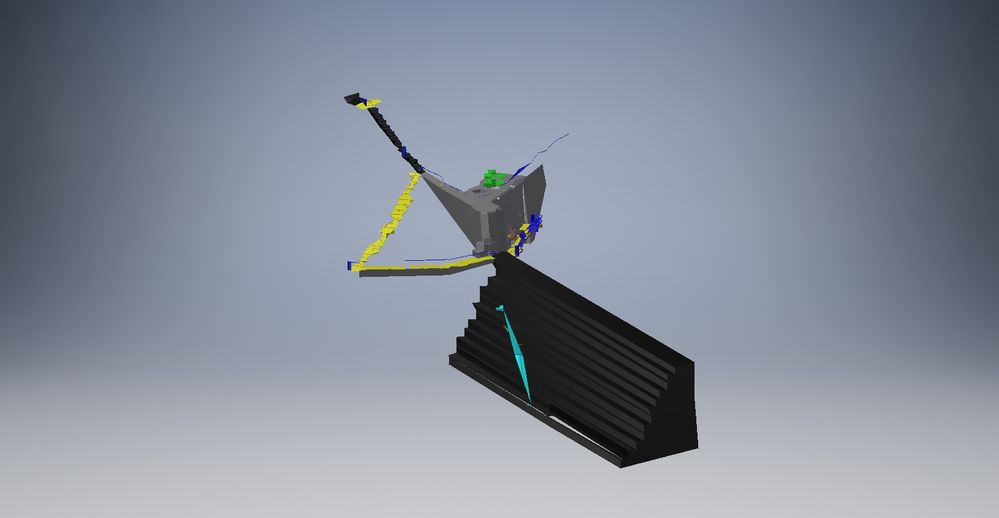
Inventor_import.jpgDWG_View.jpg

0 Likes
Accepted solutions (1)
1,999 Views
9 Replies
Replies (9)
Message 2 of 10

brettQ8JNM
Participant
Participant

AutoCad DWG Model files

0 Likes
Message 3 of 10

brettQ8JNM
Participant
Participant

Inventor Files.

0 Likes
Message 4 of 10

j.palmeL29YX
Mentor
Mentor

Your dwg includes a chaotic mix of 3DSolids. Surfaces, Regions, 3DFaces and PolygonMeshes.

First I'd try in AutoCAD to convert all into 3DSolids.

Furthermore your model is partially incomplete. (see pic).

After all these repairs, you'll have a better chance of success.


I tried it in the meantime - without success too.

I don't know what causes the problem. Next I would split the dwg into severla small parts and import piece for piece. So you will see (hopefully) what causes the problem.


Jürgen Palme
Did you find this post helpful? Feel free to Like this post.
Did your question get successfully answered? Then click on the ACCEPT SOLUTION button.

EESignature

Message 5 of 10

brettQ8JNM
Participant
Participant

Thankyou for the feedback. 

I will try some converting and splitting and see how I go.

0 Likes
Message 6 of 10

j.palmeL29YX
Mentor
Mentor

In the meantime I isolated the one big solid (the "stair") only and tried to import it in Inventor. Unfortunately also without success.

Sorry, I can't help you. I have no idea what's wrong with this model.


Jürgen Palme
Did you find this post helpful? Feel free to Like this post.
Did your question get successfully answered? Then click on the ACCEPT SOLUTION button.

EESignature

0 Likes
Message 7 of 10

j.palmeL29YX
Mentor
Mentor

Still an idea: Move your model close to the origin point (0,0,0). May be this will give you better results, actually you are in a very high range of coordinatels. (untested, i'm in hurry now)


Jürgen Palme
Did you find this post helpful? Feel free to Like this post.
Did your question get successfully answered? Then click on the ACCEPT SOLUTION button.

EESignature

0 Likes
Message 8 of 10

j.palmeL29YX
Mentor
Mentor

@j.palmeL29YX wrote:

Move your model close to the origin point (0,0,0). May be this will give you better results,


Yep!

In AutoCAD I moved the model to the origin point and got in Inventor the attached result. Seems to be akzeptable. Try it ...

Jürgen Palme
Did you find this post helpful? Feel free to Like this post.
Did your question get successfully answered? Then click on the ACCEPT SOLUTION button.

EESignature

0 Likes
Message 9 of 10

j.palmeL29YX
Mentor
Mentor
Accepted solution

... and also the complete model (zipped about 42 MB, therefore not uploaded) looks fine now in Inventor. Without some small details [PolyfaceMeshes] which could not were converted (example see in the attached pic).

Jürgen Palme
Did you find this post helpful? Feel free to Like this post.
Did your question get successfully answered? Then click on the ACCEPT SOLUTION button.

EESignature

Message 10 of 10

brettQ8JNM
Participant
Participant

Thank you very much for your assistance on this one. It is greatly appreciated.

0 Likes
