- Mark as New
- Bookmark
- Subscribe
- Mute
- Subscribe to RSS Feed
- Permalink
- Report
I've got a single machine that exhibits this behavior on both Inventor 2013 and now 2014. I can't seem to find a post anywhere that would suggest what the issue is. I have a ilogic macro that fills in the iproporties of Project/Project based on file name and a look up to excel. I know i could do it inside of ilogic or a text file but it is easier to modify in excel and does work on all other comptuters and use to work on this one. When Inventor is first opened, and you open a drawing and run the macro for the first time you get this error.
oFileName = ThisDoc.FileName(False) 'without extension
Dim _Folder As String
Dim F_Finder As String
'If iProperties.Value("Project", "Project")= NullString
	'iProperties.Value("Project", "Part Number")
	F_Finder = (Left(oFileName,4))
	'GoExcel.Open("C:\Vault_Workspace\Folders.xlsx", "Sheet1")
	'GoExcel.TitleRow = 1
	i = GoExcel.FindRow("C:\Vault_Workspace\Folders.xlsx", "Sheet1", "Part" ,  "=", F_Finder)
	_Folder = GoExcel.CurrentRowValue("Folder")
	iProperties.Value("Project", "Project") = PDF_Folder
	'End If
	_Folder = iProperties.Value("Project", "Project")
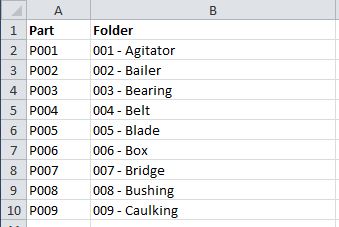
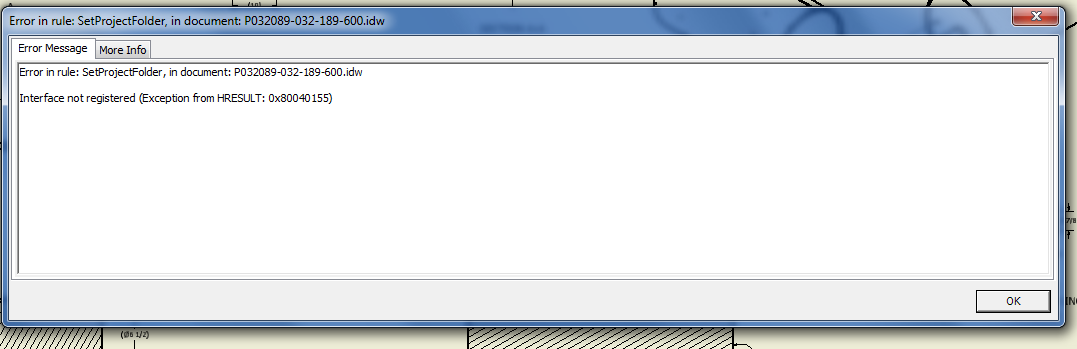

then if you run it again you get the this error.

Now this error would make sense if the part number isn't in the list, but it is normally.
Anyone have any insight into why both 2013 & 2014 would be doing this? Next to going back to a old restore point which for some reason would be back in 2010 and re-installing 2013 again. i'm at a loss.
Solved! Go to Solution.