Hello @ebujnoch,
Sorry to hear you are still having issues, but there is an AdSSO update for Mac, please follow the steps again.
I have copied them below:
Update the Autodesk Single Sign On Component
- To download and update the Autodesk Single Sign On Component, follow the steps highlighted here: Autodesk Single Sign On Component (AdSSO) Update for 2020/2021 MAC OS product versions.
- Then reboot the system & test the application.. If the above steps did not help, see below for more advanced workarounds:
Reinstall the Autodesk Desktop Licensing Service
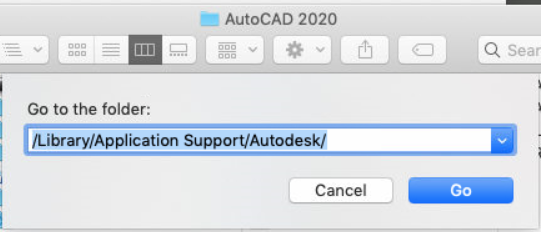
- In the Finder, click Go > Go to folder... and type /Library/Application Support/Autodesk and then click Go.
- Rename the folders AdskLicensing and AdskLicensingService to AdskLicensing.old and AdskLicensingService.old.
- Open the Terminal from Finder > Go > Utilities > Terminal.
- Type or copy-paste the following command:
sudo chmod -R 777 /Library/Application Support/Autodesk
Note: The Terminal will ask for your account password. Typing will show no characters. This is normal. Type the password and press Enter/Return.
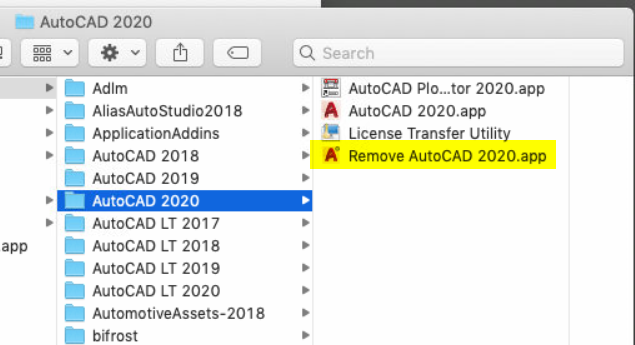
- Uninstall the Autodesk software. For example: AutoCAD for Mac 2020 has /Applications/Autodesk/AutoCAD 2020/Remove AutoCAD 2020.
- Reinstall AdskLicensing with the latest licensing update, following these steps:
- Close all Autodesk applications.
- Download Autodesk Licensing Service 10.1.1.66 installer.
- Decompress the downloaded file by double-clicking on the downloaded compressed .tar.gz file.
- After extraction, the following four files will be there:
- AdskLicensing-10.1.1.66-mac-installer.pkg
- adlmflexnetserverIPV6.pkg
- Double-click each of these and follow instructions to install.
- Install the Autodesk software again.
Please "Accept Solution" if a reply or replies have helped resolve the issue or answered your question, to help others in the community.