Maya 2017 Licensse doesn't appear account management. Can't install Updates.

Maya 2017 Licensse doesn't appear account management. Can't install Updates.

Anonymous
Not applicable
2,303 Views
17 Replies
Message 1 of 18

Maya 2017 Licensse doesn't appear account management. Can't install Updates.

Anonymous
Not applicable

2017-01-17_18-57-09


Maya 2017 doesn't appear in my account despite having downloaded it using an education license. (I got the email to prove that bit.) I'm assuming this is why I can't get any of the update packs to appear in Autodesk Desktop App.  It's been like this for about a month.

0 Likes
Accepted solutions (2)
2,304 Views
17 Replies
Replies (17)
Message 2 of 18

natasha.l
Alumni
Alumni

Hello @Anonymous,


Apologies for the late reply. It takes 24-48hrs for products to appear on your Autodesk Account. Although you can download & install your products after creating an account in the Educational Community. 


Please review this article if you have questions on the Steps to Setting-Up Student Software


Keep us posted. Smiley Happy


0 Likes
Message 3 of 18

Anonymous
Not applicable

Unfortunately it still doesn't appear in my Autodesk Account and Autodesk Desktop App, which is rather critical because 2017 is amazingly buggy and I was hoping I could get the latest update / extension. :C

0 Likes
Message 4 of 18

natasha.l
Alumni
Alumni

Hello @Anonymous,


In that case since it has been well over 24-48hrs, I apologize for the inconvenience.   


Autodesk is aware that customers with education licenses are unable to access the latest updates to their products, and are actively working to resolve this issue. We will follow up to this post when it has been fixed.


Thank you. 

0 Likes
Message 5 of 18

Anonymous
Not applicable

Thanks for the response. 🙂  Looking forward to it.

0 Likes
Message 6 of 18

Anonymous
Not applicable

This still doesnt work and a new update is out. :C

0 Likes
Message 7 of 18

ctedin3
Contributor
Contributor

I've never been able to download the updates. Updates 1 - 3 have never shown up as available. Never. I can see all the "hotfixes" for previous versions, but I seem to be blocked out of downloading any updates. These are critical for me, being a college instructor who uses Maya for every one of his classes. The students had so many problems with the first version out, that the updates are required to get anything done. This is strange. Can we have an answer to this? Thanks.

0 Likes
Message 8 of 18

Anonymous
Not applicable

Yep same here man. Im tempted to seek someone out that has non education version and trying to see if they find the files that install the update by digging around. I can't believe its come to this.

0 Likes
Message 9 of 18

natasha.l
Alumni
Alumni
Accepted solution

Hello @Anonymous,


I would try going back to your Educational Account and select the product Maya 2017 (version, operating system, Language) It will take 24-48 hours for the product to show up on the account. Did you select the product to the account at some point this maybe the reason it doesn't show up in the account. 

sign_in.png

Please let us know. 

0 Likes
Message 10 of 18

natasha.l
Alumni
Alumni

Hello @ctedin3,


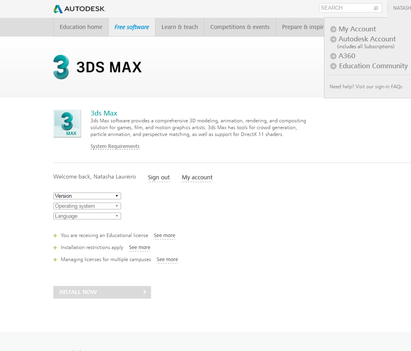
Please review the Steps for Setting-Up Student Software to set this up properly. When you create an Educational Account you have products available in your account only after you select them. It seems you have not selected the Maya 2017 product in the "All Products" click the product then you have to specify in drop down (version, operation system, lang.)


Example: 

3ds_max_student.png


Let us know how it goes. Smiley Happy

0 Likes
Message 11 of 18

Anonymous
Not applicable

Still no go. I don't see any products that I've downloaded (and received serial numbers for) on this list. It keeps getting smaller and smaller too. I don't see how I can "select Maya 2017" in this list here. I must be missing something obvious, but I really don't know what...

0 Likes
Message 12 of 18

Anonymous
Not applicable

I logged in as usual to my account and downloaded the free student version. No problems there. I stay logged in, check the Autodesk Account Manager, but it doesn't show up. 


I used to have a commercial account a few years ago. I now have a new account since I became a full time instructor, tied to my school email. Can that be the problem? The correct one should be the tribecaflashpoint.edu account.

0 Likes
Message 13 of 18

natasha.l
Alumni
Alumni

Hello @Anonymous,


It takes 24-48 hours for the product to show up in your Autodesk Account, so if you just added the products today you have to wait 24-48hrs. 


Or are you saying you have already gone through this process days ago and it's been more than 48 hours? 

0 Likes
Message 14 of 18

Anonymous
Not applicable

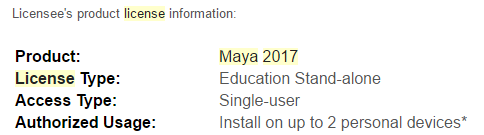
2017-03-02_21-07-41

Got several emails listing the "confirmation" of my Maya 2017 license and still nothing in the Autodesk Desktop App, nor my autodesk education account.

0 Likes
Message 15 of 18

natasha.l
Alumni
Alumni

Hello @Anonymous,


Please revisit the https://manage.autodesk.com/ of your Autodesk Account today. It appears on the account, please let me know if you have any further questions. 


Thank you. 

0 Likes
Message 16 of 18

ctedin3
Contributor
Contributor
Sorry. Still nothing shows up.

Lead Faculty, Digital Art and VFX
Tribeca Flashpoint College
Chicago, IL
0 Likes
Message 17 of 18

natasha.l
Alumni
Alumni
Accepted solution

Hello @ctedin3,


The product was added, but showed up as expired for some reason. The account as been resynced and you should see the product in 24hrs in the account. 


If you need to download & install the product you can via Autodesk Virtual Agent and use the serial number generated in the Educational Community Account. 

0 Likes
Message 18 of 18

ctedin3
Contributor
Contributor
Thanks. I'll give it a try.

Lead Faculty, Digital Art and VFX
Tribeca Flashpoint College
Chicago, IL
0 Likes