Autodesk download manager doesn't open a download

Autodesk download manager doesn't open a download

Anonymous
Not applicable
8,207 Views
2 Replies
Message 1 of 3

Autodesk download manager doesn't open a download

Anonymous
Not applicable

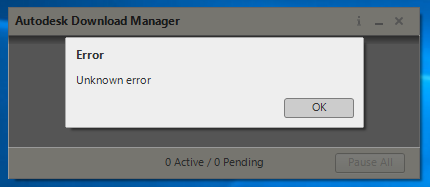
When I'm trying to open a download it simply shows me an unknown error. I couldn't find any solution on google or here.

unnamed.png

Accepted solutions (1)
8,208 Views
2 Replies
Replies (2)
Message 2 of 3

Mark.Lancaster
Consultant
Consultant

@Anonymous


Welcome to the Autodesk User's Community..


There's a couple of ways to properly download and install your Autodesk product to your machine.  Please review this article and the solution it provides.


If the installation does fail using the preferred methods, please post your installation log file here so we can review it.


Posting info: Sometimes the installation log file contains the serial # that was assigned to you.  Open your log file using Windows Notepad and perform a search on "/SN".  Depending on the number of installation attempts, your serial # may be located throughout the log file.  If present, remove or "X" out your serial # prior to posting.


Good luck on your installation and report back on your progress.

Mark Lancaster


  &  Autodesk Services MarketPlace Provider


Autodesk Inventor Certified Professional & not an Autodesk Employee


Likes is much appreciated if the information I have shared is helpful to you and/or others


Did this resolve your issue? Please accept it "As a Solution" so others may benefit from it.

0 Likes
Message 3 of 3

natasha.l
Alumni
Alumni
Accepted solution

Hello @Anonymous, 


This issue could be due to several things but as mentioned try a differnt method & prepare your system before hand. Please follow the steps below: 

  1. Reboot the computer, make sure apps are not auto running in the background 
  2. Log in as Administrator (check your permissions, full control) or create a new profile
  3. Make sure you have an uninterrupted & high-speed connection to the internet
  4. Clean out the TEMP folder. To open the TEMP folder, type %TEMP% in the address bar of Windows Start Menu and hit Enter (Windows)
  5. Temporarily disable security settings like Antivirus, Firewall & UAC on your Windows operating system
  6. Use the Browser Download Method in your Autodesk Account or via the AVA | Autodesk Virtual Agent (download all the parts)

Let us know if you are still having the issue. 


Please "Accept Solution" if a reply or replies have helped resolve the issue or answered your question, to help others in the community.